

About the Last High Low Stop-Loss Indicator
The Last High-Low Stop-Loss indicator for MT4 is designed to simplify stop-loss placement for forex traders.
It plots a blue line for buy trades and a red line for sell trades directly on the chart.
Traders can use these lines as reference points to place stops a few pips beyond the suggested level.
The indicator allows setting a minimal stop distance, such as 15 pips, to avoid premature stop-outs during normal market fluctuations.
It is easy to use on any timeframe and works well alongside any trading strategy that requires precise risk management.
Adjustable inputs allow traders to fine-tune the indicator for their preferred trading style or currency pair.
Free Download
Download the “last-high-low-stop-loss.mq4” MT4 indicator
Key Features
- Plots a blue stop-loss line for buy trades and a red stop-loss line for sell trades.
- Helps traders set stops beyond recent highs or lows.
- Adjustable minimal stop distance to suit different market conditions.
- Customizable via the indicator input menu.
- Improves risk management and reduces guesswork for stop placement.
Indicator Chart
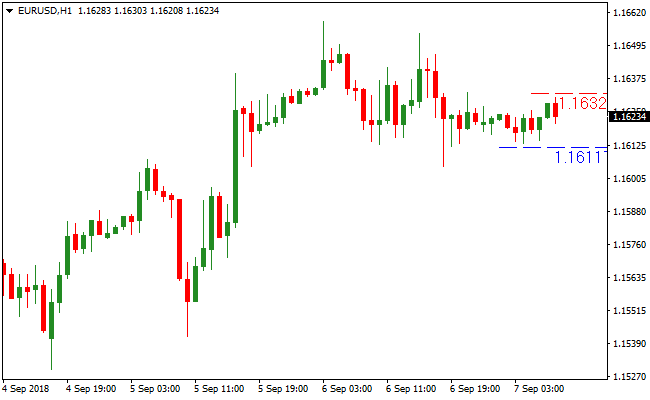
The EUR/USD 1-Hour chart below shows the Last High-Low Stop-Loss MT4 indicator in action.
Blue lines suggest safe stop levels for buy trades, while red lines indicate stops for sell trades.
It helps traders place stops consistently and avoid emotional decisions.
Guide to Trade with Last High Low Stop-Loss Indicator
Buy Rules
- Identify a buy trade setup using your preferred strategy.
- Check the blue stop-loss line plotted by the indicator.
- Place your stop a few pips below the blue line.
- Ensure the minimal stop distance setting is respected to avoid premature stop-outs.
Sell Rules
- Identify a sell trade setup using your preferred strategy.
- Check the red stop-loss line plotted by the indicator.
- Place your stop a few pips above the red line.
- Confirm the minimal stop distance is applied to reduce early exits.
Stop Loss
- Set stops beyond the indicator lines for buy or sell trades.
- Adjust stops according to volatility and timeframe.
- Use the minimal stop distance setting to maintain proper risk management.
Take Profit
- Follow your regular strategy or exit at a key support/resistance level.
- Consider trailing the stop once the price moves in your favor.
- Close the position if the trend reverses or your predefined target is reached.
MT4 Strategy: Last High/Low Stop Loss + ATR Trailing Stop Rapid Trading Method
This MT4 rapid trading strategy combines the Last High/Low Stop Loss Indicator and the ATR Trailing Stop Indicator to capture fast intraday trades.
The Last High/Low Stop Loss Indicator helps define precise stop-loss levels, placing buy stops a few pips below the blue line and sell stops a few pips above the red line.
The ATR Trailing Stop indicator identifies trend direction, showing a blue line below candlesticks for bullish trends and a red line above for bearish trends, allowing traders to enter trades quickly in the direction of momentum.
This strategy works best on M1 and M5 charts, making it ideal for rapid trading during active sessions.
By combining precise stop levels with trend confirmation, traders can take advantage of short-term moves while managing risk effectively.
Buy Entry Rules
- The ATR Trailing Stop shows a blue line below the candlesticks, confirming a bullish trend.
- Place a buy order at market when the trend aligns with price action above the blue ATR line.
- Set stop loss a few pips below the blue Last High/Low line.
- Take profit when the ATR Trailing Stop line turns red or after capturing 8-15 pips.
Sell Entry Rules
- The ATR Trailing Stop shows a red line above the candlesticks, confirming a bearish trend.
- Place a sell order at market when the trend aligns with price action below the red ATR line.
- Set stop loss a few pips above the red Last High/Low line.
- Take profit when the ATR Trailing Stop line turns blue or after capturing 8-15 pips.
Advantages
- Combines precise stop-loss placement with trend confirmation for higher probability trades.
- Effective for rapid trades on lower timeframes such as M1 and M5.
- ATR line provides trend direction to guide entry and exit decisions.
- Quick entry and exit rules reduce hesitation during fast market movements.
- Can be applied to multiple currency pairs with frequent intraday opportunities.
Drawbacks
- Requires quick execution and focus due to rapid market movements.
- High frequency of signals can lead to overtrading if not managed carefully.
- Short-term ATR fluctuations may cause early exits on otherwise strong trends.
Case Study 1: EURUSD M1
During the London session, EURUSD showed a blue ATR Trailing Stop line below the candlesticks.
A buy trade was entered above the ATR line with a stop loss a few pips below the blue Last High/Low line.
Price moved upward rapidly, and the trade was closed when the ATR line turned red, capturing 10 pips.
Using both indicators helped execute a fast, trend-aligned scalp.
Case Study 2: GBPJPY M5
GBPJPY displayed a red ATR Trailing Stop line above the candlesticks, confirming a bearish trend.
A sell trade was executed below the ATR line with a stop above the red Last High/Low line.
Price moved downward quickly, and the trade was closed when the ATR line turned blue, securing 12 pips.
Combining precise stops with trend confirmation allowed for a rapid, high-probability intraday trade.
Strategy Tips
- Focus on major pairs during high liquidity sessions for better trend clarity.
- Confirm the trend with the ATR line before entering trades to reduce false entries.
- Use defined stop losses from the Last High/Low indicator to manage risk effectively.
- Take profits quickly using ATR line color change or pip targets of 8-15 pips.
- Keep a fast execution mindset for M1 and M5 trades to capitalize on short-term momentum.
Download Now
Download the “last-high-low-stop-loss.mq4” Metatrader 4 indicator
FAQ
Can this indicator be used on any timeframe?
Yes. It works on all timeframes from M1 to Monthly, allowing flexible stop-loss placement.
Is it compatible with any trading strategy?
Absolutely. It complements scalping, day trading, and swing trading strategies by providing reliable stop references.
How do I set the minimal stop distance?
The minimal stop distance can be adjusted in the indicator’s input tab, ensuring stops aren’t placed too close to market noise.
Can I rely solely on this indicator for entries?
No. It is designed for stop-loss placement. Entry decisions should be based on your preferred trading method.
Summary
The Last High/Low Stop-Loss Forex indicator helps traders place stop-losses efficiently and consistently.
By drawing blue and red lines for buy and sell trades, it simplifies risk management across any timeframe.
Adjustable settings and minimal stop distance options allow customization for different trading styles.
It works well alongside any trading strategy, offering traders a practical tool to protect capital and reduce emotional decision-making.





