
About the ZFXI Swap Indicator
The ZFXI Swap indicator for MT4 is designed to display essential trading data in a single, dedicated window.
It helps traders monitor swap rates, spreads, and key price levels without switching between multiple tools.
The indicator shows the active currency pair name, current spread, swap values for buy and sell positions, and high-low ranges for the current day, week, and month.
This information allows traders to make more informed decisions, especially when holding positions beyond one session.
ZFXI Swap works well for both short-term and position traders who want a better overview of trading costs and price behavior.
Keeping metrics visible at all times improves trade planning and risk awareness.
All displayed symbols and data fields can be adjusted directly from the inputs tab, giving traders full control over what appears in the indicator window.
Free Download
Download the “zfxi-swap-indicator.ex4” MT4 indicator
Key Features
- Displays swap values for buy and sell positions.
- Shows the current spread for each selected currency pair.
- Includes daily, weekly, and monthly high-low ranges.
- Runs in a separate window for clean chart visibility.
- Supports multiple currency pairs at the same time.
- Fully customizable via the indicator inputs.
Indicator Chart
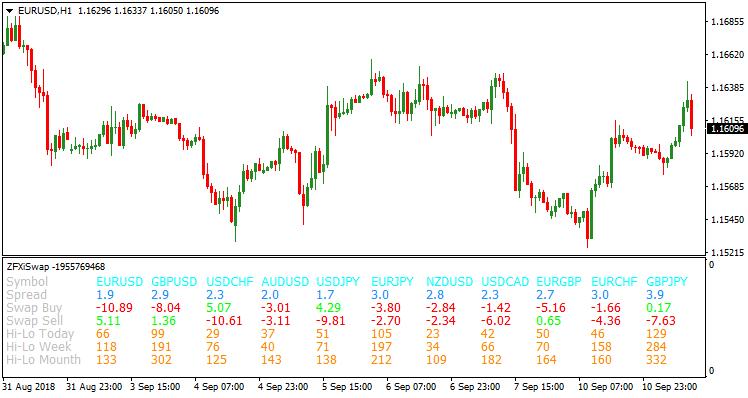
The chart example displays the ZFXI Swap indicator in a separate information window.
The panel shows swap rates, spreads, and high-low price levels for the selected currency pairs, giving a quick overview of trading costs and recent price behavior.
Guide to Trade with ZFXI Swap Indicator
Buy Rules
- Select currency pairs with favorable or low negative buy swap values.
- Check that the current spread remains within acceptable limits.
- Confirm price is trading near the lower part of the daily or weekly range.
- Open a buy trade when market conditions align with your strategy.
Sell Rules
- Focus on pairs offering favorable sell swap values.
- Ensure spread conditions remain stable during entry.
- Look for price near the upper area of the daily or weekly range.
- Open a sell trade once your technical setup is confirmed.
Stop Loss
- Set the stop loss beyond the current daily high or low.
- Use the weekly range as a reference for wider trades.
- Reduce stop distance on lower volatility days.
- Always size risk according to account balance.
Take Profit
- Target the opposite side of the daily price range.
- Use partial exits near key intraday levels.
- Hold longer trades toward the weekly high or low when the swap is favorable.
- Manually close positions if spread or swap conditions change.
MT4 Strategy: ZFXI Swap + Trend Predictor V1.0 Trading Method
This MT4 strategy combines the ZFXI Swap Metatrader 4 Forex Indicator with theTrend Predictor V1.0 Forex Indicator to create a complete approach for both intraday and swing traders.
The ZFXI Swap tool is powerful because it displays real time data like spreads, swap rates, and high to low levels for the day, week, and month.
This information helps traders understand market conditions before entering any trade.
The Trend Predictor works with simple blue and red arrows that mark potential turning points in price, making it easy to time entries with minimal confusion.
This combination works well on M30, H1, and H4 time frames.
It is suitable for beginners and experienced traders because the rules are simple and the signals are clear.
The goal is to match Trend Predictor signals with the broader market structure shown by ZFXI Swap.
When both indicators agree, entries become more reliable.
Buy Entry Rules
- A blue arrow from Trend Predictor forms under the price.
- The ZFXI Swap indicator shows the daily or weekly high to low structure moving upward.
- The current spread is acceptable and not much higher than usual.
- Place the stop loss below the most recent swing low.
- Take profit at the nearest weekly resistance or when price reaches the weekly high zone displayed on ZFXI Swap.
Sell Entry Rules
- A red arrow from Trend Predictor forms above the price.
- The ZFXI Swap indicator shows lower daily or weekly levels compared to previous sessions.
- The spread is normal or stable for that pair.
- Place the stop loss above the most recent swing high.
- Take profit at the nearest weekly support or when price touches the weekly low area displayed on ZFXI Swap.
Advantages
- Clear buy and sell signals with no confusing patterns.
- Market structure is easy to read thanks to the high to low levels of day, week, and month.
- Works on many currency pairs because ZFXI Swap allows you to add or remove pairs through its inputs.
- Suitable for intraday and swing trading with stable trade frequency.
Drawbacks
- Arrow signals sometimes appear during flat markets, so filtering is needed.
- High spreads during news events can cancel good setups.
- Best results require higher time frames, so fewer daily trades.
Case Study 1
On EURUSD H1, a blue arrow appeared near the bottom of a pullback.
The ZFXI Swap indicator showed that the weekly low had already formed and price was lifting away from it.
The spread was low and stable.
A buy trade was taken with a stop under the swing low.
The pair moved up gradually and reached the weekly high zone for a gain of 78 pips.
The Trend Predictor arrow matched the shift in structure shown by the ZFXI Swap levels, creating a clean trending move.
Case Study 2
On GBPJPY H1, a red arrow formed during a retracement rally.
The ZFXI Swap window showed that the pair remained under the weekly midpoint and was moving toward the weekly low again.
Spread remained normal, making the setup acceptable.
A sell entry was placed with a stop above the recent swing high.
Price continued lower over the next sessions and touched the weekly low boundary for a profit of 87 pips.
Strategy Tips
- Use the ZFXI Swap indicator as your market condition filter. When the daily, weekly, or monthly high to low range is expanding, it often signals a trending environment.
- Before taking any trade, check the spread shown in the ZFXI Swap window. If the spread is wider than normal, skip the setup.
- The Trend Predictor arrows work best when they appear close to key levels highlighted by ZFXI Swap. .
- Wait for candle confirmation after an arrow appears. This helps avoid early entries in unstable conditions. A closed candle in the same direction as the arrow improves signal accuracy.
- Always align the arrow direction with the higher time frame levels from ZFXI Swap.
- Remove unnecessary pairs from the ZFXI Swap inputs to keep your MT4 chart clean.
- If you trade H1 or H4, also check the monthly high and low levels. These zones act as natural barriers where price often slows down or reverses.
- Prefer trading during the London or New York sessions. These sessions usually keep spreads stable, which improves the reliability of both indicators.
Download Now
Download the “zfxi-swap-indicator.ex4” Metatrader 4 indicator
FAQ
What type of trader benefits most from the ZFXI Swap indicator?
It is especially useful for traders who hold positions overnight or longer and want constant visibility of swap costs and spreads.
Can I track multiple currency pairs at once?
Yes, you can add or remove symbols directly from the inputs tab and monitor several pairs simultaneously.
Does the indicator generate buy or sell signals?
No, it focuses on displaying trading information rather than generating entry signals. It works best alongside a technical strategy.
Can the displayed data be customized?
All fields and symbols can be adjusted in the settings to match individual trading needs.
Summary
The ZFXI Swap indicator provides a practical overview of trading costs and price ranges in one compact window.
It helps traders stay aware of swap implications and spread conditions at all times.
By combining swap data with daily, weekly, and monthly price ranges, the indicator supports smarter trade planning and position management.
It is a valuable addition for traders who prioritize cost efficiency and market awareness.





