About the Trend Identifier Indicator
The Trend Identifier indicator is a technical tool designed for MT4 to isolate the direction of market momentum by utilizing a unique channel-based calculation.
While it may remind some traders of the Average Directional Movement Index, this indicator operates differently by focusing on the relationship between a red signal line and a blue trading channel.
It filters out the minor retracements that often cause traders to exit early.
By monitoring the interaction between the signal line and the channel boundaries, you can objectively identify the start of a new trend or the exhaustion of an existing one.
This makes it an essential tool for trend-following strategies on various timeframes.
Free Download
Download the “trend-id.mq4” MT4 indicator
Key Features
- A dynamic trading channel that adapts to current market volatility.
- Responsive red signal line for identifying precise trend crossovers.
- Effective across all major currency pairs and metal markets.
- Visual trend confirmation that reduces reliance on subjective analysis.
- Capable of identifying both emerging trends and potential market reversals.
Indicator Chart
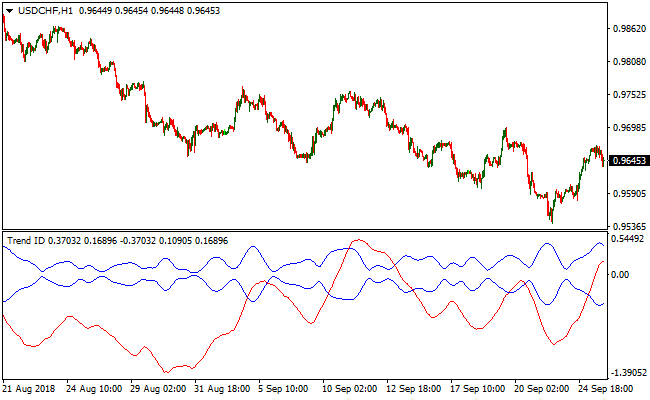
The chart displays the Trend Identifier indicator plotted below the main price action.
You can see the red signal line moving through the blue trading channel.
When the red line breaks above the channel, it signals a strong upward move, whereas a break below the channel indicates that the market is entering a sustained bearish phase.
Guide to Trade with Trend Identifier Indicator
Buy Rules
- Wait for the red signal line of the Trend Identifier Indicator to cross above both blue channel lines.
- Confirm that the crossover is coming from below the channel for a fresh momentum signal.
- Open a buy trade at the close of the candle where the crossover is confirmed.
Sell Rules
- Observe the red signal line as it moves toward the upper boundary of the blue channel.
- Initiate a sell trade when the red signal line crosses below both blue channel lines from above.
- Ensure the price action on the main chart supports the bearish momentum shift.
Stop Loss
- Place the stop loss for buy orders below the most recent swing low point.
- For sell positions, set the stop loss a few pips above the most recent swing high.
- Maintain a stop loss that accounts for the typical daily range of the currency pair.
Take Profit
- Consider taking profits when the red signal line begins to move back into the blue channel.
- Exit the trade completely if the signal line crosses to the opposite side of the channel.
- Apply a trailing stop to lock in gains as the trend progresses in your favor.
Trend Identifier Indicator + SuperTrend NRP Forex Scalping Strategy
This scalping strategy uses the Trend Identifier MT4 indicator and the SuperTrend NRP MT4 indicator together to catch quick intraday moves in trending conditions.
The Trend Identifier provides channel-based trend signals where the red signal line crossing the blue channel lines indicates the trend direction.
The SuperTrend NRP adds a volatility-based confirmation, showing bullish trends with a green line and bearish trends with an orange line.
Using both indicators together reduces false entries and improves the chances of catching strong momentum moves.
This strategy works best on short timeframes such as M1, M5, and M15 and is ideal for active traders who prefer fast scalps.
It can be applied across multiple currency pairs to identify high-probability intraday trading opportunities.
Buy Entry Rules
- Wait until the red signal line from the Trend Identifier crosses above both blue channel lines (from below).
- Check that the SuperTrend NRP line is showing a bullish trend (green line).
- Enter a buy trade once both conditions are met.
- Place a stop loss just below the recent swing low or a few pips below the entry candle low.
- Set a take profit target around 8–15 pips or according to a 1:1.5–1:2 risk/reward ratio.
Sell Entry Rules
- Wait until the red signal line from the Trend Identifier crosses below both blue channel lines (from above).
- Confirm that the SuperTrend NRP line shows a bearish trend (orange line).
- Enter a sell trade once both conditions are met.
- Place a stop loss just above the recent swing high or a few pips above the entry candle high.
- Set a take profit target around 8–15 pips or according to a conservative risk/reward ratio.
Advantages
- Dual confirmation reduces false signals.
- Suitable for scalping on M1, M5, and M15 timeframes.
- Clear entry and exit rules support disciplined trading.
- Allows fast profit potential without holding trades for long periods.
- It can be applied to multiple currency pairs for diversified scalping.
Drawbacks
- High frequency of trades can lead to fatigue and mistakes if not monitored carefully.
- Small scalping profits can be reduced by spreads and broker commissions.
- Requires quick decision-making, which may not suit beginner traders.
Case Study 1: Bullish Scalping (M5 NZDUSD)
On the NZDUSD M5 chart during the Asian session, the red signal line of the Trend Identifier crossed above both blue channel lines, signaling a potential bullish move.
At the same time, the SuperTrend NRP line turned green, confirming the market’s upward bias.
The pair had been consolidating in a small range before the breakout, which allowed for a clear entry point.
A buy trade was entered at 0.6241 as the price broke out of the consolidation zone.
The market initially retraced slightly, testing the previous swing low near 0.6235, but the trade remained protected by the stop loss set at 0.6232.
After the minor pullback, the price resumed its upward momentum and hit the take profit level at 0.6262.
This trade captured 21 pips.
Case Study 2: Bearish Scalping (M1 EURJPY)
During the European session on EURJPY M1, the red signal line from the Trend Identifier dropped below both blue channel lines, indicating strong downward momentum.
The SuperTrend NRP line simultaneously turned orange, confirming the bearish trend.
The pair had previously been testing resistance levels, and the breakout to the downside created an ideal shorting opportunity.
A sell trade was entered at 155.82.
The price initially moved sideways for a few candles, testing minor support near 155.76, but the stop loss at 155.94 provided protection in case of a reversal.
The market then accelerated downward, quickly reaching the take profit at 155.65.
The trade closed with 17 pips profit.
Strategy Tips
- Use the strategy only when the Trend Identifier signal and the SuperTrend NRP line confirm the same direction to filter low-probability trades.
- Pay attention to the slope of the Trend Identifier channel. A steep slope indicates stronger momentum and higher probability trades.
- For scalping, focus on pairs with tight spreads and good liquidity to reduce trading costs and slippage.
- Observe price behavior around minor support and resistance levels before taking a trade to avoid false breakouts.
- Keep trades short and avoid overtrading, especially during low volatility periods, to preserve capital.
- Maintain a trading journal to track the effectiveness of signals, average pips gained, and win/loss ratio.
Download Now
Download the “trend-id.mq4” Metatrader 4 indicator
FAQ
How does this differ from a standard ADX indicator?
The Trend Identifier Indicator provides a much more direct signal by using a central channel and a single signal line.
While the ADX measures trend strength through multiple lines, this tool focuses on the crossover mechanics.
What is the best way to avoid false signals in ranging markets?
In sideways markets, the red signal line may hover inside the blue channel without a clear breakout.
To avoid bad entries, only take trades when the red line clearly exits the channel boundaries.
Combining the Trend Identifier Indicator with a volume-based tool can also help confirm that there is enough market participation to sustain the move.
Summary
The Trend Identifier Indicator is a robust solution for anyone looking to simplify their trend-following approach.
By focusing on the crossover of the red signal line and the blue trading channel, it removes the guesswork from identifying market direction.
While no tool is perfect, its ability to visualize trend strength makes it a valuable addition to any MT4 setup.





