About the Stochastic Signals Alert Indicator
The Stochastic Signals Alert Metatrader 4 forex indicator is a signal-based tool built around the classic stochastic oscillator.
Its main purpose is to notify traders when the market reaches overbought or oversold conditions using automated alerts.
The indicator triggers alerts when the stochastic value moves above the 80 level or below the 20 level.
Alerts can be delivered through on-screen notifications, email alerts, or push notifications, depending on user preferences.
This indicator performs best during range-bound market conditions.
In strong trends, signals are more effective when aligned with the prevailing market direction, allowing traders to focus only on setups that match broader price movement.
Free Download
Download the “StochasticAlerts.mq4” MT4 indicator
Key Features
- Built-in stochastic overbought and oversold alerts.
- On-screen, email, and push notification support.
- Displays trade prompts directly on the chart.
- Optional display of MT4 account information.
Indicator Chart
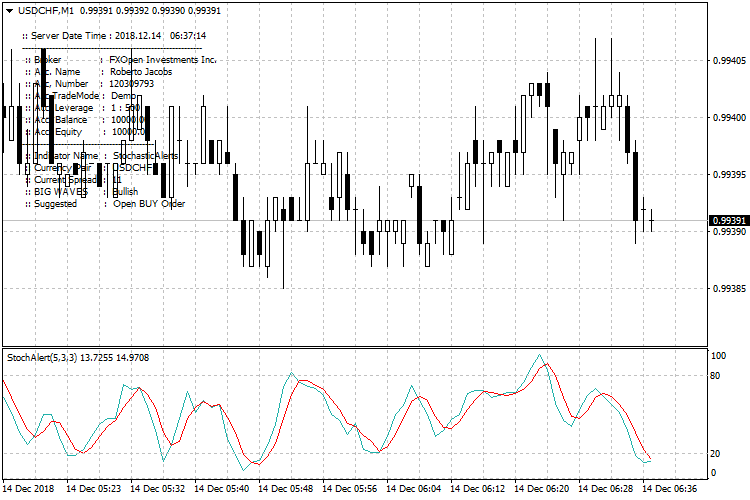
The chart shows the Stochastic Signals Alert indicator applied to a price chart with alert messages displayed.
Buy and sell prompts appear when the stochastic oscillator reaches extreme levels, helping traders react quickly to potential reversals during ranging conditions.

Guide to Trade with Stochastic Signals Alert
Buy Rules
- Wait for the indicator to display an “open BUY order” message.
- Confirm that the broader market is not in a strong downtrend.
- Enter a buy trade after price shows stabilization near support.
- Focus on oversold signals during upward or sideways market phases.
Sell Rules
- Wait for the indicator to display an “open SELL order” message.
- Confirm that the broader market is not in a strong uptrend.
- Enter a sell trade after price stalls near resistance.
- Focus on overbought signals during downward or sideways market phases.
Stop Loss
- Place the stop loss beyond the most recent swing point.
- For buy trades, set the stop below the recent consolidation low.
- For sell trades, set the stop above the recent consolidation high.
- Keep the stop outside short-term market noise.
Take Profit
- Target the opposite side of the current trading range.
- Use prior support or resistance as profit objectives.
- Consider partial exits near mid-range price levels.
- Close the trade when stochastic returns to neutral levels.
MT4 Stochastic Signals Alert + Flat Trend RSI Day Trading Strategy
This day trading strategy combines the Stochastic Signals Alert MT4 Forex Indicator with the Flat Trend RSI MT4 Forex Indicator.
The Stochastic Signals Alert gives buy and sell signals based on the stochastic crossing of key levels.
A buy signal is generated when the stochastic crosses back above 20 from below, and a sell signal appears when it crosses back below 80 from above.
The Flat Trend RSI adds a trend filter using histogram bars: blue bars indicate a bullish trend and red bars indicate a bearish trend.
Combining both indicators allows traders to enter trades aligned with the trend while identifying short-term momentum reversals.
This strategy works best on M15 and M30 charts and is suitable for day traders looking for intraday trend-following opportunities.
Buy Entry Rules
- Flat Trend RSI histogram must be blue, indicating a bullish trend.
- Stochastic Signals Alert must generate a buy signal (stochastic crosses back above 20 from below).
- Enter long at the open of the next candle after the buy signal appears while the histogram remains blue.
- Place a stop loss below the most recent swing low or minor support level.
- Set take profit at a 1:2 risk-to-reward ratio, or exit if the histogram turns red or a sell signal occurs.
Sell Entry Rules
- Flat Trend RSI histogram must be red, indicating a bearish trend.
- Stochastic Signals Alert must generate a sell signal (stochastic crosses back below 80 from above).
- Enter short at the open of the next candle after the sell signal appears while the histogram remains red.
- Place a stop loss above the most recent swing high or minor resistance level.
- Set take profit at a 1:2 risk-to-reward ratio, or exit if the histogram turns blue or a buy signal occurs.
Advantages
- Combines trend filter and momentum reversal signals for higher probability trades.
- Clear entry and exit points simplify decision-making for intraday traders.
- Works well on multiple currency pairs during active trading sessions.
- Defined stop loss and take profit help manage risk and maintain consistent performance.
- Can capture both trend continuation and short-term pullbacks using stochastic signals.
Drawbacks
- In sideways or low volatility markets, stochastic signals may produce false entries.
- Histogram may lag slightly, causing delayed trade confirmation during sudden trend reversals.
- Risk of overtrading if too many stochastic signals appear during choppy market conditions.
Case Study 1
On EURUSD M15 during the London session, the Flat Trend RSI histogram was blue, indicating a bullish trend.
The Stochastic Signals Alert crossed back above 20 after a minor retracement, generating a buy signal.
The trader entered long at the next candle, with a stop loss 8 pips below the recent swing low.
Price rose steadily over 30 minutes and reached a 16-pip take profit.
The histogram remained blue, and no sell signal appeared, resulting in a clean intraday trade.
Case Study 2
On GBPUSD M30 during the New York session, the Flat Trend RSI histogram turned red, showing a bearish trend.
The Stochastic Signals Alert crossed back below 80, giving a sell signal.
The trader entered short at the next candle, placing a stop loss 12 pips above the recent swing high and a take profit 24 pips below.
Over the next 45 minutes, the price fell and hit the take profit target, confirming the trend and validating the signal.
Strategy Tips
- Focus on major and liquid currency pairs such as EURUSD, GBPUSD, USDJPY, or AUDUSD for better execution and tighter spreads.
- Trade during active sessions like London or London and New York overlap to capture stronger intraday moves.
- Avoid trading in sideways or low volatility markets, as signals can produce false entries.
- Maintain consistent position sizing and adhere to your risk management rules.
- Skip trades when stochastic signals appear near strong support or resistance levels to reduce whipsaws.
Download Now
Download the “StochasticAlerts.mq4” Metatrader 4 indicator
FAQ
Does this indicator work best in trending markets?
No. It performs better during sideways or consolidating market conditions.
Can alerts be customized?
Yes. Users can enable or disable on-screen, email, and push notifications from the indicator settings.
Is the stochastic period adjustable?
Yes. All standard stochastic parameters can be modified in the input menu.
Summary
The Stochastic Signals Alert MT4 indicator simplifies range trading by delivering automated alerts at key overbought and oversold levels.
It helps traders focus on high-probability reversal zones without constantly monitoring the stochastic oscillator.
With flexible alert options and straightforward signals, the indicator is a useful addition for traders who prefer structured setups during consolidating market phases.





