
About the TG Money Management Indicator
The TG Money Management Indicator is a utility for traders who prioritize capital preservation and mathematical discipline.
Unlike traditional technical tools that focus on entry signals, this indicator is dedicated to the most vital aspect of trading: risk control.
It functions by automatically calculating the ideal position size for every trade based on your account balance and the specific volatility of the market.
By integrating the Average True Range into its core logic, the tool ensures that your stop loss levels are mathematically sound rather than arbitrary.
One of the primary benefits of this tool is its ability to remove the emotional burden of manual calculations during fast-moving market conditions.
It provides real-time data on how much capital is at risk, allowing you to maintain a professional approach to every execution.
Free Download
Download the “TG-Money-Managment-Indicator.mq4” MT4 indicator
Key Features
- Automated position sizing based on a user-defined percentage of account equity.
- Dynamic stop loss calculation powered by the ATR technical indicator for volatility-adjusted protection.
- Real-time display of maximum lot sizes to ensure you never exceed your risk parameters.
- Fully customizable parameters, including risk per trade, ATR periods, and display settings.
Indicator Chart
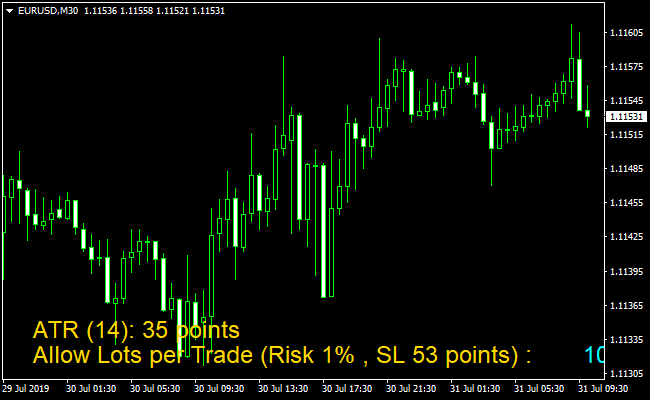
The TG Money Management Indicator chart features a dedicated information panel that displays calculated risk values and recommended lot sizes.
It translates complex account metrics into actionable data points, showing exactly where your risk stands before you pull the trigger.
Guide to Trade with TG Money Management Indicator
Buy Rules
- Determine your entry point based on your primary technical analysis or signal indicator.
- Check the TG Money Management Indicator panel for the recommended lot size based on your 2% risk limit.
- Set the ATR-based stop loss distance provided by the indicator to account for current market volatility.
- Execute the buy order using the precise position size calculated by the tool.
Sell Rules
- Identify a valid sell setup using your preferred trend or reversal strategy.
- Consult the indicator interface to see the maximum allowable volume for the current pair.
- Apply the stop loss level suggested by the ATR calculation to give the trade enough breathing room.
- Open the sell position while ensuring your total market exposure remains within safe limits.
Stop Loss
- Use the ATR-calculated level provided by the indicator to set a volatility-based exit point.
- Switch to a fixed stop loss in the inputs menu if you are trading a specific structural pattern.
- Always place your stop loss immediately at the time of trade execution to prevent unexpected slippage.
- Ensure the stop loss reflects a maximum risk of 2% of your total account balance per trade.
Take Profit
- Set a take profit target that is at least twice the distance of the stop loss provided by the indicator.
- Close the trade at key structural levels such as previous daily highs or major resistance zones.
- Monitor the trade and consider locking in partial profits once the price reaches a 1:1 risk-to-reward ratio.
MT4 Bulls Power and TG Money Management Scalping Strategy
This MT4 scalping strategy combines the TG Money Management MT4 Indicator with the Bulls Power Oscillator MT4 Indicator.
The Bulls Power Oscillator shows a grey histogram above zero for a bullish signal and below zero for a bearish signal.
The TG Money Management indicator calculates the maximum position size automatically based on the ATR or a fixed stop loss, helping you manage risk efficiently.
This strategy works best for scalping on M1, M5, or M15 charts.
By combining trend momentum with precise position sizing, traders can enter short-term trades with clear risk limits.
The visual histogram makes it easy to identify buy and sell signals, while the money management indicator ensures the position size matches your risk tolerance.
Buy Entry Rules
- The Bulls Power Oscillator histogram must be above zero to confirm bullish momentum.
- Use the TG Money Management indicator to determine your maximum position size based on ATR or a fixed stop loss.
- Enter long at the close of the candle when the histogram first moves above zero after a pullback.
- Place the stop loss according to the value suggested by the TG Money Management indicator.
- Close the trade when the Bulls Power histogram flips below zero, signalling potential trend reversal.
Sell Entry Rules
- The Bulls Power Oscillator histogram must be below zero to confirm bearish momentum.
- Use the TG Money Management indicator to determine the appropriate position size.
- Enter short at the close of the candle when the histogram first moves below zero after a retracement.
- Place the stop loss as recommended by the TG Money Management indicator.
- Close the trade when the Bulls Power histogram flips above zero, signalling a possible trend reversal.
Advantages
- Combines trend momentum with strict risk management for safer scalping.
- Bulls Power histogram provides clear buy and sell signals.
- Automatic position sizing reduces the chance of over-leveraging.
- Works well during active market sessions with strong price movements.
- Suitable for both beginners and experienced scalpers.
Drawbacks
- Trades may be stopped out quickly during sudden spikes if the ATR is high.
- Strategy depends on the correct configuration of the TG Money Management indicator.
Case Study 1
On EURUSD M5 during the London session, the Bulls Power histogram turned above zero, confirming a bullish trend.
The TG Money Management indicator calculated a safe position size based on a 12-pip ATR.
A long trade was entered, and the price moved upward steadily, reaching a 22-pip take profit.
Using the indicator to manage risk allowed the trade to follow the trend safely without risking too much capital.
Case Study 2
GBPJPY M15 showed a bearish setup during the New York session.
The histogram turned below zero, and the TG Money Management indicator suggested a position size with a 15-pip stop loss.
A short trade was taken, and the price moved down quickly, reaching a 28-pip profit.
The combination of trend confirmation and automatic position sizing provided a controlled and efficient trade.
Strategy Tips
- Focus on trading sessions with strong volatility to improve signal reliability.
- Always use the position size suggested by the TG Money Management indicator to protect your account.
- Check higher time frames to confirm the general trend before entering trades.
- Wait for a clear histogram movement above or below zero rather than entering immediately on small fluctuations.
Download Now
Download the “TG-Money-Managment-Indicator.mq4” Metatrader 4 indicator
FAQ
How does the ATR setting affect my stop loss in this indicator?
The ATR setting allows the TG Money Management Indicator to measure the average movement of the last several candles.
By using this data, the indicator suggests a stop loss that is outside the normal market noise, helping you avoid being stopped out by minor fluctuations before the actual move occurs.
Can I change the risk percentage from the default settings?
Yes, all parameters can be adjusted in the inputs menu.
While the indicator allows for various settings, it is highly recommended to keep your risk per trade at 2% or less to ensure that a string of losses does not significantly impact your trading capital.
Does this indicator work on gold and indices or just forex?
This tool is versatile and works on any asset available in MT4.
It is particularly useful for volatile assets like gold or oil, where manual lot size calculation can be difficult due to varying contract sizes and high price velocity.
What is the difference between fixed and ATR stop loss modes?
Fixed mode uses a set number of pips for every trade regardless of market conditions.
ATR mode is dynamic and will suggest a wider stop loss when the market is volatile and a tighter one when the market is quiet, which is generally considered a more professional approach.
Summary
The TG Money Management Indicator is an indispensable asset for any trader looking to treat their activity as a serious business.
Automating the calculation of lot sizes and risk levels ensures that every trade you take is backed by consistent logic.
This discipline is what separates successful long-term traders from those who struggle with consistency.
To get the most out of this tool, always adhere to the maximum 6% total exposure rule across all open positions.
Implementing this utility into your daily routine will provide the structural framework necessary for sustainable growth and long-term market survival.





