About the Bollinger Bands Buy Sell Signals Indicator
The Bollinger Bands Buy Sell Signals Indicator is a technical tool designed to pinpoint entry opportunities when price action deviates significantly from its mean.
By combining the standard volatility envelopes with the Average True Range (ATR), this indicator effectively identifies when a move has exhausted itself and is ready for a reversal.
While many traders struggle to decide if a touch of the band is a continuation or a reversal, this indicator uses internal calculations to plot arrows only when specific momentum conditions are met.
It is especially useful for identifying “squeeze” plays and subsequent expansions, giving the trader an edge in timing their market participation during periods of high liquidity.
Free Download
Download the “FollowLine_v1.5.mq4” MT4 indicator
Key Features
- Integrated ATR filter functionality that can be toggled to improve signal quality during choppy markets.
- User-adjustable ATR period settings, with a recommended value of 25 for enhanced accuracy.
- Real-time arrow alerts that appear on the chart to signify immediate buy or sell opportunities.
Indicator Chart
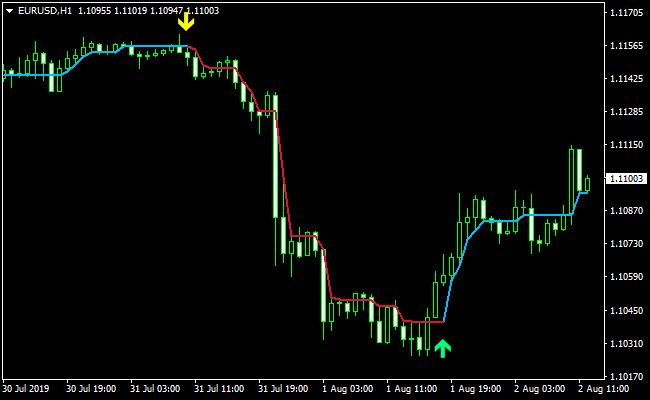
The Bollinger Bands Buy Sell Signals Indicator chart features color-coded arrows that appear directly above or below the price candles.
Green arrows signify a bullish reversal from the lower band, while yellow arrows indicate a bearish reversal from the upper band.
Guide to Trade with Bollinger Bands Buy Sell Signals Indicator
Buy Rules
- Enable the ATR filter in the settings and set the value to 25 for better precision.
- Execute a buy order when a green arrow appears pointing upward on the chart.
- Ensure the candle has closed before entering the position to confirm the signal.
Sell Rules
- Enable the ATR filter in the settings and set the value to 25 for better precision.
- Execute a sell order when a yellow arrow appears pointing downward on the chart.
- Ensure the candle has closed before entering the position to confirm the signal.
Stop Loss
- Position your stop loss a few pips below the most recent support level.
- Position your stop loss a few pips above the most recent resistance level.
- Alternatively, use a fixed stop loss based on the current ATR value to account for volatility.
Take Profit
- Use a fixed pip target for your buy and sell trades.
- Close the trade if an opposite signal arrow appears before your target is reached.
MT4 Bollinger Trend Direction and Scalper Entry Strategy
This MT4 strategy combines the strength of trend confirmation with precise entry timing.
It uses the Bollinger Bands Buy Sell Signals MT4 indicator to identify the market direction, and the Best Forex Scalping Indicator MT4 to give clear buy and sell entry arrows.
The Bollinger tool highlights the overall trend with blue arrows for bullish movement and red arrows for bearish movement.
The scalping indicator provides the actual entries with green arrows for buy signals and yellow arrows for sell signals.
This combination helps traders avoid guessing the trend and reduces early or late entries.
The strategy works best on M1, M5 and M15 charts.
It suits scalpers and day traders who want fast and repeatable setups.
Buy Entry Rules
- The Bollinger indicator must show a blue arrow to confirm bullish trend direction.
- The Best Forex Scalping Indicator MT4 must print a green arrow after or near the blue trend arrow.
- Enter long at the close of the candle where the green arrow appears.
- Place the stop loss around 10 to 20 pips below the entry, depending on market volatility.
- Use take profit targets of 15 to 30 pips on M5 or 20 to 35 pips on M15.
Sell Entry Rules
- The Bollinger indicator must show a red arrow to confirm bearish trend direction.
- The Best Forex Scalping Indicator MT4 must print a yellow arrow after or near the red trend arrow.
- Enter short at the close of the candle where the yellow arrow appears.
- Place the stop loss around 10 to 20 pips above the entry, depending on volatility.
- Use take profit targets of 15 to 30 pips on M5 or 20 to 35 pips on M15.
Advantages
- Trend direction and entry signals are separated, which improves clarity.
- Blue and red Bollinger arrows prevent trading against momentum.
- Scalping arrows give fast and clean entries.
- Works well during active sessions with steady movement.
- Simple structure suitable for beginners and advanced traders.
Drawbacks
- Not ideal during low liquidity hours.
- Requires fast execution because scalping entries do not last long.
Case Study 1
During the London open on EURUSD M5, the Bollinger indicator printed a blue arrow showing a bullish trend.
Two candles later, the Best Forex Scalping Indicator MT4 printed a green arrow.
A long position was opened with a 15 pip stop loss.
Price continued upward and reached a 26 pip profit before slowing down.
The trend and entry alignment produced a clean and low-risk trade.
Case Study 2
On GBPJPY M15 during the New York session, the Bollinger indicator produced a red arrow signalling bearish momentum.
After a small retracement, the Best Forex Scalping Indicator MT4 printed a yellow entry arrow.
A short trade was taken with a 20 pip stop loss.
The move pushed downward quickly and reached a 33 pip take-profit target.
Strategy Tips
- Focus on markets with strong movement because this strategy performs best when the price has a clear direction.
- Wait for both indicators to align instead of taking early entries. Patience improves accuracy.
- Use the H1 chart to confirm that you are trading in the same direction as the larger trend.
- Avoid trading during very quiet periods where candles are small and signals lose reliability.
- Protect profits by moving the stop loss to breakeven once the trade moves at least halfway to the target.
Download Now
Download the “FollowLine_v1.5.mq4” Metatrader 4 indicator
FAQ
Why should I set the ATR filter to a value of 25?
Setting the ATR filter to 25 helps the Bollinger Bands Buy Sell Signals Indicator ignore minor price fluctuations that don’t have enough underlying momentum.
This specific value acts as a threshold, ensuring that the arrows only appear when the market move has significant enough range to be considered a valid trade.
Can I change the color of the signal arrows?
The indicator settings allow for full customization of the visual outputs.
You can modify the green and yellow arrow colors to suit your chart background, though the default settings are designed for high visibility on most standard templates.
Is it necessary to use other indicators with this tool?
While the Bollinger Bands Buy Sell Signals Indicator is powerful on its own, it is highly recommended to use it alongside volume analysis or support and resistance levels.
Combining these tools helps you filter out signals that occur in the middle of a range rather than at key structural turning points.
Summary
The Bollinger Bands Buy Sell Signals Indicator is a robust solution for traders looking to capitalize on volatility and mean reversion.
By incorporating an ATR filter, it addresses the common issue of false signals during quiet market hours, making it a more reliable choice than standard band-crossing strategies.
The usability is high, as the arrows provide a direct call to action without requiring complex manual calculations.
To maximize its potential, traders should experiment with different parameter settings to match the specific volatility of the currency pair they are trading.





