About the Spread Monitor Indicator
The Spread Monitor Forex indicator for MT4 is a practical tool designed to help traders track spread behavior across different currency pairs and instruments.
Instead of guessing when spreads are favorable, the indicator records and displays the lowest and highest spreads over a selected time period.
By monitoring spreads throughout the trading day, traders gain a better understanding of how costs fluctuate during different market sessions.
This is especially useful for scalpers and intraday traders, where spread size has a direct impact on profitability.
The indicator is also valuable when comparing Forex brokers.
Some brokers offer ultra-low spreads combined with commission-based pricing, while others rely solely on variable spreads.
Using this tool allows traders to make informed decisions before committing to a trading account.
Free Download
Download the “SpreadWatch2.ex4” MT4 indicator
Key Features
- Displays the lowest spread recorded for a selected period.
- Displays the highest spread recorded for a selected period.
- Works on all MT4-supported instruments.
- Helps compare spread conditions across brokers.
- Useful for scalping and cost-sensitive strategies.
- Customizable time range and input settings.
Indicator Chart
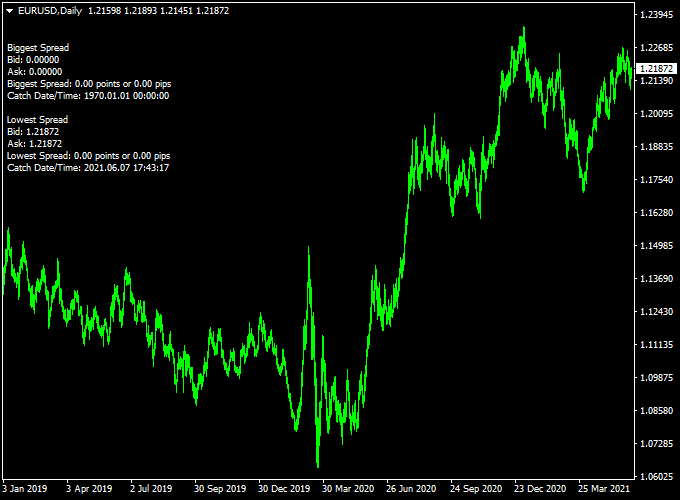
The chart shows the Spread Monitor indicator attached to an MT4 chart, tracking spread changes in real time.
It highlights both minimum and maximum spread values, allowing traders to quickly identify favorable and unfavorable trading conditions.
Guide to Trade with Spread Monitor
Buy Rules
- Check that the current spread is close to the recorded minimum.
- Confirm normal market conditions during active sessions.
- Proceed with buy trades only when the spread costs are acceptable.
Sell Rules
- Verify that the spread remains within a normal range.
- Avoid opening sell trades during sudden spread expansion.
- Enter trades when spreads stabilize.
Stop Loss
- Place stop losses based on price action rather than spread values.
- Avoid adjusting stops during temporary spread spikes.
Take Profit
- Set take profit levels according to your trading strategy.
- Ensure expected profit comfortably exceeds the spread cost.
Spread and Winners Rise Forex Scalping Strategy for MT4
The Spread Monitor Forex Indicator for MT4 displays the biggest and lowest spreads for your chosen time period and currency pair.
When used together with the Winners Rise Forex Scalper Indicator for MT4, which shows a green histogram for buy signals and a red histogram for sell signals, this combination creates a practical scalping method that focuses on liquidity and fast execution.
This strategy works best on short-term charts such as the M1, M5, and M15 timeframes.
It’s designed for active traders who prefer fast trades and consistent results.
The key is to use the Spread Monitor to avoid high-spread moments that can reduce profits, while the Winners Rise indicator helps time entries with precision.
This system works well during high-volume sessions such as London and New York when spreads are tight and volatility is high.
Buy Entry Rules
- Trade only when the spread shown by the Spread Monitor indicator is near the lowest value of the session.
- Wait for the Winners Rise indicator to turn green, showing bullish momentum.
- Confirm that the recent candle closes above the previous candle’s high for momentum confirmation.
- Place a buy order at the open of the next candle.
- Set the stop loss 5 to 10 pips below the nearest swing low or recent minor support.
- Take profit at 10 to 20 pips, or when the histogram turns red, whichever comes first.
Sell Entry Rules
- Trade when the spread displayed by the Spread Monitor indicator is narrow and stable.
- Wait for the Winners Rise indicator to turn red, signaling bearish pressure.
- Confirm that the last candle closes below the previous candle’s low.
- Enter a sell trade at the open of the next candle.
- Place the stop loss 5 to 10 pips above the nearest swing high or resistance area.
- Take profit at 10 to 20 pips, or exit when the histogram turns green.
Advantages
- The Spread Monitor keeps traders from entering trades when spreads widen unexpectedly.
- Entries are filtered with both volatility and momentum, improving timing accuracy.
- Works well during major trading sessions when market activity is strong.
- It can be applied to any major currency pair with tight spreads like EURUSD or GBPUSD.
Drawbacks
- Scalping requires fast decision-making and discipline to exit at signals.
- High spreads during news events can make this system unreliable.
- May not perform well in slow markets or during Asian sessions.
- Execution delays can reduce profit potential if your broker has latency.
Example Case Study 1 – EURUSD M5
During the London open, the Spread Monitor displayed a narrow spread of 0.6 pips.
The Winners Rise indicator turned green around 08:15 GMT, confirming upward momentum.
A buy order was placed at 1.0840 with a stop loss at 1.0830.
The price moved quickly to 1.0860 within 20 minutes, reaching the 20-pip target.
This trade reflected how a low-spread environment combined with a clean buy signal can produce fast profits.
Example Case Study 2 – GBPUSD M1
In the New York session, spreads stayed tight at 0.8 pips.
The Winners Rise indicator showed a red histogram at 14:20 GMT.
A sell trade was entered at 1.2745, with a stop loss at 1.2755.
Momentum pushed the pair lower to 1.2725 in just under ten minutes, producing a 20-pip gain.
The spread remained low throughout the move, showing how timing entries only when spreads are narrow improves overall results.
Strategy Tips
- Trade only when the Spread Monitor shows stable, low spreads — avoid entries when spreads widen.
- Focus on the London and New York sessions when market activity is highest.
- Always wait for a full histogram color change before entering to avoid false reversals.
- Consider setting a daily profit target and stopping after reaching it to prevent overtrading.
- Backtest this approach on different pairs to identify which instruments produce smoother signals.
Download Now
Download the “SpreadWatch2.ex4” Metatrader 4 indicator
FAQ
Why is monitoring spread important?
Spread directly affects trade cost. High spreads can reduce profitability, especially for short-term strategies.
Can this indicator help choose a broker?
Yes. By comparing spread behavior across brokers, traders can identify which broker offers more stable and competitive pricing.
Does the indicator predict future spreads?
No. It records and displays historical and current spread data to support informed trading decisions.
Which traders benefit most from this tool?
Scalpers, day traders, and algorithmic traders benefit the most due to their sensitivity to transaction costs.
Summary
The Spread Monitor Forex indicator for MT4 gives traders transparency into spread behavior across different market conditions.
It helps reduce unnecessary trading costs by highlighting optimal times to trade.
The indicator is easy to use and valuable for broker comparison and execution planning.
It supports disciplined trading by keeping costs visible and controlled.





