

About the Price Quote Indicator
The Price Quote Indicator for MT4 is a specialized utility designed to keep essential market data at the forefront of your workspace.
Its primary goal is to provide immediate situational awareness by displaying the current price, daily percentage change, and the session’s range extremes directly on the activity chart.
By tracking how far price has moved from the previous day’s close, it helps traders determine if the market is overextended or just beginning a new trend.
This tool is essential for maintaining focus on key price levels without needing to toggle between multiple windows or data tables.
Free Download
Download the “Price_Quote.mq4” MT4 indicator
Key Features
- The indicator displays the current price in a large, easy-to-read format on the main window.
- It tracks the daily high and low to help identify potential support and resistance zones.
- The tool calculates the percentage change from yesterday’s close for instant sentiment analysis.
- The display is fully customizable, allowing traders to adjust the position and color to fit their template.
Indicator Chart
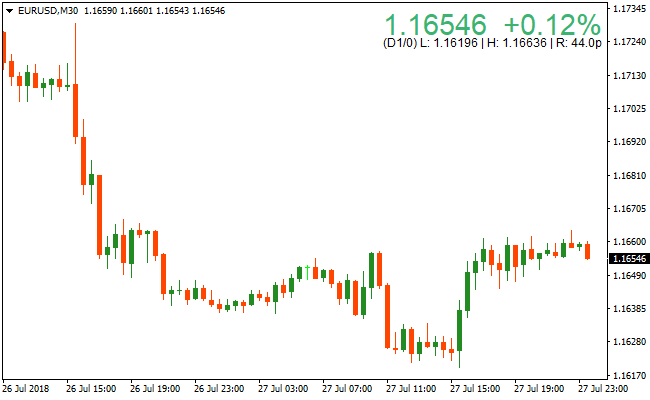
The chart displays the Price Quote Indicator as a data overlay on the main trading screen.
You can see the real-time price updates alongside the current day’s high and low markers, which highlight the boundaries of the market’s recent volatility and the overall percentage gain or loss.
Guide to Trade with Price Quote Indicator
Buy Rules
- Monitor the Price Quote Indicator to see if the current price is breaking above the daily high.
- Ensure the percentage change is positive, indicating bullish daily momentum.
- Open a buy order when price action confirms a breakout above the recorded high of the day.
Sell Rules
- Monitor the Price Quote Indicator to see if the current price is breaking below the daily low.
- Ensure the percentage change is negative, confirming bearish daily pressure.
- Open a sell order when price action sustains a move below the recorded low of the day.
Stop Loss
- For buy trades, place the stop loss slightly below the current day’s midpoint or recent local support.
- For sell trades, place the stop loss slightly above the current day’s midpoint or recent local resistance.
- Maintain a stop distance that accounts for the average daily range of the currency pair.
Take Profit
- Exit the trade when the price reaches a major psychological level or daily expansion target.
- Consider closing the position if the percentage change begins to stall or reverse sharply.
- Aim for a fixed reward ratio of at least one to two relative to your initial risk.
Price Quote Super Alligator Signal Forex Scalping Strategy MT4
This MT4 scalping strategy uses real-time price context from the Price Quote Indicator along with precise entry signals from the Super Alligator Signal Indicator.
The Price Quote indicator gives traders instant information about the current price, the percentage move from yesterday’s price, and the day’s high and low.
That context helps you determine if the market is trending, ranging, or at key levels when a Super Alligator signal appears.
The Super Alligator Signal indicator gives clear buy and sell arrows, making entry decisions much easier.
This strategy works best on the M1 and M5 charts where scalping is most effective.
It fits active day traders who want short duration trades with tight risk management.
Because scalping requires quick decisions, the rules here are clear and rule-based, so you can trade confidently without guesswork.
Buy Entry Rules
- Confirm the current price is above the previous day’s price on the Price Quote indicator. A positive percentage move suggests bullish bias.
- Wait for a red arrow from the Super Alligator Signal indicator. The red arrow signals a buy entry opportunity.
- Enter the buy trade immediately after the red arrow appears and price confirms direction with a green (bullish) candlestick close.
- Place the stop loss 3 to 3 pips below the entry candle’s low. Adjust according to volatility.
- Set take profit between 12 and 30 pips, depending on the pair’s volatility and timeframe you use.
Sell Entry Rules
- Confirm the current price is below the previous day’s price on the Price Quote indicator. A negative percentage move shows bearish bias.
- Wait for a blue arrow from the Super Alligator Signal indicator. A blue arrow gives your sell trigger.
- Open the sell trade immediately after the blue arrow appears with a confirming bearish candlestick close.
- Place the stop loss 3 to 5 pips above the entry candle’s high to avoid early stop-outs.
- Set take profit between 12 and 30 pips to capture a quick move in the scalping setup.
Advantages
- Combines real-time market context with clear entry signals for better trade quality.
- Simple rules make it easy to follow even under fast price movement.
- Works well on low timeframes where scalping is most effective.
- Easy to integrate with session filters or spread checks to enhance performance.
Drawbacks
- The strategy depends on active market conditions and performs poorly during quiet or low liquidity periods.
- Tight stop losses can be triggered by short-term noise, especially on the M1 timeframe.
Case Study 1
On USDCHF M1 during the London session, the Price Quote indicator showed the current price was above yesterday’s price with a positive percentage move, indicating bullish bias.
The price was nearer the day’s low, suggesting room to move up.
Shortly after, a red arrow from the Super Alligator Signal indicator appeared.
A buy trade was entered. Price climbed steadily and hit the 15 pip take profit.
The combination of real-time price context and the signal arrow helped time the entry and avoid entering too early during consolidation.
Case Study 2
On GBPJPY M5 in the New York session, the Price Quote indicator showed the current price below yesterday’s price with a negative percentage change, signaling bearish bias.
Price was near the day’s high but had rejected a small resistance area.
A blue arrow from the Super Alligator Signal indicator appeared, giving the sell trigger.
A sell trade was opened with a stop loss 4 pips above the recent swing high.
Price moved downward and reached the 28 pip take profit before any reversal signs, confirming the strength of the combined strategy rules.
Strategy Tips
- Always check the Price Quote reading before acting on any Super Alligator signal to confirm bias. This helps avoid weak entries.
- Watch the day’s high and low on the Price Quote indicator and avoid entering when price is stuck near these extremes without momentum.
- Keep lot sizes small relative to account size to handle quick price swings and protect your capital.
- Review your scalping results daily to see which setups performed best. Adjust take profit and stop loss levels based on pair behavior.
Download Now
Download the “Price_Quote.mq4” Metatrader 4 indicator
FAQ
How does the percentage change help my trading?
The percentage change indicates the strength of the daily trend.
A move greater than 0.5% often suggests a strong trending day, while a low percentage indicates a quiet, ranging market where breakouts are less likely to follow through..
Where on the chart is the information displayed?
You can modify the settings to place the data in any corner of the chart.
This ensures the Price Quote Indicator remains visible without blocking your view of the candlesticks or other technical tools.
Summary
The Price Quote Indicator is a highly practical tool for traders who want to stay informed of market extremes and momentum at a glance.
Its primary benefit is the consolidation of daily performance data, such as percentage shifts and range boundaries, into a simple visual interface.
By providing the high and low of the day in real-time, it allows for faster decision-making during volatile breakout sessions.
Integrating this utility into your routine ensures you are always aware of where the price stands in relation to the day’s opening and historical extremes.





