
About the Multi Pair Signals Dashboard Indicator
The free Multi Pair Signals Dashboard indicator for MT4 (Metatrader 4) is a multi-time frame trend signal tool that consolidates trade cues for several time frames into one panel.
It displays trend signals as arrows across key time frames, helping traders monitor momentum without switching charts.
This indicator opens in a dedicated sub-window below your main chart and shows buy and sell arrow signals for M5, M15, M30, H1, H4, D1, and W1 time frames.
Blue up arrows indicate bullish setups, while red down arrows suggest bearish setups.
By gathering signals from multiple frames, the dashboard gives you a quick sense of trend alignment across short, medium, and long horizons.
Because it streamlines multi-time frame analysis into one view, the dashboard helps with decision-making and timing.
It can be a useful companion to your core strategy, especially when you want confirmation across time frames before taking a position.
Free Download
Download the “Multi pair dashboard.ex4” indicator for MT4
Key Features
- Shows buy and sell arrow signals for multiple time frames.
- Includes signals from M5 through W1.
- Helps assess trend alignment without changing charts.
- Displays in a dashboard panel below the MT4 chart.
Indicator Chart
The Multi Pair Signals Dashboard Indicator chart appears in a separate window beneath your main price chart.
It shows rows of arrow icons aligned with time frames from M5 to W1.
Blue up arrows suggest bullish momentum on a specific time frame.
Red down arrows signal bearish pressure.
This lets you see whether multiple frames agree on direction or if the market is mixed.
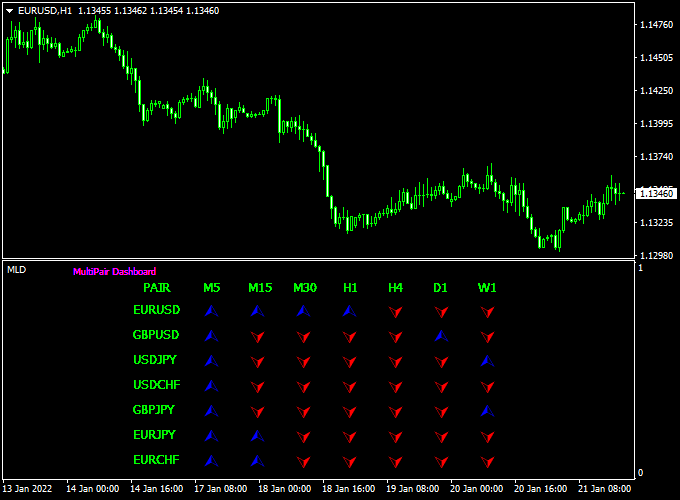
Guide to Trade with Multi Pair Signals Dashboard Indicator
Buy Rules
- Identify several consecutive time frames showing blue up arrows in the dashboard.
- Confirm bullish context on your primary chart using trend or price action tools.
- Wait for the lower time frame signal to align with higher time frames.
- Enter a buy trade when alignment occurs with trend confirmation.
Sell Rules
- Identify multiple time frames showing red down arrows.
- Confirm bearish context on your main chart.
- Wait for several frames to agree before executing.
- Enter a sell trade when signals align with the broader trend bias.
Stop Loss
- Place a stop loss below the most recent swing low for buys.
- Place a stop loss above the recent swing high for sells.
- Avoid overly tight stops that contradict time frame signals.
Take Profit
- Set the initial take profit at the next support or resistance level.
- Trail stops as signals remain aligned across frames.
- Exit when lower time frames flip against your trade direction.
Practical Tips
- Look for agreement across multiple time frames before acting.
- Avoid trading when signals are mixed or contradict each other.
- Pair the dashboard with trend or price action tools for added context.
- Keep sessions with major news events in mind, as signals may react faster.
Multi Pair Dashboard and ZWinner Trend Forex Strategy for MT4
The Multi Pair Dashboard and ZWinner Trend Forex Strategy for MT4 is a practical approach for traders who want to monitor multiple currency pairs and identify high-probability trades.
It combines the Multi Pair Signals Dashboard Indicator for MT4 with the ZWinner Trend Forex Indicator for MT4.
The dashboard shows buy and sell arrows across several time frames, while the ZWinner histogram confirms market momentum.
This strategy works well on M30, H1, and H4 charts and is suitable for intraday and swing traders who want clear, rule-based entries.
By focusing on multiple time frame alignment, traders can filter out weaker signals and follow the dominant trend.
The dashboard provides a quick overview of several pairs at once, while the ZWinner histogram adds momentum confirmation.
This combination increases the probability of successful trades while maintaining a simple and visual approach.
Buy Entry Rules
- Wait for at least three time frames on the Multi Pair Dashboard to display a blue UP arrow.
- Confirm that the ZWinner Trend histogram is green and rising.
- Enter a buy trade at the open of the next candle after both signals align.
- Set the stop loss 10–20 pips below the most recent swing low.
- Take profit when the histogram turns red or use a fixed target of 2 to 2.5 times the stop loss distance.
- A trailing stop based on ATR can also be used for larger moves.
Sell Entry Rules
- Wait for at least three time frames on the Multi Pair Dashboard to display a red DOWN arrow.
- Confirm that the ZWinner Trend histogram is red and falling.
- Enter a sell trade at the open of the next candle after both signals align.
- Place the stop loss 10–20 pips above the most recent swing high.
- Take profit when the histogram turns green or use a fixed target of 2 to 2.5 times the stop loss distance.
- A trailing stop can also be used to follow strong moves.
Advantages
- Multi-time frame confirmation improves accuracy and reduces false signals.
- Clear visual signals make it easy to follow and execute trades.
- Can monitor several currency pairs at the same time.
- Works for both intraday and swing trading styles.
- Combines trend direction and momentum for higher probability entries.
Drawbacks
- Fewer trades may occur because multiple confirmations are required.
- Signals may lag slightly in very fast-moving markets.
- Performance may decrease during sideways or low-volatility periods.
- Not suitable for ultra-short-term scalping below the M5 timeframe.
Case Study 1 – AUD/USD M30 Chart
On the AUD/USD M30 chart, the Multi Pair Dashboard showed blue UP arrows on the M30, H1, and H4 time frames.
The ZWinner Trend histogram turned green, confirming bullish momentum.
A buy trade was opened at 0.6730 with a stop loss at 0.6710.
The price moved steadily to 0.6780 over the next few hours, resulting in a gain of 50 pips.
This trade demonstrated how aligning multiple time frames can provide a clear entry and a smooth trend-following trade.
Case Study 2 – USD/CAD H4 Chart
On the USD/CAD H4 chart, the Multi Pair Dashboard showed red DOWN arrows on the H1, H4, and D1 time frames.
At the same time, the ZWinner Trend histogram turned red, confirming bearish momentum.
A sell trade was opened at 1.3450 with a stop loss at 1.3490.
Over the next day, the price fell to 1.3350, resulting in a gain of 100 pips.
This setup illustrated how following the dominant trend across multiple time frames can lead to profitable swing trades.
Strategy Tips
- Use this strategy on pairs with strong movement, such as EUR/USD, GBP/USD, AUD/USD, USD/CAD, and EUR/JPY.
- Confirm at least three time frames before entering a trade.
- Avoid taking trades during major news releases that may cause high volatility.
- Consider adding a 200 EMA filter for additional trend confirmation.
- Keep risk per trade small and consistent to preserve capital over time.
- Test the strategy on a demo account before using it live to understand the behavior of both indicators.
Download Now
Download the “Multi pair dashboard.ex4” indicator for Metatrader 4
FAQ
What do the arrows mean?
Blue up arrows indicate buy signals, while red down arrows indicate sell signals.
They reflect trend cues across specific time frames.
Which time frames are included?
The dashboard includes M5, M15, M30, H1, H4, D1, and W1.
This range helps you observe short to long-term trends at a glance.
Can I trade directly from the dashboard?
The dashboard itself gives signals but is best used with price action or other confirmation tools.
Do not rely solely on arrows for execution decisions.
Summary
The Multi Pair Signals Dashboard Indicator for MT4 provides a simple way to observe buy and sell signals across multiple time frames in one panel.
This helps you assess trend agreement without switching charts.
For buy trades, look for blue up arrows across several frames that align with your main chart’s trend.
For sell trades, look for red down arrows that indicate bearish alignment.
While the dashboard shows signals efficiently, pairing it with trend confirmation and risk management will improve reliability.
Used thoughtfully, it can help streamline your multi-time frame analysis and execution timing.





