
About the Forex Closing Bar Price Indicator
The Forex Closing Bar Price Indicator for MetaTrader 4 displays the exact closing price of the most recently completed candle directly on the main chart window.
Instead of checking the data window or zooming into candles, traders can instantly see where the price closed.
This indicator is particularly useful for trading approaches that depend on candle close confirmation.
Price action traders, breakout traders, and bar-close systems benefit from having the closing price visible at all times, helping reduce emotional entries and early executions.
All visual settings can be adjusted from the indicator inputs.
You can change the font size, color, and screen position, allowing the closing price to fit naturally into any chart layout without cluttering the view.
Free Download
Download the “Magnified CloseBarPrice.mq4” indicator for MT4
Key Features
- Shows the latest candle closing price directly on the MT4 chart
- Large readable text for fast decision-making
- Custom font size, color, and corner position
- Compatible with all currency pairs and timeframes
- Lightweight design with minimal platform load
Indicator Chart
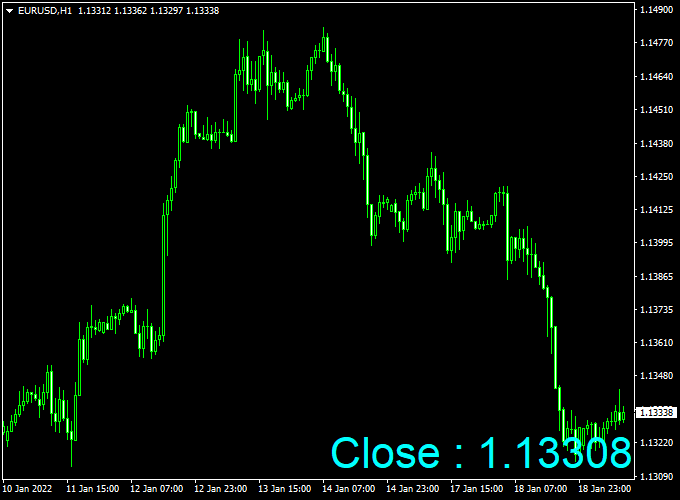
The chart below illustrates the Forex Closing Bar Price Indicator applied to an MT4 price chart.
The closing price is displayed in a chosen corner, reflecting the final value of the last completed candle.
This makes it easy to confirm candle closes when monitoring breakouts, pullbacks, or session-based price levels.

Guide to Trade with the Forex Closing Bar Price Indicator
Buy Rules
- Wait for a candle to close above a key resistance or trend level
- Confirm the closing price displayed matches the breakout level
- Open a buy trade
Sell Rules
- Wait for a candle to close below support or a bearish trend line
- Use the displayed closing price to confirm downside momentum
- Enter a sell trade
Stop Loss
- Place the stop loss a few pips beyond the candle that confirmed the entry
- For buy trades, set the stop below the low of the confirmation candle
- For sell trades, set the stop above the high of the confirmation candle
Take Profit
- Target the next higher timeframe support or resistance level
- Close part of the position at a 1:1 risk-to-reward ratio
- Let the remaining position run while the candle closes remain favorable
Practical Tips
- Avoid entering trades before the candle has closed and the price is confirmed
- Use higher timeframes for stronger close-based confirmations
- Keep the font size large enough to read without distracting from price action
MT4 Closing Bar and XTC Trend Forex Strategy
The MT4 Closing Bar and XTC Trend Forex Strategy is a straightforward and effective approach designed for traders who want clear, reliable signals without overcomplicated tools.
This method focuses on combining real closing price action with momentum confirmation to identify strong market moves.
The Forex Closing Bar Price Indicator displays the most recent closing price directly on the chart, making it easy to see whether the market has closed higher or lower than before.
The XTC Forex Trend Indicator supports this analysis by showing a blue histogram during bullish trends and a red histogram during bearish phases.
This strategy works best on the H1 and H4 timeframes.
It is suitable for both swing and intraday traders who prefer following the main market trend rather than anticipating short-term reversals.
The visual combination of price and color-based momentum gives clear trading signals even to less experienced traders.
Buy Entry Rules
- Wait for the Closing Bar Price Indicator to show a higher closing value than the previous bar.
- Check that the XTC Forex Trend Indicator histogram turns blue, confirming bullish momentum.
- Open a buy position at the next candle’s opening price.
- Set a stop loss 20 to 30 pips below the recent swing low.
- Take profit when the histogram starts to weaken or when a 1:2 risk-to-reward ratio is reached.
Sell Entry Rules
- Wait for the Closing Bar Price Indicator to show a lower close than the previous bar.
- Confirm that the XTC Forex Trend Indicator histogram turns red, showing bearish pressure.
- Open a sell position at the next candle’s opening price.
- Set a stop loss 20 to 30 pips above the latest swing high.
- Take profit when the histogram color fades or when a clear opposite close appears.
Advantages
- Easy to read and visually simple for all experience levels.
- Works on multiple currency pairs and timeframes.
- Reduces false signals by using closing prices as filters.
- Non-repainting signals improve entry consistency.
- Combines perfectly with manual trailing stop or partial close techniques.
Drawbacks
- May lose accuracy during sideways or flat market conditions.
- Can produce delayed entries when waiting for a confirmed close.
- False signals are possible during low volatility periods.
- Requires patience to wait for both confirmations before entry.
Case Study 1: EUR/USD H1
On the EUR/USD H1 chart, the Closing Bar Price Indicator showed a higher close at 1.0850 while the XTC Trend histogram switched to blue.
A buy trade was opened at 1.0852 with a 25-pip stop loss below the previous low.
The price rose steadily, reaching 1.0905 within six hours for a total of +53 pips.
As soon as the histogram weakened, the trade was closed, locking in a clean profit.
This setup showed how confirmation between closing price and trend strength can filter out market noise.
Case Study 2: GBP/JPY H4
On GBP/JPY, a lower closing bar appeared at 187.45 while the XTC histogram changed from blue to red, signaling a new bearish phase.
A sell trade was entered at 187.42 with a 35-pip stop loss.
Over the next few candles, the price dropped to 186.50, providing a +92 pip gain.
The histogram remained red throughout the move, showing strong selling pressure and confirming the accuracy of the setup.
Strategy Tips
- Focus on active pairs like EUR/USD, GBP/USD, and USD/JPY for smoother momentum.
- Only trade when both the closing bar and histogram agree in direction.
- Avoid trading just before major news events or economic releases.
- Use a higher timeframe trend to filter trades in the main market direction.
- Adjust stop loss and take profit levels according to volatility and session type.
Download Now
Download the “Magnified CloseBarPrice.mq4” indicator for Metatrader 4
FAQ
Is this indicator useful for scalping?
Yes. On lower timeframes, it helps scalpers confirm exact candle closes before entering fast trades.
Can the indicator display multiple candle closes?
No. It shows only the most recent completed candle, keeping the chart clean and focused.
Summary
The Forex Closing Bar Price Indicator for MT4 is a simple yet effective tool for traders who depend on candle close confirmation.
By displaying the closing price directly on the chart, it supports more disciplined and accurate trade decisions.
With flexible visual settings and compatibility across all timeframes, it fits easily into any trading approach.
For traders who want confirmation without distraction, this indicator adds real practical value.





