
About the Linear Regression Forex Channel Indicator
The Linear Regression Forex Channel Indicator for Metatrader 4 is an advanced 7-line trend channel that helps traders anticipate future price movements.
Plotting multiple channel boundaries around a central linear regression line provides clear zones for trend identification, trade entries, and exits.
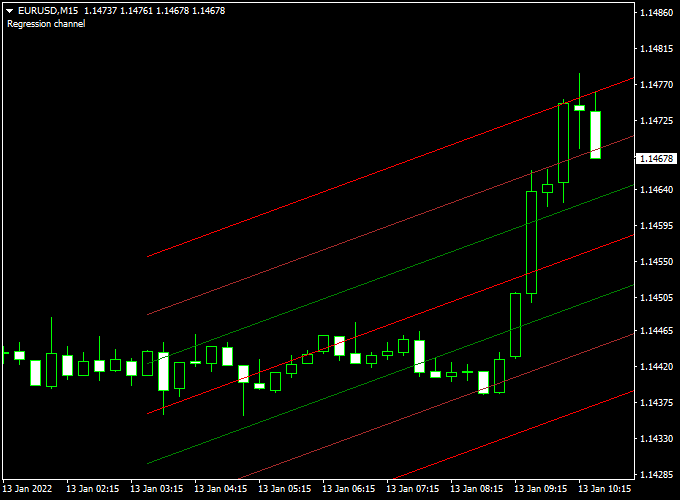
Displayed in the main MT4 chart window, the indicator consists of three upper channel lines, three lower channel lines, and a middle linear regression line.
The upper and lower lines create a structured price corridor, while the middle line highlights the average market direction.
This setup allows traders to assess trend strength, pullback opportunities, and potential reversal zones.
It is ideal for traders who want a visual, channel-based tool to enhance trend-following strategies and manage entries with precision.
Free Download
Download the “linear regression channel.ex4” indicator for MT4
Key Features
- Seven-line linear regression channel for trend analysis
- Three upper and three lower lines highlight extremes
- The central regression line shows the average market direction
- Suitable for entry, exit, and trend filtering
Indicator Chart
The chart example shows the Linear Regression Forex Channel applied to an MT4 price chart.
The seven lines form a structured corridor that visualizes trend direction and pullback zones.
Price reactions at the outer lines often indicate entry opportunities or trend exhaustion.

Guide to Trade with Linear Regression Forex Channel
Buy Rules
- Ensure the Linear Regression channel is sloping upward
- Wait for the price to pull back and touch the lower red channel line from above
- Enter a buy trade once price confirms bullish rejection at the lower line
Sell Rules
- Ensure the Linear Regression channel is sloping downward
- Wait for the price to move toward the upper red channel line from below
- Enter a sell trade once price shows bearish rejection at the upper line
Stop Loss
- For buy trades, place a stop loss slightly below the lowest lower channel line
- For sell trades, place a stop loss slightly above the highest upper channel line
- Adjust stops based on market volatility and market conditions
Take Profit
- Primary target at the opposite channel line
- Consider partial exits at the middle regression line for conservative trades
- Extend targets if the trend slope is strong and persistent
Practical Tips
- Use higher timeframe trends to filter lower timeframe entries
- Avoid trading when the channel flattens or narrows significantly
- Combine with momentum or support/resistance tools for stronger setups
- Monitor price behavior near the outer channel lines for early reversal signals
MT4 Scalping Strategy Using Linear Regression Forex Channel and Best Forex Scalping Indicator
This MT4 scalping strategy combines the trend-following capabilities of the Linear Regression Forex Channel Indicator with the momentum-confirming signals of the Best Forex Scalping Indicator.
It’s designed for traders aiming to capture short-term price movements on volatile currency pairs.
The strategy works best on the 1-minute to 5-minute timeframes, making it ideal for scalpers seeking quick entries and exits.
By using these two indicators together, traders can identify the prevailing trend and confirm entry points with momentum, enhancing the probability of successful trades.
Buy Entry Rules
- Ensure the Linear Regression Forex Channel Indicator displays an upward-sloping channel, indicating a bullish trend.
- Wait for the Best Forex Scalping Indicator to show a blue arrow, signaling a buy opportunity.
- Enter a buy trade at the market price once both conditions are met.
- Set a stop loss just below the recent swing low or the lower boundary of the channel.
- Set a take profit at the upper boundary of the channel or a predetermined number of pips, depending on market conditions.
Sell Entry Rules
- Ensure the Linear Regression Forex Channel Indicator displays a downward-sloping channel, indicating a bearish trend.
- Wait for the Best Forex Scalping Indicator to show a red arrow, signaling a sell opportunity.
- Enter a sell trade at the market price once both conditions are met.
- Set a stop loss just above the recent swing high or the upper boundary of the channel.
- Set a take profit at the lower boundary of the channel or a predetermined number of pips, depending on market conditions.
Advantages
- Combines trend direction with momentum confirmation for higher accuracy.
- Works effectively in volatile markets where small price movements can be exploited.
- Suitable for various currency pairs, including EUR/USD, GBP/USD, and USD/JPY.
Drawbacks
- Requires a stable internet connection as scalping demands fast execution.
- Performance may vary depending on broker spreads and execution speed.
- Not ideal for illiquid currency pairs that can produce erratic signals.
Case Study 1: AUD/JPY on 1-Minute Chart
On the AUD/JPY 1-minute chart, the Linear Regression Forex Channel Indicator displayed an upward-sloping channel, indicating a bullish trend.
Shortly after, the Best Forex Scalping Indicator produced a blue arrow, signaling a buy opportunity.
The trade was entered at 89.50, with a stop loss at 89.45 and a take profit of 89.60.
The trade closed successfully with a 10-pip gain within 5 minutes.
Case Study 2: NZD/USD on 5-Minute Chart
On the NZD/USD 5-minute chart, the Linear Regression Forex Channel Indicator showed a downward-sloping channel, indicating a bearish trend.
A red arrow appeared on the Best Forex Scalping Indicator, signaling a sell entry.
The trade was entered at 0.6500, with a stop loss at 0.6510 and a take profit of 0.6485.
The trade reached the take profit target, netting 15 pips in 10 minutes.
Strategy Tips
- Always wait for confirmation from both indicators before entering a trade.
- Use the channel boundaries to set stop loss and take profit levels accurately.
- Monitor market news as high-impact events can cause unexpected price spikes, invalidating scalping signals.
- Adjust take profit levels based on currency pair volatility; some pairs may require tighter targets to maximize success.
Download Now
Download the “linear regression channel.ex4” indicator for Metatrader 4
FAQ
How does this differ from a standard 3-line regression channel?
The Linear Regression Forex Channel uses seven lines instead of three, providing additional upper and lower levels for better visualization of price extremes and pullback zones.
Which timeframes work best for this indicator?
It can be used on all timeframes, but H1 and H4 charts often provide clearer trend structure for swing trading and trend-following strategies.
Can it be used for scalping?
Yes, on lower timeframes, it can guide short-term entries when combined with higher timeframe trend confirmation and momentum indicators.
Summary
The Linear Regression Forex Channel Indicator for MT4 offers a detailed, 7-line view of trend direction, pullbacks, and potential entry zones.
Its structure helps traders manage trades with greater precision and confidence.
The indicator is flexible across timeframes and currency pairs and can be combined with momentum or trend confirmation tools for improved trade quality.
Observing how price interacts with the channel lines allows traders to spot high-probability entry points, fine-tune stop loss and take profit levels, and trade with consistent discipline within the trend.





