
About the Limited Donchian Channel Forex Indicator
Limited Donchian Channel is a free MT4 (Metatrader 4) indicator that can be used for trade entries and exits or as an additional trend filter that works together with an existing strategy or system.
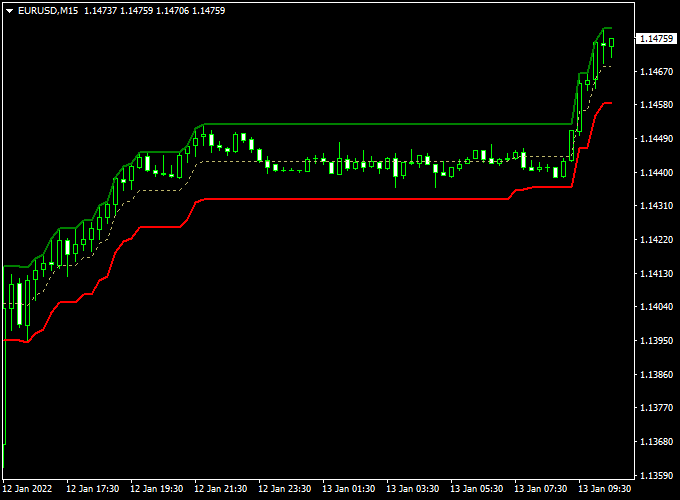
The indicator appears in the main MT4 chart window as three colored lines that form a channel.
The green and dotted green lines represent directional boundaries, while the red line highlights key price interaction zones.
Together, these lines help traders visualize whether the market is trending, pulling back, or preparing for a continuation move.
Limited Donchian Channel can be used as a standalone entry tool or as an added trend filter within an existing strategy.
It adapts well to different timeframes and is especially useful for traders who prefer channel-based trading with clear directional bias.
Free Download
Download the “Limiteddonchianchanel.mq4” indicator for MT4
Key Features
- Displays a focused Donchian-style price channel
- Uses three colored lines for directional clarity
- Helps identify trend direction and pullback zones
- Suitable for entries, exits, and trend filtering
- Clean display in the main chart window
Indicator Chart
The chart example shows the Limited Donchian Channel applied to an MT4 price chart.
The green, red, and dotted green lines form a price channel that highlights recent highs and lows.
Price reactions near the channel boundaries often point to potential trading opportunities.
Guide to Trade with the Limited Donchian Channel
Buy Rules
- Wait for the Limited Donchian Channel to slope upwards
- Watch for the price to retrace toward the lower red channel line
- Enter a buy trade when the price reaches the lower red line and shows bullish intent
Sell Rules
- Wait for the Limited Donchian Channel to slope downwards
- Watch for the price to move toward the upper red channel line
- Enter a sell trade when the price reaches the upper red line and shows bearish intent
Stop Loss
- Place a stop loss slightly outside the channel boundary opposite your entry
- For buy trades, place a stop below the lower channel area
- For sell trades, place a stop above the upper channel area
Take Profit
- Target the opposite side of the channel for conservative exits
- Let profits run if the channel maintains a strong slope
- Adjust the take profit based on nearby support or resistance
Practical Tips
- The indicator works best during the London and American trading sessions
- Use a higher timeframe direction to filter lower timeframe entries
- Avoid trading when the channel is flat or compressed
- Combine with momentum confirmation for stronger setups
Limited Donchian Channel + EW Trend MT4 Scalping Strategy
This MT4 scalping strategy combines the Limited Donchian Channel Forex Indicator and the EW Trend Indicator for Scalping.
The Limited Donchian Channel identifies the short-term market trend by the slope of the channel.
An upward-sloping channel indicates bullish momentum while a downward slope signals a bearish trend.
The EW Trend Indicator provides precise entry signals using its histogram.
A reading above zero indicates a buy opportunity, and below zero signals a sell.
This strategy is suitable for M5 and M15 charts for scalping quick intraday profits.
By combining trend direction with precise entry timing, traders can avoid false moves and enter positions when momentum is in their favor.
The strategy is ideal for highly liquid currency pairs where price reacts sharply to short-term swings, such as EUR/USD, GBP/JPY, and AUD/USD.
Buy Entry Rules
- The Limited Donchian Channel is sloping upwards, confirming a bullish trend.
- The EW Trend histogram is above zero, signaling a buy entry.
- Enter a buy trade at the open of the next candle after confirmation.
- Place a stop loss below the lower band of the Donchian channel or the recent swing low.
- Take profit at 5–12 pips or exit when the histogram turns below zero.
Sell Entry Rules
- The Limited Donchian Channel is sloping downwards, indicating a bearish trend.
- The EW Trend histogram is below zero, confirming a sell opportunity.
- Enter a sell trade at the next candle open after signal confirmation.
- Set a stop loss above the upper band of the Donchian channel or the most recent swing high.
- Take profit at 5–12 pips or exit when the histogram rises above zero.
Advantages
- Combines trend direction and precise entry signals for higher accuracy.
- Works well for quick intraday trades on volatile pairs.
- Simple setup suitable for beginners and experienced scalpers.
- Defined stop loss and take profit levels improve risk management.
Drawbacks
- False breakouts can occur during sideways markets.
- Requires active monitoring due to its short-term scalping nature.
- Stop losses can be hit frequently if the market oscillates near the channel bands.
- Performance may vary between currency pairs with different volatility profiles.
Case Study 1 – EUR/USD M5 Chart
EUR/USD showed an upward-sloping Donchian Channel during the London session.
The EW Trend histogram moved above zero at 1.0925.
A buy trade was executed at 1.0926 with a stop loss at 1.0918 and a take profit at 1.0931.
Within 15 minutes, the trade reached the target for a 5-pip gain before the histogram showed signs of weakening.
Case Study 2 – GBP/JPY M15 Chart
During the Tokyo session, GBP/JPY had a downward-sloping Donchian Channel.
The EW Trend histogram dropped below zero at 192.45.
A sell trade was entered at 192.42 with a stop loss at 192.75 and a take profit at 192.30.
The pair fell steadily, reaching the target within 20 minutes for a 12-pip profit before the histogram began to rise.
Strategy Tips
- Focus on pairs with high liquidity and strong intraday movements.
- Trade during the London and New York sessions for optimal volatility.
- Use M5 for more frequent entries and M15 for higher probability trades.
- Exit trades promptly when histogram signals change to prevent reversals from eroding profits.
- Keep risk per trade small due to the short-term scalping nature of this strategy.
This MT4 scalping strategy provides a clear and structured approach to capturing small intraday moves.
By aligning trend direction from the Limited Donchian Channel with precise histogram signals from the EW Trend Indicator, traders can maximize opportunities while managing risk effectively.
Download Now
Download the “Limiteddonchianchanel.mq4” indicator for Metatrader 4
FAQ
What makes this Donchian Channel different from a standard one?
The Limited Donchian Channel focuses on a more refined price range, which keeps the chart cleaner and highlights actionable pullbacks rather than wide extremes.
Which timeframes are most effective?
The indicator works on all timeframes, but M15 to H1 are popular for scalping and intraday trading, especially during active sessions.
Can this indicator be used as a trend filter only?
Yes. Many traders use the channel slope alone to define bullish or bearish conditions and apply separate entry tools for precise timing.
Summary
The Limited Donchian Channel Forex Indicator for MT4 provides a clear and practical way to trade price channels, pullbacks, and trend continuation moves.
Its three-line channel helps traders stay aligned with market direction while identifying favorable entry zones.
The indicator is flexible, easy to read, and effective across multiple trading styles.
It performs particularly well during high-liquidity sessions and can be used for both scalping and swing trading.
When combined with complementary tools such as momentum or trend confirmation indicators, the Limited Donchian Channel becomes a strong addition to any structured trading approach.





