About the JJN Active Trading Hours Indicator
The JJN Active Trading Hours Indicator for MT4 is designed to help traders identify the most active periods in the forex market.
Clearly marking the start and end of high-volume trading hours makes it easier to plan entries, exits, and manage trades during periods of stronger price movement.
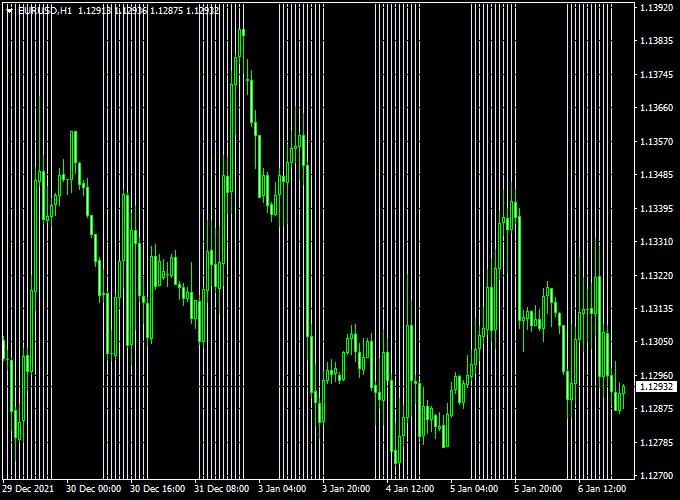
The indicator displays white vertical lines on the main MT4 chart.
The first line represents the start of active trading hours, and the last line marks the end.
This visual representation allows traders to quickly see when the market is most likely to have higher volatility and liquidity, improving decision-making for intraday and scalping strategies.
Free Download
Download the “JJN-ActiveHours.mq4” indicator for MT4
Key Features
- Displays active trading hours on the chart using white vertical lines
- First line marks the start, last line marks the end of active sessions
- Works on all currency pairs and timeframes
- Useful for intraday and scalping strategies
Indicator Chart
The chart shows the JJN Active Trading Hours Indicator applied to an MT4 price chart.
White vertical lines indicate the beginning and end of the active trading period.
Traders can use this information to align their trades with market sessions that have higher liquidity and movement.

Guide to Trade with the JJN Active Trading Hours Indicator
Buy Rules
- Plan buy trades during active trading hours indicated by the white lines
- Confirm entries with trend direction, support levels, or breakout indicators
- Focus on currency pairs most active during these hours
Sell Rules
- Plan sell trades during active trading hours
- Confirm entries with trend direction, resistance levels, or price action signals
- Prioritize trades during periods of higher liquidity
Stop Loss
- Set stops based on nearby swing highs for sell trades
- Set stops below recent swing lows for buy trades
Take Profit
- Target levels reached during the active trading period
- Exit trades when the market slows down or opposite signals appear
- Consider partial exits at key support or resistance levels
Practical Tips
- Use the indicator to focus trading during the most active market hours
- Combine with trend, breakout, or price action indicators for higher accuracy
- Avoid trading outside active hours to reduce false signals
- Focus on liquid currency pairs for more reliable moves
JJN Active Trading Hours + Renko Boxes MT4 Intraday Strategy
The JJN Active Trading Hours Indicator for MT4 and the Renko Boxes Forex Indicator for MT4 create a simple and reliable intraday strategy that focuses on precision timing and clean trade setups.
The Active Trading Hours indicator draws white vertical lines to highlight periods of high market activity, while the Renko Boxes indicator plots blue lines for buy signals and red lines for sell signals.
Together, they help traders capture intraday price swings during the most volatile trading sessions.
This method works best on the M5 and M15 timeframes and suits day traders who prefer structured entries based on both market timing and price action confirmation.
It allows traders to take advantage of the London and New York sessions, where momentum is strong and moves develop quickly.
Buy Entry Rules
- Wait for a white vertical line from the Active Trading Hours indicator to appear, signaling the start of an active session.
- Check that the Renko Boxes indicator has printed a blue line, indicating a bullish move.
- Confirm that the price closes above the previous blue line, showing momentum continuation.
- Enter a buy position on the next candle close.
- Set the stop loss a few pips below the nearest Renko low (10–20 pips depending on the pair).
- Take profit after 20–40 pips, or when a red Renko line appears.
Sell Entry Rules
- Wait for a white vertical line, indicating that active market hours have begun.
- Ensure that the Renko Boxes indicator shows a red line, confirming a bearish move.
- Enter a sell position once the price closes below the last red line for confirmation.
- Place a stop loss just above the previous Renko high (10–20 pips).
- Set a take profit between 20–40 pips, or close the trade when a blue Renko line appears.
Advantages
- Filters trades to high-volume hours for better price movement.
- Uses clear visual signals for straightforward decision-making.
- Reduces the chance of entering trades during quiet market periods.
- Works well on major pairs like EUR/USD, GBP/USD, and USD/JPY.
- Provides consistent intraday opportunities every trading session.
Drawbacks
- Signals can lag slightly during fast reversals.
- Low volatility sessions may produce false or weak moves.
- Requires constant monitoring during the trading window.
- Not suitable for swing or long-term trading.
Example Case Study 1
On EUR/USD M15 during the London open, a white vertical line appeared at 08:00 GMT, showing active trading hours.
The Renko Boxes indicator plotted a blue line shortly after.
A buy trade was opened at 1.0860 with a stop loss at 1.0842 and a take profit at 1.0898.
The trade reached the target in less than two hours, producing a gain of +38 pips as volume increased during the session.
Example Case Study 2
During the New York session on GBP/USD M5, the Active Trading Hours indicator marked the 13:00 GMT window.
The Renko Boxes indicator showed a red line, confirming bearish sentiment.
A sell entry at 1.2635 with a stop loss at 1.2655 and take profit at 1.2600 yielded +35 pips as the price dropped sharply within the first hour of trading activity.
Strategy Tips
- Trade only during the periods marked by the white vertical lines.
- Confirm direction with at least one additional Renko signal before entering.
- Use smaller Renko box sizes for more signals or larger ones for cleaner setups.
- Avoid trading near major news releases when volatility is unpredictable.
- Lock in profits early if the Renko signal changes color mid-session.
- Practice this setup on a demo account before applying it live.
Download Now
Download the “JJN-ActiveHours.mq4” indicator for Metatrader 4
FAQ
Can I use the indicator on all currency pairs?
Yes. It works on major, minor, and exotic pairs across all MT4 timeframes.
Does it repaint or adjust after the session ends?
No. The white vertical lines remain fixed, marking the start and end of active trading hours accurately.
Can I trade only based on active trading hours?
Active hours indicate when volatility is higher, but it is best to combine with trend or entry signals for more reliable trades.
Summary
The JJN Active Trading Hours Indicator for MT4 highlights the start and end of the most active market sessions with clear white vertical lines.
This allows traders to plan trades during periods of higher volatility and liquidity.
Using this indicator together with trend analysis or breakout tools can improve trade accuracy.
Overall, the JJN Active Trading Hours Indicator is a simple, practical, and reliable tool that helps traders focus on high-probability trading periods without cluttering the chart.





