
About the 4 Moving Averages Indicator
The 4 Moving Averages indicator for MT4 is a momentum-based tool that consolidates the data from four distinct moving averages into a single histogram window.
Its essential function is to provide a consensus on trend direction by analyzing the alignment of multiple periods simultaneously.
When the averages align to the upside, green bars appear above the zero level; when they align to the downside, purple bars form below.
This indicator is vital for filtering out market noise, as it only triggers a signal when a broad momentum shift occurs across various timeframes.
Free Download
Download the “4-ma-strength-indicator.mq4” MT4 indicator
Key Features
- The indicator uses four customizable moving average periods to determine trend strength.
- It features a color-coded histogram that separates bullish, bearish, and neutral market states.
- The zero-line crossover system provides definitive entry and exit triggers.
- A blank space in the histogram identifies flat or range-bound markets to avoid bad trades.
Indicator Chart
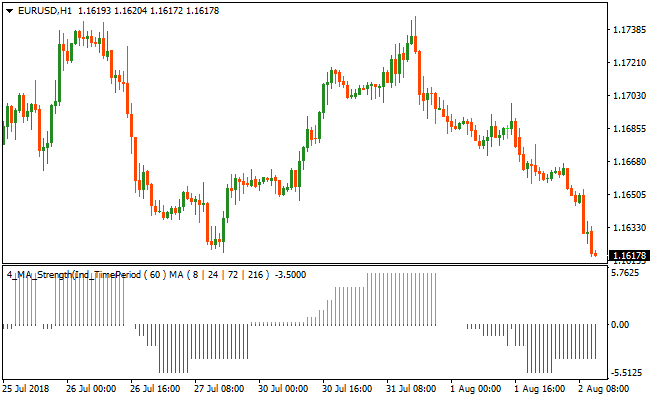
The chart displays the 4 Moving Averages indicator in a separate window below the price action.
You can see the first green bar appearing to signal a fresh bullish trend, while the transition to purple bars highlights a clear move into bearish territory.
Guide to Trade with 4 Moving Averages Indicator
Buy Rules
- Monitor the indicator window for the appearance of the first green histogram bar.
- Ensure the green bar is forming above the zero level to confirm bullish momentum.
- Open a buy trade at the close of the candle where the green signal first appears.
Sell Rules
- Monitor the indicator window for the appearance of the first purple histogram bar.
- Ensure the purple bar is forming below the zero level to confirm bearish momentum.
- Open a sell trade at the close of the candle where the purple signal first appears.
Stop Loss
- For buy trades, place the stop loss below the most recent local support or swing low.
- For sell trades, place the stop loss above the most recent local resistance or swing high.
- Ensure the stop loss is adjusted according to the current volatility of the pair.
Take Profit
- Close the trade when the indicator displays an opposite color bar.
- Exit the position if a blank space appears, indicating a move into a flat market.
- Use a fixed risk-to-reward ratio of at least one to two for consistent growth.
4 Moving Averages Buy/Sell Signals and Zone Trade MT4 Scalping Strategy
This MT4 scalping strategy combines the trend momentum shown by the 4 Moving Averages Buy/Sell Signals Metatrader 4 Forex Indicator with fast entry signals from the Zone Trade Forex Scalper Indicator MT4.
The 4 Moving Averages indicator uses green bars above zero to indicate bullish momentum and purple bars below zero to indicate bearish momentum.
The Zone Trade indicator gives buy and sell signals visually by coloring the candle green for buy and red for sell.
This strategy focuses on quick scalping trades where trend direction and timely entries align.
It works best on M1 and M5 charts where small price advances can be captured repeatedly during active market sessions.
The rule set is crafted to improve your chances by entering when both momentum and entry signals agree, helping to avoid random noise on short timeframes.
Buy Entry Rules
- The 4 Moving Averages Buy/Sell Signals indicator must show green bars above zero, indicating bullish momentum.
- The Zone Trade Forex Scalper indicator must display a green candle, signaling a buy entry opportunity.
- Enter a buy trade at the close of the candle where the green scalper candle appears while the momentum bars remain green.
- Place the stop loss a few pips below the recent swing low or just below the low of the entry candle on M1 and M5 charts.
- Exit the trade when the 4 Moving Averages bars turn purple or when the next red Zone Trade candle appears.
Sell Entry Rules
- The 4 Moving Averages Buy/Sell Signals indicator must show purple bars below zero, indicating bearish momentum.
- The Zone Trade Forex Scalper indicator must display a red candle, signaling a sell entry opportunity.
- Enter a sell trade at the close of the candle where the red scalper candle appears while the momentum bars remain purple.
- Place the stop loss a few pips above the recent swing high or just above the high of the entry candle on M1 and M5 charts.
- Exit the trade when the 4 Moving Averages bars turn green or when the next green Zone Trade candle appears.
Advantages
- Combines trend momentum with clear scalper entry signals to reduce random entries.
- Visual trade entries help you spot opportunities quickly on fast timeframes.
- Works on M1 and M5 charts for scalping in active markets.
- Simple rules make it easy to learn and follow consistently.
- Helps you capture small intra‑session moves with clear exits.
Drawbacks
- Momentum color changes may lag slightly when the market reverses sharply.
- Requires discipline to exit when signals reverse rather than holding too long.
- Spread costs can impact net profitability on very small pip moves, especially on M1.
Case Study 1 – NZDUSD M1
On NZDUSD using the M1 timeframe during the London session activity, the 4 Moving Averages indicator displayed green bars above zero, signaling bullish momentum.
The Zone Trade indicator then showed a green candle.
A buy trade was entered at the close of the signal candle with the stop loss placed a few pips below the entry candle’s low.
Price moved higher for the next several bars while green momentum bars remained above zero.
The trade was closed when the 4 Moving Averages bars turned purple, capturing 9 pips on this quick scalp with trend and entry alignment.
Case Study 2 – USDCAD M5
On USDCAD in an M5 timeframe, the 4 Moving Averages indicator turned purple below zero, indicating bearish momentum.
Shortly thereafter, the Zone Trade indicator displayed a red candle.
A sell trade was taken on the close of the red candle with the stop loss placed just above the entry candle high.
Price continued lower over the next few bars as momentum remained bearish.
The trade was exited when a green Zone Trade candle appeared, capturing 17 pips as the market shifted direction on this active session move.
Strategy Tips
- Focus on active trading sessions such as London and New York for stronger momentum and cleaner scalping signals.
- Avoid taking trades when the momentum bars are flat or oscillating around zero; this often indicates weak conditions.
- Use tight stop losses appropriate for M1 and M5 charts but allow enough room for normal price movement to avoid being stopped prematurely.
- Monitor spread costs on your chosen pair; lower spread pairs will often yield better scalping results on tight setups.
Download Now
Download the “4-ma-strength-indicator.mq4” Metatrader 4 indicator
FAQ
How does this indicator handle sideways or ranging markets?
The indicator is designed to show a blank space when the four moving averages are not in alignment.
This serves as a neutral signal, warning traders to stay out of the market until a clear trend resumes.
Can I customize the moving average periods for specific pairs?
Yes, all four periods are fully adjustable in the settings.
You can use shorter periods for aggressive scalping or longer periods to capture major swing trading trends on daily charts.
What is the benefit of using four averages instead of just two?
Using four averages requires a higher level of price confirmation.
This reduces the frequency of “whipsaws” or false signals that often occur with standard two-average crossover systems.
Summary
The 4 Moving Averages indicator is an excellent choice for traders seeking a clear and objective way to follow the trend.
Its primary benefit is the visual simplicity of the histogram, which removes the need to track multiple lines on the main chart.
By identifying bullish, bearish, and neutral phases, it helps traders stay disciplined and avoid high-risk ranging conditions.





