
About the Dynamic Gains Indicator
The Dynamic Gains Indicator for MT4 is a trend-following tool that provides traders with visual buy and sell signals directly on the main chart.
It is designed to simplify trend identification and help traders react quickly to market direction changes.
The indicator plots colored arrows for trade signals: light-blue arrows indicate a potential buy, while yellow arrows suggest a possible sell.
By clearly marking opportunities, Dynamic Gains allows traders to focus on high-probability setups without analyzing raw price movement.
Dynamic Gains is versatile and can be applied in different ways.
It works as a primary entry system, a confirmation tool alongside other indicators, or a guide for exit decisions.
Its design makes it suitable for all currency pairs, including majors, minors, and exotic pairs.
Free Download
Download the “DYNAMIC GAINS 1.mq4” indicator for MT4
Key Features
- Colored buy and sell signal arrows directly on the MT4 chart
- Trend-following signals for timely trade entries
- Works on all currency pairs and timeframes
- Flexible usage for entries, exits, or confirmations
- Clear trading signals reduce analysis time
- Helps identify trend direction and momentum
Indicator Chart
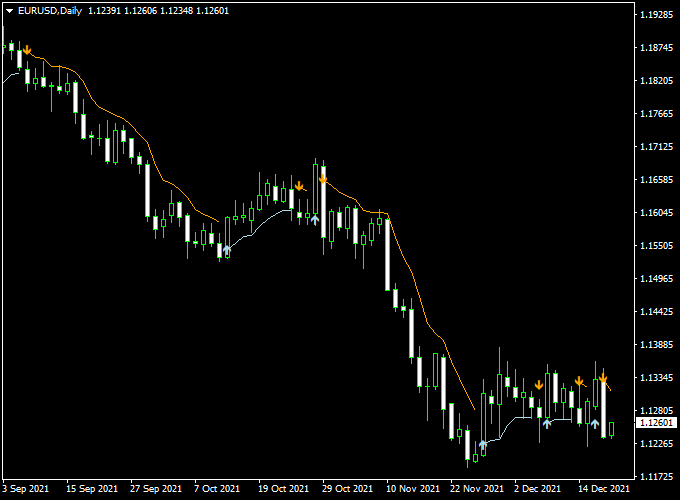
The chart below shows the Dynamic Gains Indicator in action. Colored arrows mark potential buy and sell opportunities in real time.
Light-blue arrows indicate bullish setups, suggesting traders consider a buy position.
Yellow arrows indicate bearish setups, suggesting traders consider selling.
These signals can be combined with trend or support/resistance analysis for better trade timing.
Guide to Trade with Dynamic Gains Indicator
Buy Rules
- Enter a buy trade when a light-blue signal arrow appears
- Confirm price is above key support or trend alignment
- Enter trade after the candle closes confirming the signal
- Consider using higher timeframe trends for additional confirmation
Sell Rules
- Enter a sell trade when a yellow signal arrow appears
- Confirm price is below key resistance or trend alignment
- Enter the trade after the candle closes confirming the signal
- Use a higher timeframe context to avoid counter-trend trades
Stop Loss
- Place stop loss below the nearest swing low for buys and above the nearest swing high for sells
- Adjust based on market volatility
- Ensure stops are wide enough to prevent being stopped out by normal fluctuations
Take Profit
- Target the next major swing high or low based on recent price action
- Consider partial exits as price approaches strong levels
- Trail stop to follow the price if the trend continues in your favor
Practical Tips
- Use higher timeframe analysis to filter signals
- Avoid trading immediately after low-volume sessions
- Combine with support/resistance or trend indicators for added confidence
- Wait for candle close confirmation before entering trades
Dynamic Gains Indicator + XTC Trend MT4 Strategy
This MT4 strategy combines the Dynamic Gains Forex Indicator with the XTC Forex Trend Indicator.
The Dynamic Gains indicator identifies trend-following opportunities with clear buy and sell signals, while the XTC Trend Indicator confirms the market direction and trend strength.
Together, they create a reliable system for capturing strong price moves.
This strategy works best on 15-minute, 30-minute, and 1-hour charts for intraday trading, but can also be used on 4-hour charts for swing trades.
It is suitable for traders who prefer visual signals and want a system that minimizes false entries in trending markets.
Buy Entry Rules
- The XTC Trend Indicator must show a bullish blue trend arrow.
- The Dynamic Gains Forex Indicator must display blue histogram bars.
- Enter a long position at the close of the candle, confirming both indicators.
- Stop loss should be placed below the most recent swing low or a fixed distance below entry, such as 20 pips on shorter timeframes.
- Take profit should target the next resistance level or use a fixed risk-to-reward ratio of 1:2 or higher.
Sell Entry Rules
- The XTC Trend Indicator must paint a bearish orange trend arrow.
- The Dynamic Gains Forex Indicator must display red bearish histogram bars.
- Enter a short position at the close of the candle confirming both indicators.
- Stop loss should be placed above the most recent swing high or a fixed distance above entry, such as 20 pips on shorter timeframes.
- Take profit should target the next support level or use a fixed risk-to-reward ratio of 1:2 or higher.
Advantages
- Combines trend direction with precise buy and sell signals for stronger entries.
- Adaptable to multiple timeframes and currency pairs.
- Reduces false entries by confirming signals across two indicators.
Drawbacks
- May lag slightly in very sharp market reversals, causing delayed entries.
- Less effective in sideways or choppy markets.
Case Study 1 — EUR/USD 15m
On a 15-minute EUR/USD chart, the Dynamic Gains indicator showed a bullish arrow at 1.1050. The XTC Trend indicator was blue, confirming an uptrend.
A long trade was entered at 1.1052. Stop loss was set at 1.1035, 17 pips below the entry.
The trade reached a take-profit target at 1.1082, 30 pips above entry.
The trade achieved a 1.76 risk-to-reward ratio in under one hour.
Case Study 2 — GBP/JPY 30m
On a 30-minute GBP/JPY chart, the XTC Trend Indicator signaled a bearish trend. The Dynamic Gains indicator produced an orange sell signal at 153.50.
A short position was entered at 153.48. Stop loss was set at 153.65, 17 pips above entry, and the take profit was placed at 153.10, 38 pips below entry.
The trade successfully captured the move with a 2.2 risk-to-reward ratio over two hours.
Strategy Tips
- Adjust stop loss and take profit levels according to the volatility of the pair.
- Use proper position sizing to risk no more than 1–2% of trading capital per trade.
- Consider trailing stops after partial profit targets to maximize gains.
- Backtest the strategy on multiple pairs and timeframes to ensure consistency.
By combining the Dynamic Gains Forex Indicator with the XTC Forex Trend Indicator, traders gain a robust MT4 system with clear entries, exits, and risk management.
The combination allows disciplined, trend-following trading while reducing false signals.
Download Now
Download the “DYNAMIC GAINS 1.mq4” indicator for Metatrader 4
FAQ
How do the signal arrows work?
The Dynamic Gains Indicator generates colored arrows based on trend momentum and market direction.
Light-blue arrows suggest potential buying opportunities, while yellow arrows indicate possible selling pressure.
Can this indicator be used on lower timeframes?
Yes, it can be applied on lower timeframes, but signals may be more frequent and less reliable.
Higher timeframes generally provide stronger trend confirmation.
Which currency pairs are best for Dynamic Gains?
The indicator is suitable for all currency pairs, including majors, minors, and exotics.
It performs best when applied to pairs with good liquidity and clear trending behavior.
Does Dynamic Gains work with other indicators?
Yes, it can be combined with moving averages, support/resistance tools, or oscillators to enhance trade analysis and provide additional confidence for entry decisions.
Summary
The Dynamic Gains Indicator for MT4 provides simple and effective trend signals using colored arrows.
It helps traders identify bullish and bearish setups without complex analysis, making it suitable for both new and experienced traders.
Its flexibility across currency pairs and timeframes allows traders to use it for entries, exits, or as a confirmation tool.
When applied with disciplined risk management, Dynamic Gains can enhance trading decisions and support more consistent results.





