About the DSL MACD Oscillator
The DSL MACD Oscillator is an advanced version of the traditional MACD indicator, designed for MetaTrader 4.
It introduces a dual-signal line approach, replacing the standard single signal line with two, allowing for more nuanced trend analysis and potentially reducing false signals.
This enhancement makes it particularly useful for identifying trend reversals and confirming trade entries and exits with greater accuracy.
Free Download
Download the “dsl-macd-oscillator.mq4” indicator for MT4
Key Features
- Dual-signal line design for improved trend analysis.
- Enhanced visualization of market momentum and potential reversal points.
- Customizable parameters to suit different trading strategies.
Indicator Chart (EUR/USD H1)
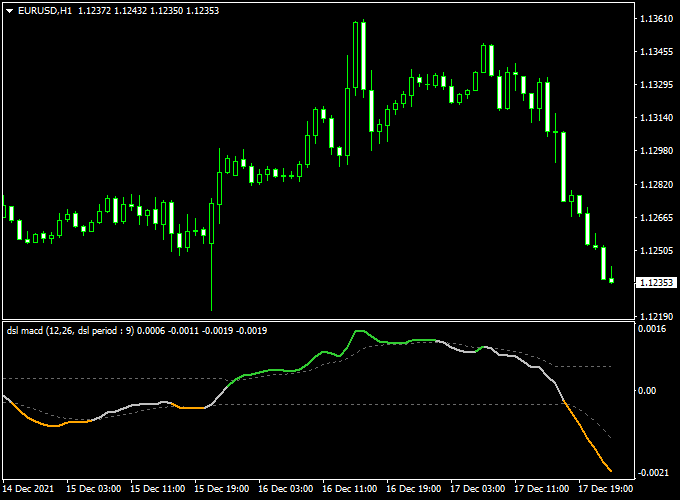
The DSL MACD Oscillator is displayed in a separate window below the main chart, featuring two lines: the MACD line and the signal line.
The histogram represents the difference between these lines, providing a visual representation of market momentum.
Crossovers between the MACD and signal lines can indicate potential buy or sell signals.
Buy and Sell Trading Rules
Buy Rules
- Open a buy trade when the green signal line appears on the chart.
- Set a stop loss below the recent swing low to manage risk.
- Take profit at the next resistance level or according to a predefined risk-reward ratio.
Sell Rules
- Open a sell trade when the orange signal line appears on the chart.
- Place a stop loss above the recent swing high to limit potential losses.
- Take profit at the next support level or based on your risk-reward strategy.
Scalping Strategy Using DSL MACD Oscillator and Hourly Pivot Points for MT4
This scalping strategy leverages the DSL MACD Oscillator and Hourly Pivot Points indicators to identify high-probability trade setups on lower timeframes, such as the 1-minute (M1) and 5-minute (M5) charts.
It is designed for traders seeking quick, actionable signals with clear entry and exit points.
Buy Entry Rules
- The DSL MACD Oscillator line crosses above the zero line, indicating bullish momentum.
- The price is above the Hourly Pivot Point, confirming an uptrend.
- Enter a buy position at the close of the candle that meets these conditions.
- Set your stop loss just below the Hourly Pivot Point.
- To take profit, aim for at least 20 pips or more.
Sell Entry Rules
- The DSL MACD Oscillator line crosses below the zero line, indicating bearish momentum.
- The price is below the Hourly Pivot Point, confirming a downtrend.
- Enter a sell position at the close of the candle that meets these conditions.
- Set your stop loss just above the Hourly Pivot Point.
- To take profit, aim for at least 20 pips or more.
Advantages
- Combines momentum and trend-following indicators for robust trade signals.
- Suitable for quick trades on lower timeframes.
- Clear entry and exit rules help maintain discipline and consistency.
Drawbacks
- The strategy can generate false signals in very low volatility periods, leading to minor losses.
- Frequent trading may result in higher spreads and commissions, which can reduce overall profitability.
- Requires constant monitoring, which can be demanding and stressful for some traders.
Example Case Studies
Case Study 1: AUD/USD on the 1-Minute Chart
At 09:45 AM, the DSL MACD Oscillator line crossed above the zero line, signaling bullish momentum.
Simultaneously, the price was above the Hourly Pivot Point, confirming an uptrend.
A buy order was placed at 0.6750, with a stop loss at 0.6745 and a take profit at 0.6755.
The price reached the take profit level within 16 minutes.
Case Study 2: USD/JPY on the 5-Minute Chart
At 3:20 PM, the DSL MACD Oscillator line crossed below the zero line, signaling bearish momentum.
Concurrently, the price was below the Hourly Pivot Point, confirming a downtrend.
A sell order was placed at 148.50, with a stop loss at 148.60 and a take profit at 148.40.
The price reached the take profit level within 36 minutes.
Strategy Tips
- Always use stop-loss orders to manage risk effectively.
- Consider trading during major market sessions (e.g., London or New York) for better liquidity.
- Monitor the news calendar for high-impact events that may affect market volatility.
- Regularly review and adjust your trading plan based on performance and market conditions.
Download Now
Download the “dsl-macd-oscillator.mq4” indicator for Metatrader 4
Indicator Specifications
| Specification | Detail |
|---|---|
| Platform | MetaTrader 4 (MT4) |
| File Type | MQ4 / EX4 |
| Timeframes | All timeframes (M1 to D1) |
| Pairs | All major and minor forex pairs |
| Inputs | Customizable MACD fast period, slow period, and signal period |
| Default Settings | Fast period = 12, Slow period = 26, Signal period = 9 |
| License | Free download for personal use; redistribution rules apply |
FAQ
How does the DSL MACD Oscillator differ from the standard MACD?
The DSL MACD Oscillator replaces the traditional single signal line with two, providing a more nuanced approach to trend analysis and potentially reducing false signals.
Can it be used for scalping?
Yes, the DSL MACD Oscillator can be applied on shorter timeframes, such as M1 or M5, for scalping strategies.
Is it suitable for other markets besides forex?
Yes, the DSL MACD Oscillator can be applied to commodities, indices, and cryptocurrencies, as it analyzes price trends universally.
Summary
The DSL MACD Oscillator for MT4 is a powerful tool for traders seeking to identify trend reversals and confirm trade entries and exits with greater accuracy.
Its dual-signal line design enhances trend analysis, while its customizable parameters allow for adaptation to different trading strategies.
When used in conjunction with other technical analysis tools and proper risk management strategies, the DSL MACD Oscillator can significantly improve trading decisions and overall performance.





