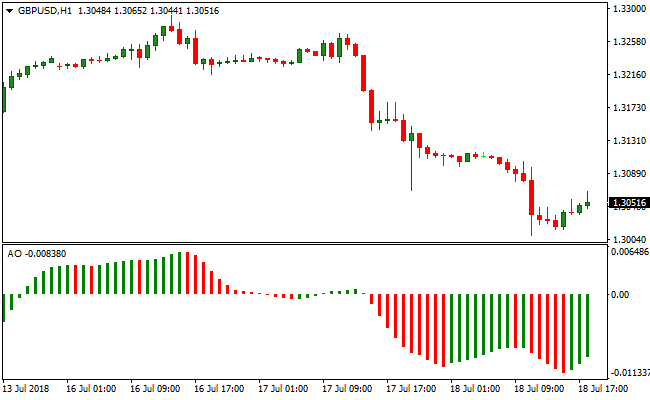
About the Awesome Oscillator Indicator
The Awesome Oscillator Indicator for MT4 measures short-term momentum relative to long-term price action.
It fluctuates above and below the zero line, showing bullish momentum when above zero and bearish momentum when below zero.
Traders use it to time entries in the direction of the overall trend.
For better accuracy, combine the Awesome Oscillator with a trend-following tool, such as a 100-period EMA.
Only take bullish signals in an uptrend and bearish signals in a downtrend.
It helps identify momentum shifts before price movements accelerate.
Free Download
Download the “Awesome.mq4” MT4 indicator
Key Features
- Measures short-term momentum against long-term price action.
- Above zero indicates bullish momentum; below zero indicates bearish momentum.
- Helps time entries in line with the trend.
- Pairs well with trend indicators like moving averages or EMA.
Indicator Chart
The Awesome Oscillator appears in a subwindow below the main chart.
Green bars show bullish momentum, and red bars show bearish momentum.
Traders use zero line crossovers and bar color changes to confirm momentum and time entries.

Guide to Trade with Awesome Oscillator
Buy Rules
- Confirm the overall trend is upward using a trend indicator.
- Wait for the Awesome Oscillator to move above zero.
- Look for bullish momentum signals or green bar sequences.
- Enter a buy trade when momentum aligns with the trend.
Sell Rules
- Confirm the overall trend is downward using a trend indicator.
- Wait for the Awesome Oscillator to move below zero.
- Look for bearish momentum signals or red bar sequences.
- Enter a sell trade when momentum aligns with the trend.
Stop Loss
- For buy trades, place the stop a few pips below the last swing low.
- For sell trades, place the stop a few pips above the last swing high.
- Optionally, add a small buffer to account for market noise.
- Move the stop to break-even once the trade moves in your favor.
Take Profit
- Close buy trades when the Awesome Oscillator crosses back below zero.
- Close sell trades when the Awesome Oscillator crosses back above zero.
- Using opposite signals ensures trades exit automatically when momentum shifts.
Awesome Oscillator and Zero Lag Moving Average MT4 Forex Strategy
This MT4 strategy combines momentum strength with trend direction using the Awesome Indicator and the Zero Lag Moving Average Indicator.
The Awesome indicator generates a buy signal when it crosses above the 0.00 level from below and a sell signal when it crosses below the 0.00 level from above.
The Zero Lag Moving Average identifies trend direction: price above the moving average indicates a bullish trend, and price below it indicates a bearish trend.
Combining these indicators helps filter high-probability entries in the direction of the prevailing trend, making this strategy suitable for M15 and H1 charts for intraday trading.
Buy Entry Rules
- Ensure price is above the Zero Lag Moving Average, indicating a bullish trend.
- Wait for the Awesome indicator to cross above the 0.00 level from below.
- Enter a buy trade at the close of the candle where the crossover occurs.
- Place a stop loss below the most recent support level.
- Take profit at the next resistance level or when the Awesome indicator crosses back below the 0.00 level.
Sell Entry Rules
- Ensure price is below the Zero Lag Moving Average, indicating a bearish trend.
- Wait for the Awesome indicator to cross below the 0.00 level from above.
- Enter a sell trade at the close of the candle where the crossover occurs.
- Place a stop loss above the most recent resistance level.
- Take profit at the next support level or when the Awesome indicator crosses back above the 0.00 level.
Advantages
- Integrates trend direction with momentum for more reliable trade signals.
- Awesome indicator provides simple entry points with its zero-level crossovers.
- Zero Lag Moving Average filters out trades against the prevailing trend.
- Suitable for multiple timeframes including M15 and H1 for intraday trading.
- Helps capture strong intraday moves with defined rules for entries and exits.
- Flexible enough to incorporate additional confirmation tools like support and resistance levels.
Drawbacks
- Zero-level crossovers can produce false signals in sideways or choppy markets.
- The trend filter may delay entries during sharp trend reversals.
- Momentum-based exits may close trades before reaching optimal price levels.
Example Case Study 1
On GBPUSD M15, price stayed above the Zero Lag Moving Average, confirming a bullish trend.
The Awesome indicator crossed above the 0.00 level from below, signaling a buy.
A buy trade was entered at the candle close with a stop loss set 2 pips below the most recent support.
Price continued upward and the trade was closed at the next resistance level, resulting in a 32 pip profit.
Combining trend and momentum helped capture the main intraday move.
Example Case Study 2
On USDCAD H1, price remained below the Zero Lag Moving Average, showing a bearish trend.
The Awesome indicator crossed below the 0.00 level from above, signaling a sell.
A sell trade was opened at candle close with a stop loss placed 6 pips above the most recent resistance.
Price moved lower and the trade closed at the next support level, yielding a 45 pip profit.
Aligning trend direction with momentum crossover produced a high-probability setup.
Strategy Tips
- Combine the Awesome indicator and Zero Lag MA with higher timeframe analysis for stronger trend confirmation.
- Focus on trades where price aligns with both the trend and momentum for higher probability setups.
- Adjust trade size according to volatility to manage risk more effectively.
- Use alerts for Awesome indicator crossovers to ensure timely entries.
- Consider taking partial profits near key support or resistance zones to lock in gains.
- Observe historical price behavior with the Zero Lag MA to identify recurring intraday patterns.
- Skip trades if momentum and trend signals do not fully align to reduce low-probability setups.
- Combine with volatility indicators to avoid entering during flat market conditions.
Download Now
Download the “Awesome.mq4” Metatrader 4 indicator
FAQ
Can the Awesome Oscillator identify trend reversals?
Yes. Crossovers of the zero line combined with changes in bar color can indicate potential momentum reversals.
Can I use it alone?
It can be used alone, but combining it with a trend filter like a 100-period EMA increases reliability.
What does bar color signify?
Green bars indicate bullish momentum, and red bars indicate bearish momentum. Sequences of the same color show strengthening momentum.
Summary
The Awesome Oscillator Indicator for MT4 measures short-term momentum relative to the trend.
It helps traders spot bullish or bearish strength and time entries and exits efficiently.
Combined with a trend filter, it highlights high-probability trades across all timeframes and currency pairs.
The zero line and bar colors provide clear signals of momentum shifts, making it suitable for scalping, intraday, and swing trading.


