
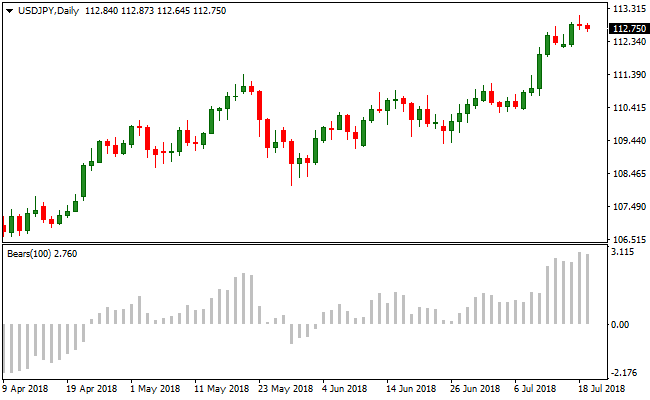
About the Bears Power Oscillator Indicator
The Bears Power Oscillator for MT4 measures bearish momentum by comparing price lows to an exponential moving average.
Values above zero suggest bullish pressure, while values below zero indicate bearish strength.
Traders can use it to gauge trend direction and time entries with momentum.
For higher accuracy, combine the indicator with a trend-following tool, such as a 100- or 200-period simple moving average.
Trades should follow the trend: take bearish signals in a downtrend and bullish signals in an uptrend.
The indicator works on all currency pairs and timeframes, supporting scalping, intraday, and swing trading.
Free Download
Download the “Bears.mq4” MT4 indicator
Key Features
- Oscillator showing bearish strength relative to an EMA.
- Above zero signals bullish pressure; below zero signals bearish pressure.
- Helps timing entries in trending markets.
- Works best with a trend filter like a moving average.
Indicator Chart
The Bears Power Oscillator appears in a subwindow below the main price chart.
Bars above zero suggest bullish momentum, while bars below zero indicate bearish momentum.
Traders can combine it with a trend indicator like the 200 SMA to filter trades and confirm the overall market direction.

Guide to Trade with the Bears Power Oscillator
Buy Rules
- Confirm the overall trend is upward with a trend indicator like a 100 or 200 SMA.
- Wait for the Bears Power to cross above zero from below.
- Enter a buy trade when momentum aligns with the uptrend.
- Focus on entries where bullish momentum is building.
Sell Rules
- Confirm the overall trend is downward with a trend indicator.
- Wait for the Bears Power to cross below zero from above.
- Enter a sell trade when momentum aligns with the downtrend.
- Focus on entries where bearish momentum is strengthening.
Stop Loss
- For buy trades, place the stop just below the last swing low or minor support level.
- For sell trades, place the stop just above the last swing high or minor resistance level.
- Move the stop to break-even once the trade moves favorably by a reasonable margin.
Take Profit
- Close buy trades when the Bears Power crosses back below zero or shows a bearish reversal signal.
- Close sell trades when the Bears Power crosses back above zero or shows a bullish reversal signal.
- Partial exits can be taken near key support or resistance levels.
Bears Power Oscillator and Trend Bars MT4 Forex Day Trading Strategy
This MT4 day trading strategy combines momentum strength with price trend visualization using the Bears Power Oscillator Indicator and the Trend Bars Indicator.
The Bears Power Oscillator provides buy signals when it crosses above zero from below and sell signals when it crosses below zero from above.
The Trend Bars highlight market direction with blue bars for bullish trends and red bars for bearish trends.
This combination allows traders to enter trades aligned with momentum and the prevailing trend, making it suitable for day trading on M15 and M30 charts.
Buy Entry Rules
- Confirm that the Trend Bars are blue, indicating a bullish trend.
- Wait for the Bears Power Oscillator to cross above the zero line from below.
- Enter a buy trade at the close of the candle where the crossover occurs.
- Place stop 2-3 pips below the recent swing low or Trend Bars support level.
- Take profit at the next resistance level or when the oscillator crosses back below zero.
Sell Entry Rules
- Confirm that the Trend Bars are red, indicating a bearish trend.
- Wait for the Bears Power Oscillator to cross below the zero line from above.
- Enter a sell trade at the close of the candle where the crossover occurs.
- Place stop 2-3 pips above the recent swing high or Trend Bars resistance level.
- Take profit at the next support level or when the oscillator crosses back above zero.
Advantages
- Combines trend direction and momentum for well-aligned day trading entries.
- The Bears Power Oscillator generates objective entry and exit points.
- Works effectively on M15 and M30 charts, suitable for active day trading.
- Helps avoid countertrend trades, reducing potential losses.
- Dynamic exits based on momentum shifts capture intraday trend moves.
- Supports multiple trade opportunities per day during active sessions.
- Easy for traders of all levels to implement consistently.
Drawbacks
- Requires constant monitoring to capture timely day trading setups.
- Trade opportunities may be limited during quiet market periods.
- Rapid price movements from news events can invalidate trades quickly.
- Day trading can be stressful due to the fast pace and multiple signals.
Example Case Study 1
On EURUSD M15, the Trend Bars were blue, showing a bullish trend.
The Bears Power Oscillator crossed above zero from below, signaling a buy.
The trade was entered at candle close with a stop 2-3 pips below the recent swing low.
Price continued upward, and the trade was closed at the next resistance level, resulting in a 35 pip profit.
Following the trend alongside momentum allowed the trader to capture the core intraday movement efficiently.
Example Case Study 2
On AUDJPY M30, the Trend Bars turned red, indicating a bearish trend.
The Bears Power Oscillator crossed below zero from above, signaling a sell.
A sell trade was entered at candle close with a stop 2-3 pips above the recent swing high.
Price moved downward steadily, and the trade was exited at the next support level, resulting in a 48 pip profit.
Combining trend and oscillator signals provided a high-probability day trading setup.
Strategy Tips
- Focus on trades that align with the Trend Bars color to increase success probability.
- Wait for the Bears Power Oscillator to confirm momentum before entering a trade.
- Use M15 charts for faster setups and M30 charts for more deliberate entries.
- Set stop losses 2-3 pips beyond recent swing points to protect capital while allowing room for normal price fluctuations.
- Consider scaling out partial positions at intermediate levels to lock in profits gradually.
- Keep track of which currency pairs generate the most reliable setups to focus trading efforts.
- Use alerts or notifications for oscillator crossovers to ensure timely trade entries.
Download Now
Download the “Bears.mq4” Metatrader 4 indicator
FAQ
What makes Bears Power different from other oscillators?
Unlike standard oscillators, it measures bearish strength directly against an EMA.
This highlights selling pressure rather than just overbought/oversold levels.
Can it spot trend reversals early?
Yes. Sharp moves below zero after extended bullish momentum can signal a potential short-term reversal.
How can I combine it with other indicators?
It pairs well with trend or volatility indicators. You can confirm strong selling pressure before entering a trade.
Does the bar size matter?
Yes. Larger negative bars show stronger bearish momentum. Traders can prioritize these signals for higher-probability entries.
Summary
The Bears Power Oscillator provides a simple way to measure bearish momentum and identify trade entries in line with the trend.
Combined with a moving average or trend filter, it helps traders spot high-probability setups on any timeframe.
Using zero line crossovers, traders can track momentum shifts and time entries and exits more effectively.





