About the CCI ATR Super Trend Indicator
The CCI ATR Super Trend indicator for MT4 combines the Commodity Channel Index with the Average True Range to identify trend direction and potential trade opportunities.
By blending momentum and volatility data, the indicator adapts to changing market conditions while keeping signals easy to follow.
The indicator plots a colored signal line directly on the price chart.
A green line reflects bullish conditions, while a red line reflects bearish conditions.
Color changes act as trade signals, making it suitable for both new and experienced market participants.
In addition to the trend line, the indicator can display fractal markers that highlight local highs and lows.
These fractals help with timing entries and managing open positions.
The tool works across multiple timeframes, from fast scalping charts to longer-term swing setups.
Free Download
Download the “3-bars-high-low-indicator.ex4” MT4 indicator
Key Features
- Combines CCI momentum with ATR volatility filtering.
- Displays a color-changing trend signal line.
- Optional fractal markers for added price context.
- Shows the latest signal directly on the chart.
- Suitable for scalping, day trading, and swing trading.
Indicator Chart
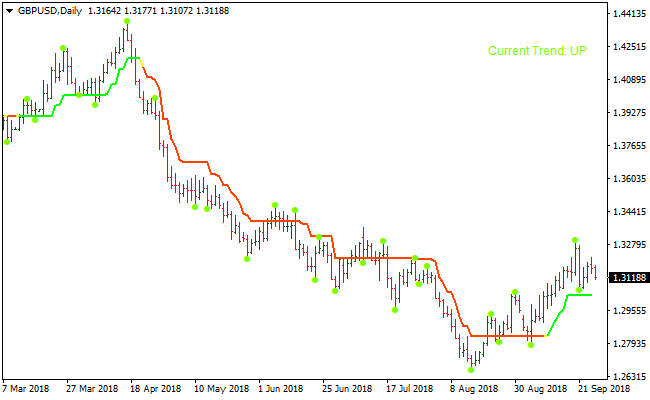
The image below shows the CCI ATR Super Trend indicator applied to a price chart.
The colored signal line highlights trend direction, while fractal bullets mark recent price swings.
Buy and sell signals become visible as the line switches color.
Guide to Trade with the CCI ATR Super Trend Indicator
Buy Rules
- Wait for the signal line to change from red to green.
- Confirm price is holding above the signal line.
- Enter the buy trade at the close of the signal candle.
Sell Rules
- Wait for the signal line to change from green to red.
- Confirm price is holding below the signal line.
- Enter the sell trade at the close of the signal candle.
Stop Loss
- Place the stop loss beyond the most recent fractal level.
- For buy trades, keep the stop below recent support.
- For sell trades, keep the stop above recent resistance.
- Exit early if price closes firmly against the signal line.
Take Profit
- Target the next visible support or resistance zone.
- Trail the stop loss as the signal line continues in your favor.
- Lock partial profits when a new fractal forms against the trade.
CCI ATR Super Trend + Elite PRO Scalper Indicator Forex Scalping Strategy
This MT4 scalping strategy combines the CCI ATR Super Trend indicator with the Elite PRO Scalper indicator.
The CCI ATR Super Trend shows the overall market direction by switching its line to green during buy trends and red during sell trends.
The Elite PRO Scalper provides precise entries using blue arrows for buy signals and red arrows for sell signals.
When used together, they create a simple, clean, and fast scalping method suitable for M1 and M5 charts.
It works best during high volume periods like the London and New York sessions where price moves more consistently and offers better short-term opportunities.
Buy Entry Rules
- The Super Trend line must be green which confirms a buy trend.
- Wait for a blue arrow from the Elite PRO Scalper indicator.
- Enter a buy position after the candle with the arrow closes.
- Set stop loss a few pips below the most recent swing low. Use 5 to 10 pips on M1 or 8 to 15 pips on M5.
- Take profit target is 10 to 20 pips on M1 or 15 to 25 pips on M5.
Sell Entry Rules
- The Super Trend line must be red which confirms a sell trend.
- Wait for a red arrow from the Elite PRO Scalper indicator.
- Enter a sell position after the candle with the arrow closes.
- Set the stop loss a few pips above the most recent swing high. Use 5 to 10 pips on M1 or 8 to 15 pips on M5.
- Take profit target is 10 to 20 pips on M1 or 15 to 25 pips on M5.
Advantages
- The trend direction from the Super Trend helps avoid counter trend trades.
- The arrow signals from Elite PRO Scalper provide fast and clean entries.
- The combined method filters many weak setups that appear when using only one indicator.
- Works well with major currency pairs that have tight spreads.
- Clear and simple rules make it easy to follow in fast markets.
Drawbacks
- In slow or ranging markets, the Super Trend may change direction too often.
- Tight stop losses can be hit quickly when volatility spikes.
- The strategy needs fast reactions which may be difficult for new scalpers.
Case Study 1
On EURUSD M1 during the London session the Super Trend line was green.
A blue arrow appeared from the Elite PRO Scalper indicator.
A buy trade was opened at 1.10520. The stop loss was placed at 1.10505.
Price moved up to 1.10540 and the trade closed with a 20 pip profit.
No opposite signal appeared during the move.
Case Study 2
On GBPUSD M5 during the New York session the Super Trend line changed to red.
A red arrow appeared confirming a bearish signal.
A sell trade was entered at 1.32250 with a stop loss at 1.32270.
Price continued downward and reached 1.32090 for a profit of 16 pips.
The trade reached the target before any reversal signal appeared.
Strategy Tips
- Wait for candles to close before acting on any arrow signal to avoid early false entries.
- Use a session timer or mark session opens on your chart because most profitable moves happen shortly after London and New York open.
- Focus on pairs with stable movement patterns. EURUSD and USDJPY tend to produce cleaner scalping signals than cross pairs during calm periods.
- Only trade when spreads are tight. A large spread can completely remove the profit potential of small scalping targets.
- Use a fixed lot size during scalping to maintain consistency since trades happen frequently.
- Track your best trading hours. Many scalpers perform better during specific windows of time due to market rhythm.
- Close trades manually if price stalls for too long. Momentum is important for scalping and slow movement often leads to reversals.
Download Now
Download the “3-bars-high-low-indicator.ex4” Metatrader 4 indicator
FAQ
What role does ATR play in this indicator?
ATR helps filter signals by accounting for market volatility, reducing noise during low-activity periods.
Are fractals required to trade this indicator?
No, fractals are optional and can be turned off, but they are useful for stop placement and trade management.
Which timeframes work best?
Lower timeframes suit scalping, while H1 and above are more suitable for structured intraday and swing trades.
Can this indicator be combined with oscillators?
Yes, oscillators such as RSI or stochastic can help fine-tune entries in the direction of the trend.
Summary
The CCI ATR Super Trend MT4 indicator offers a practical way to follow market trends using both momentum and volatility.
Its color-based signals simplify decision-making while remaining adaptable to different trading styles.
With optional fractals and flexible settings, the indicator can be adjusted to match personal strategies.


