
About the Coron Indicator
The Coron indicator for MT4 tracks the overall trend of any currency pair across all timeframes.
It plots colored bars in a separate MT4 window, making trend direction easy to interpret at a glance.
Green bars indicate upward momentum and suggest a buy opportunity, while red bars show downward momentum and signal a sell.
Yellow bars highlight ranging or consolidating markets, indicating that traders should wait or maintain open positions.
The Coron indicator is simple enough for beginners yet effective for experienced traders looking to follow trends.
It can be applied to multiple currency pairs, commodities, or other instruments available on MT4.
Free Download
Download the “coron-forex.ex4” MT4 indicator
Key Features
- Trend-following indicator with clear visual signals.
- Green bars for bullish trends, red bars for bearish trends, and yellow bars for range-bound markets.
- Easy to read and interpret, even for beginners.
- Works on any currency pair and timeframe.
- Plotted in a separate MT4 window.
Indicator Chart
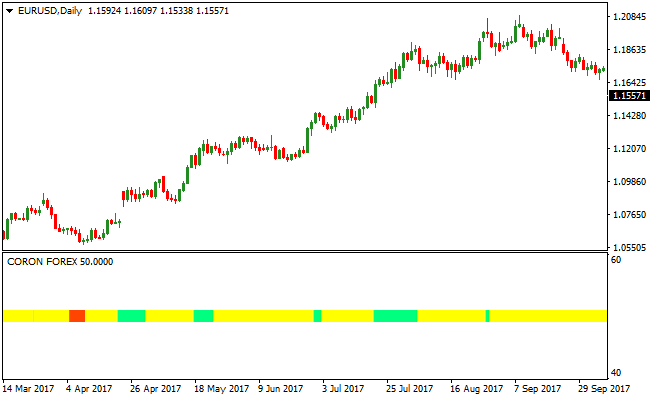
The Coron indicator below displays trend direction in real time using green, red, and yellow bars.
Traders can quickly identify when the market is trending up, trending down, or range-bound.
This example shows a green bar signaling a buy opportunity, a red bar signaling a sell, and yellow bars marking consolidation.
By following these signals, traders can align trades with the prevailing market trend and avoid entering during indecisive periods.
Guide to Trade with the Coron Indicator
Buy Rules
- Wait for the first green bar to appear in the Coron indicator window.
- Confirm that the market is trending upward or price action supports the move.
- Enter a buy trade at the close of the signal bar.
- Ignore green bars that appear during strong resistance or range-bound conditions.
Sell Rules
- Wait for the first red bar to appear in the Coron indicator window.
- Confirm that the market is trending downward or price action supports the move.
- Enter a sell trade at the close of the signal bar.
- Ignore red bars that appear during strong support or range-bound conditions.
Stop Loss
- For buy trades, place the stop loss slightly below the low of the signal bar.
- For sell trades, place the stop loss slightly above the high of the signal bar.
- Exit early if the indicator changes color against your position.
Take Profit
- Close buy trades when a red or yellow bar appears.
- Close sell trades when a green or yellow bar appears.
- Secure profits if momentum slows or price shows signs of consolidation.
- Optionally, use nearby support or resistance levels to determine exits.
CORON Indicator + Best Scalper Forex Scalping Strategy for MT4
This MT4 scalping strategy combines the trend-direction signals from the CORON Forex MT4 Indicator with entry signals from the Best Forex Scalping Indicator MT4.
The CORON indicator shows the overall market trend: green means bullish trend, red means bearish trend.
The Best Scalper Indicator displays blue arrows for buy signals and red arrows for sell signals.
By using both, you get smoother trend confirmation plus precise entry timing.
This strategy is designed for short-term scalping on volatile pairs.
Best used on timeframes M5 or M15.
Buy Entry Rules
- CORON indicator must show green (buy trend) on the chart.
- A blue arrow appears from the Best Scalper Indicator.
- Enter buy at the close of the candle with the blue arrow.
- Set stop loss a few pips below the recent swing low (for example, 8–12 pips depending on pair volatility).
- Set take profit around 15–25 pips, or exit when CORON turns red (trend reversal).
Sell Entry Rules
- CORON indicator must show red (sell trend) on the chart.
- A red arrow appears from the Best Scalper Indicator.
- Enter sell at the close of the candle with the red arrow.
- Set stop loss a few pips above the recent swing high (e.g. 8–12 pips depending on volatility).
- Set take profit around 15–25 pips, or exit when CORON turns green.
Advantages
- Trend confirmation from CORON helps avoid counter-trend scalps and reduce bad entries.
- Scalper arrows give clear entry timing, making the strategy easy to follow even under pressure.
- Short timeframes and fixed pip targets allow frequent trades and consistent risk control.
- Simple rules make it accessible for both beginners and experienced traders.
Drawbacks
- If the market is choppy or consolidating, arrows may trigger but the trend may be weak, increasing false signals.
- Frequent small-pip trades can accumulate spread and slippage costs that eat into profits.
- Strategy might underperform in low volatility sessions or during major news events.
Example Case Study 1 – GBP/USD (M5 chart)
During the London session, the CORON indicator turned green indicating a bullish trend.
Shortly after, a blue arrow appeared on the Best Scalper Indicator.
At the close of that candle GBP/USD was at 1.3192.
A buy order was placed.
Stop loss was set at 1.3184 (8 pips below).
The take profit target was at 1.3217 (25 pip target).
Price moved upward and hit the take profit within 18 minutes, giving +25 pips profit.
Example Case Study 2 – USD/JPY (M15 chart)
During the Asian-New York overlap, USD/JPY showed a red trend on the CORON indicator.
A red arrow was printed by Best Scalper Indicator at 149.58.
A sell order was entered at candle close.
Stop loss was placed at 149.70 (12 pips above the arrow candle high).
Take profit was set at 149.33 (25-pip target).
Within 25 minutes price dropped to 149.33 and hit the take profit for +25 pips.
Trend remained bearish throughout the scalp and CORON stayed red until after exit.
Strategy Tips
- Use the CORON indicator as your first filter. Only take signals in the direction of the trend it shows.
- Use the scalper arrows for precise entry timing. Avoid entering solely based on trend without a scalper arrow.
- Stick to M5 or M15 timeframes and focus on pairs with enough volatility (like GBP/USD, USD/JPY, EUR/JPY, AUD/USD).
- Use fixed pip targets but adjust stop loss size based on pair volatility so risk remains controlled.
- Keep a trading journal to note how often CORON-trend + scalper arrow setups succeed or fail, and refine settings if necessary.
Download Now
Download the “coron-forex.ex4” Metatrader 4 indicator
FAQ
Can the Coron indicator be used on any timeframe?
Yes, it works on all timeframes. Lower timeframes provide quicker signals, while higher timeframes help identify broader trends.
How can I confirm Coron signals?
Traders can combine the indicator with trend filters, moving averages, or price action patterns to reduce false entries.
Is it suitable for beginners?
Yes, the visual bar system is easy to understand and allows beginners to follow trends without complex calculations.
Summary
The Coron indicator offers a straightforward method to follow market trends using color-coded bars.
Green, red, and yellow bars allow traders to identify bullish, bearish, and range-bound conditions quickly.
It is suitable for all trading styles, from scalping to swing trading.
With proper stop loss, take profit, and trend confirmation, the Coron indicator helps traders make informed decisions and manage risk efficiently.





