About the Currency Meter V5.0 Indicator
The Currency Meter V5.0 Indicator for MT4 is a specialized analysis tool designed to identify relative strength and weakness across various currency pairs.
Unlike standard oscillators that look at a single price chart, this tool evaluates the market by aggregating data from moving averages, the RSI, Laguerre, and Williams %R.
It processes this information to provide a bird’s-eye view of which currencies are dominating and which are lagging.
This allows traders to move away from guesswork and focus on pairs with the highest probability of sustained movement.
By combining multiple mathematical models into one interface, the Currency Meter V5.0 Indicator helps you avoid low-volatility markets.
It calculates the momentum of individual currencies and displays the results in a clean table.
Free Download
Download the “currency-meter.mq4” MT4 indicator
Key Features
- Integrates four different technical indicators to provide a comprehensive strength score.
- Uses a numerical ranking system from -100 to +100 to quantify trend intensity.
- Displays real-time directional arrows to simplify the identification of bullish or bearish momentum.
- Features a compact table layout that does not clutter the main trading chart.
- Filters out market noise by focusing on extreme strength and weakness values.
Indicator Chart
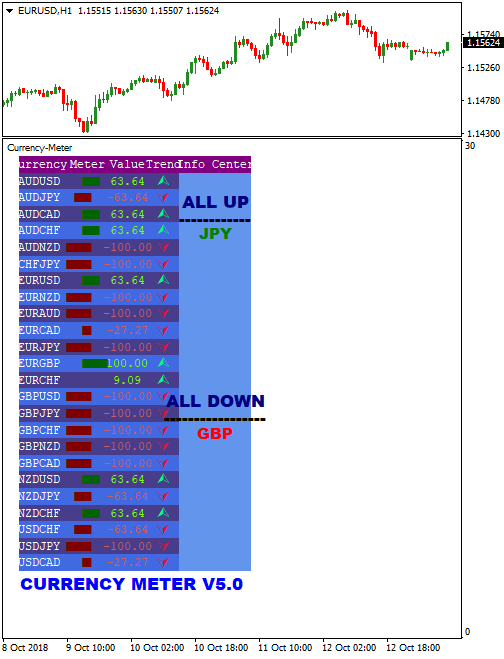
The Currency Meter V5.0 Indicator displays a comprehensive dashboard on the MT4 platform.
This chart shows a list of currency pairs accompanied by numerical values and colored arrows.
A green arrow indicates a strong upward trend, while a red arrow points to a significant downward move.
The values help you pinpoint exactly when a pair has reached peak momentum for a potential entry.

Guide to Trade with Currency Meter V5.0 Indicator
Buy Rules
- Monitor the dashboard for a currency pair displaying a green arrow.
- Ensure the strength value for the pair is at least +90 or higher.
- Wait for a secondary technical tool to confirm the bullish momentum on the price chart.
- Open a long position once both the meter and your additional analysis align.
Sell Rules
- Look for a currency pair in the table marked with a red arrow.
- Check that the strength value has reached -90 or lower.
- Verify the bearish trend using another price action tool or trend filter.
- Execute a short trade when the weakness is confirmed across both platforms.
Stop Loss
- Place the stop loss a few pips below the most recent swing low for buy trades.
- Position the stop loss above the recent swing high for sell trades.
Take Profit
- Target a fixed risk to reward ratio of 1:2 or higher.
- Consider exiting the trade if the currency strength value drops below 70 or rises above -70.
- Close the position at major support or resistance levels identified on the daily chart.
Currency Meter V5.0 + FX Sniper MT4 Scalping Strategy
This MT4 scalping strategy combines the Currency Meter V5.0 Metatrader 4 Forex Indicator and the FX Sniper Metatrader 4 Forex Indicator.
The Currency Meter V5.0 analyzes each currency pair using moving averages, Laguerre, RSI, and Williams %R. It displays the combined result in an easy-to-read table.
A green arrow next to a pair indicates an upward trend, and a red arrow indicates a downward trend.
Trade the strongest trending pairs with a +100 green symbol for buys or -100 red symbol for sells.
The FX Sniper indicator provides precise scalping entries on short-term charts.
A green line is a buy signal, and a red line is a sell signal.
Combining Currency Meter V5.0 and FX Sniper ensures that you are trading strong trends with precise timing for M1 and M5 charts, making it ideal for fast-paced scalping sessions during high volatility periods.
Buy Entry Rules
- Open the Currency Meter V5.0 and find a currency pair showing +100.00 with a green arrow, indicating a strong uptrend.
- Switch to the chart of that pair on M1 or M5.
- Wait for the FX Sniper green line to appear as a buy signal.
- Enter a buy trade when both conditions align: a strong uptrend and an FX Sniper buy signal.
- Set stop loss below the most recent swing low or below a minor support level for short-term protection.
- Take profit at 8–15 pips on M1 or 12–20 pips on M5, or trail the stop loss to follow momentum.
Sell Entry Rules
- Use the Currency Meter V5.0 to identify a pair with -100.00 and a red arrow, signaling a strong downtrend.
- Switch to the chart of that pair on M1 or M5.
- Wait for the FX Sniper red line to appear as a sell signal.
- Enter a sell trade when both conditions are met: a strong downtrend and the FX Sniper sell signal.
- Place a stop loss above the recent swing high or minor resistance level.
- Take profit at 8–15 pips on M1 or 12–20 pips on M5, or trail the stop to follow the momentum.
Advantages
- Combines trend strength analysis and precise scalping entries for higher probability trades.
- Works well on M1 and M5 charts for fast intraday trades.
- Helps avoid trading weak or sideways pairs, reducing risk.
- Clear entry and exit signals simplify decision-making.
- Adaptable to different pairs and sessions for multiple scalping opportunities per day.
Drawbacks
- Requires constant monitoring due to very short time frames.
- Small profit per trade; multiple trades are needed to accumulate gains.
- Less effective in extremely choppy markets without clear trends.
Case Study 1
On the EUR/USD 1-minute chart, the Currency Meter V5.0 shows a +100 green arrow, signaling a strong uptrend.
The FX Sniper green line appears at 1.1125.
A buy trade is entered at 1.1125.
Stop loss is set at 1.1118, and take profit at 1.1135.
The trade quickly reaches the target, yielding 10 pips, demonstrating how strong trends combined with FX Sniper timing can capture small, fast gains.
Case Study 2
On the GBP/JPY 5-minute chart, Currency Meter V5.0 shows -100 red arrow, indicating a strong downtrend.
FX Sniper red line gives a sell signal at 151.50.
A sell trade is placed with a stop loss at 151.65 and a take profit at 151.30.
The market moves down and hits the target for 20 pips.
Strategy Tips
- Always trade pairs with clear +100 or -100 signals on Currency Meter V5.0 to avoid weak trends.
- Prefer M1 and M5 charts during London and New York sessions for higher volatility and scalping opportunities.
- Use tight stop losses and take profit levels due to the fast-moving nature of scalping.
- Consider only trading pairs with both indicators in agreement to reduce false entries.
- Practice patience and discipline, avoiding overtrading even if multiple opportunities appear quickly.
Download Now
Download the “currency-meter.mq4” Metatrader 4 indicator
FAQ
How does the Currency Meter V5.0 Indicator calculate strength?
The tool uses a weighted formula that combines the RSI, Williams %R, Laguerre, and moving averages.
It scans the price action of each currency within a pair and compares them.
The final output is a score that reflects whether a currency is being bought or sold aggressively relative to its counterpart.
Can I use this tool as a standalone trading system?
It is best used as a high-level filter rather than a standalone system.
While it identifies strength, combining it with price action or a trend-following tool helps you find the exact timing for an entry.
This ensures you are not just buying a strong currency but buying it at a technically sound price level.
What are the best settings for the Currency Meter V5.0 Indicator?
The default settings are optimized for most intraday traders.
However, focusing on values above +90 or below -90 is the most effective way to use it.
These extreme values indicate that the trend is fully established and likely to continue in the short term.
Summary
The Currency Meter V5.0 Indicator offers a practical solution for traders who struggle to pick the right pair to trade.
By consolidating data from four different technical sources, it provides a reliable gauge of market momentum.
Its primary benefit is the ability to filter out weak setups, allowing you to focus on the most aggressive trends.
This saves time and reduces the mental fatigue associated with manual market scanning.