About the Indicator
The Cyber Cycle Indicator for MT4 is a free oscillator displayed in its own window, using two signal lines oscillating around the zero level.
It’s designed to help spot short-term opportunities within established trends.
Both lines crossing above zero signals bullish momentum; crossing below suggests bearish pressure.
It works well across scalping, day trading, and swing styles.
Free Download
Download the “cyber-cycle.mq4” indicator for MT4
Key Features
- Dual-line oscillator centered at zero for intuitive trend sensing.
- Buy signal when both lines cross above zero; sell when both cross below.
- Suitable for any currency pair and timeframe.
- Non-repainting—ideal for real-time setups.
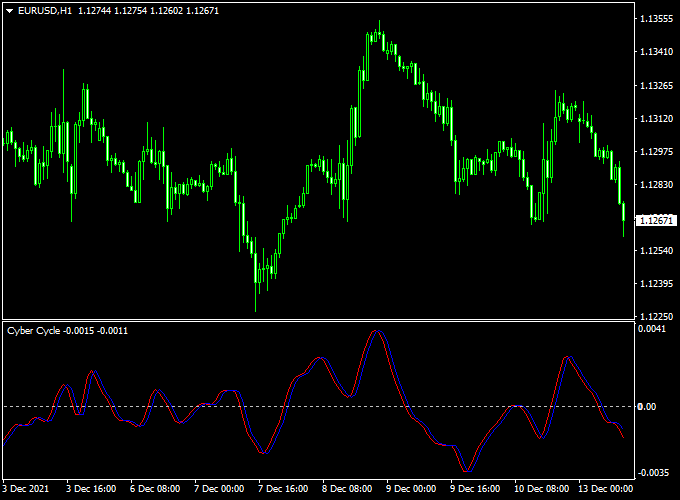
Indicator Example Chart (EUR/USD H1)
The example chart below displays the Cyber Cycle MT4 indicator in action on the trading chart.

How To Trade Using This Indicator
Entry Logic
Enter long when both lines cross above zero. Enter short when both cross below. Keep your entries aligned with the higher-timeframe trend or structure.
Stop Loss & Take Profit
Set your stop loss just beyond the recent swing high/low or use 1× ATR. Aim for at least 2R–3R, or trail your stop using ATR or key structure levels.
Download Now
Download the “cyber-cycle.mq4” indicator for Metatrader 4
Forex MT4 Strategy: Cyber Cycle + Buy Sell Cloud Indicator
What This Strategy Is About
This strategy combines the Cyber Cycle Forex Indicator (MT4) with the Buy Sell Cloud Indicator (MT4).
The Cyber Cycle indicator helps identify market cycles and turning points using cycle analysis, while the Buy Sell Cloud provides clear trend direction and entry signals by coloring the price cloud.
Together, they create a powerful method for timing entries in trending and cyclic markets.
Buy Rules
- The Cyber Cycle indicator turns back above the zero level.
- The Buy Sell Cloud colors the cloud green or displays a buy signal.
- Enter a long trade at the candle close, confirming both signals.
- Place a stop loss below the recent swing low.
- Take profit can be set at previous resistance levels or based on a 2:1 reward-to-risk ratio.
Sell Rules
- The Cyber Cycle indicator turns back below the zero level.
- The Buy Sell Cloud colors the cloud red or displays a sell signal.
- Enter a short trade at the confirming candle close.
- Place a stop loss above the recent swing high.
- Take profit can be set at previous support levels or a 2:1 reward-to-risk ratio.
Trader Case Studies
Below are examples of traders from different countries who successfully used this strategy on various currency pairs and timeframes.
Elena K – Russia
Elena, a swing trader from Moscow, applied this strategy on the USD/RUB 4-hour chart. Over 20 days, she earned a total of +275 pips by following the cycle and cloud signals carefully.
Ahmed S – Egypt
Ahmed, a part-time trader in Cairo, traded EUR/USD on the 1-hour chart using this method. He managed to accumulate +321 pips within one month by patiently waiting for both indicators to align.
Lucas B – Brazil
Lucas, a day trader from São Paulo, used the strategy on the GBP/JPY 15-minute chart. In just 10 trading days, he gained +150 pips through quick entries and disciplined exits.
Disclaimer: These case studies are for educational purposes only. Trading outcomes will vary depending on market conditions, risk management, and individual trading skills.
Advantages
- Effective in identifying turning points and trending conditions.
- Visual cloud signals make it easier to stay on the right side of the market.
- Works on multiple timeframes and currency pairs.
Drawbacks
- Less reliable in highly volatile or erratic market phases.
- Requires patience to wait for both indicators to confirm signals.
Conclusion and Tips
By combining the Cyber Cycle Indicator with the Buy Sell Cloud, traders can better time entries and exits within market cycles while confirming trends.
This dual confirmation reduces false signals and improves trade accuracy.
For best results, apply this strategy in trending markets during active sessions.
Always manage risk carefully and consider backtesting on demo accounts to become familiar with the signals and timing.
Indicator Specifications
| Platform | MT4 |
|---|---|
| Assets | Any Forex pair |
| Timeframes | All (scalp to swing) |
| Type | Oscillator (dual signal lines) |
| Repainting? | No |
| Inputs | Adjustable parameters via MT4 inputs tab (e.g., colors, alpha) |
| Download | Free “cyber-cycle.mq4” indicator file |
FAQ
1) When does this indicator work best?
It shines in trending markets. Combine it with trend filters like EMA200 or SuperTrend to reduce sideways noise.
2) Can I use it with other strategies?
Yes—use it to confirm breakouts, pullbacks, or trend-follow setups. It adds precision via cycle-based momentum.
3) How to avoid false signals?
Wait for the crossover bar to close. Higher-timeframe alignment and avoiding trading in flat conditions help improve accuracy.
4) Which timeframes suit it best?
M5–M30 work well for intraday trades; H1–H4 for swing trades. Adjust risk and target sizes to match volatility per timeframe.
5) What’s a practical exit rule?
Exit when one signal line crosses back toward zero, or price hits your defined R-multiple or support/resistance. Trailing with ATR can capture longer runs.
Conclusion
The Cyber Cycle Forex Indicator is a clean, dual-line oscillator that reveals trend cycles and momentum shifts.
It’s best when paired with trend filters and sound risk rules.
Download it free, test it in a demo environment, and refine your entry thresholds and filtering rules to fit your trading edge.


