About the Cynthias Trend Bars Indicator
The Cynthias Trend Bars indicator for MT4 is a popular candlestick trend signal tool that generates buy and sell signals with clear colored bars.
Green candlesticks indicate bullish momentum, while purple candlesticks indicate bearish momentum.
It is designed to be simple to read, even for beginners, and helps traders stay aligned with the prevailing trend.
Use it together with a trend-following system or strategy, such as Bollinger Bands, simple moving averages, or exponential moving averages, to improve trade accuracy.
Trade only green bars in an uptrend and purple bars in a downtrend to increase the likelihood of successful trades.
The indicator is suitable for scalping, day trading, and swing trading across multiple currency pairs and timeframes.
Free Download
Download the “cynthias-trend-bars.ex4” MT4 indicator
Key Features
- Colored candlestick bars to indicate bullish and bearish momentum.
- Green bars indicate buy conditions, purple bars indicate sell conditions.
- Easy-to-read signals suitable for beginners and experienced traders.
- Supports multiple timeframes: M1, M5, M15, M30, H1, H4, D1, W1, MN.
- Customizable colors, width, and style from the input tab.
Indicator Chart
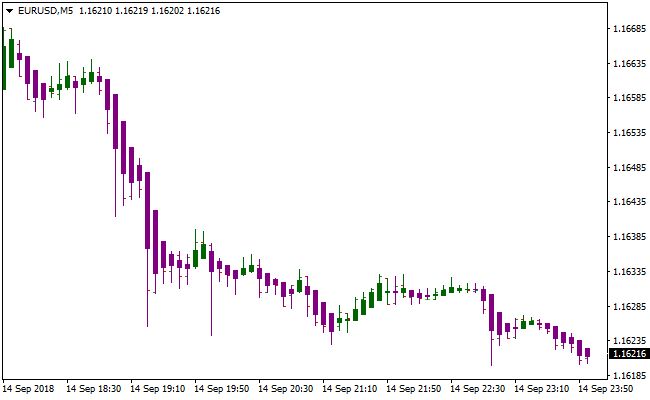
The EUR/USD 5-Minute chart below shows the Cynthias Trend Bars indicator in action.
Green candlesticks highlight bullish phases, while purple candlesticks highlight bearish phases.
Using these bars together with a trend-following system helps traders identify high-probability entries.
Guide to Trade with Cynthias Trend Bars Indicator
Buy Rules
- Confirm the overall market trend is bullish using a trend-following system.
- Wait for the Cynthias Trend Bars to turn green.
- Open a buy trade at the close of the green signal candlestick.
- Confirm the signal with additional trend filters like moving averages or Bollinger Bands.
Sell Rules
- Confirm the overall market trend is bearish using a trend-following system.
- Wait for the Cynthias Trend Bars to turn purple.
- Open a sell trade at the close of the purple signal candlestick.
- Confirm the signal with additional trend filters like moving averages or Bollinger Bands.
Stop Loss
- Set the stop loss below the nearest minor swing for buy trades.
- Set the stop loss above the nearest minor swing for sell trades.
- Adjust distance according to market volatility to avoid premature exits.
Take Profit
- Set an initial take profit target based on recent price movement or pips range.
- Alternatively, close the trade when an opposite color signal appears.
- Consider trailing stops to lock in profits during strong trends.
Cynthia Trend Bars With Best Forex Scalping Indicator MT4 Strategy
This MT4 scalping strategy focuses on quick and precise trades using short-term charts, specifically M1 and M5.
It relies on two indicators that work together to identify both trend direction and optimal entry points.
The Cynthia’s Trend Bars indicator shows whether the market is in a bullish or bearish phase through its green and purple bars, giving a clear view of the short-term trend.
The Best Forex Scalping indicator provides exact entry signals with blue and red arrows, allowing traders to enter trades when momentum aligns with the trend.
This combination reduces hesitation and helps scalpers capture small, consistent moves efficiently.
The strategy is ideal for traders who want a straightforward, visual method for fast-paced markets.
It works best during high activity sessions when currency pairs have strong, predictable movements.
By following the trend with Cynthia’s Trend Bars and confirming with the scalping arrows, traders can quickly identify setups with a higher probability of success.
This method is particularly suited for major pairs that exhibit smooth intraday trends and frequent opportunities for small gains.
Target profits are modest between 6 and 20 pips, which helps reduce exposure to sharp intraday moves while aiming for multiple small wins.
Buy Entry Rules
- Cynthia’s Trend Bars must show green bars.
- A blue arrow from the Best Forex Scalping indicator must appear.
- Enter a buy trade at the close of the signal candle.
- Place the stop loss below the nearest minor swing or 5 to 8 pips below the entry depending on volatility.
- Set a take profit target between 6 and 15 pips on M1 and between 10 and 20 pips on M5.
Sell Entry Rules
- Cynthia’s Trend Bars must show purple bars.
- A red arrow from the Best Forex Scalping indicator must appear.
- Enter a sell trade at the close of the signal candle.
- Place the stop loss above the nearest minor swing or 5 to 8 pips above the entry depending on volatility.
- Set a take profit target between 6 and 15 pips on M1 and between 10 and 20 pips on M5.
Advantages
- Clear trend direction from colored candlesticks makes entries easier.
- Entry arrows remove guesswork and reduce hesitation.
- Works well on major pairs with smooth movement.
- Fast-paced strategy suitable for scalping and day trading.
- Simple, repeatable rules for consistent application.
Drawbacks
- Scalping requires focus and quick execution.
- Choppy markets reduce signal quality.
- Spreads may impact profitability on low-volume pairs.
Strategy Tips
- Focus on currency pairs with tight spreads and good liquidity, such as EURUSD, GBPUSD, and USDJPY, to maximize profits on small targets.
- Trade only when the trend bars clearly show green or purple to avoid false signals in sideways markets.
- Use the arrow signals only in the direction of the current trend to increase the probability of a successful scalp.
- Consider waiting for a small retracement before entering to reduce the risk of entering at the extreme of a move.
- Limit the number of trades during low volatility periods, as signals can become less reliable.
- Keep a consistent risk per trade, as multiple small losses can add up if the market is choppy.
- Track your performance by noting which pairs and time frames generate the most consistent results.
- Close trades early if the trend bars change color before reaching the target, to protect gains and minimize losses.
Download Now
Download the “cynthias-trend-bars.ex4” MT4 indicator
FAQ
Can beginners use the Cynthias Trend Bars indicator?
Yes. Its colored candlesticks make buy and sell signals easy to read even for beginners.
Which trading style works best?
It works best for scalping and short-term day trading, especially on M1 and M5 charts.
Can it be combined with other indicators?
Yes. Trend-following systems like moving averages or Bollinger Bands help confirm signals and reduce false entries.
Summary
The Cynthias Trend Bars Metatrader 4 indicator provides clear bullish (green) and bearish (purple) candlestick signals.
It is suitable for scalping, day trading, and swing trading when combined with trend-following systems.
Its simple visual signals make it beginner-friendly, while its flexibility allows experienced traders to integrate it into more advanced strategies.
Used with precise entry indicators like the Best Forex Scalping tool, it can improve trade timing and help capture small, consistent gains on lower timeframes.


