About the Discipline Arrows Oscillator indicator
The Discipline Arrows Oscillator indicator for MT4 is a trend-following trading tool designed to simplify market direction and timing.
It combines an oscillator-based trend filter with directional arrow signals, helping traders focus only on opportunities that align with the prevailing market bias.
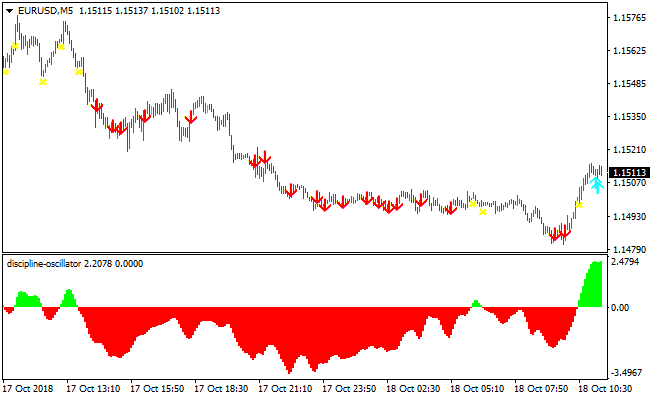
The indicator displays bullish and bearish momentum zones in a separate window below the main price chart, making trend conditions easy to recognize at a glance.
Bullish market phases are shown as green-colored areas, while bearish phases appear in red.
Based on these zones, the indicator plots arrow signals directly on the price chart.
Blue arrows highlight potential buy opportunities during bullish conditions, while red arrows signal potential sell opportunities during bearish conditions.
By adjusting the period setting, traders can fine-tune signal sensitivity, with higher values producing smoother and more selective trade setups.
Free Download
Download the “discipline-oscillator.mq4” MT4 indicator
Key features
- Trend-following oscillator displayed in a separate subwindow.
- Color-coded bullish and bearish momentum zones.
- Automatic buy and sell arrow signals aligned with trend direction.
- Adjustable period settings for signal filtering.
Indicator chart
The image below shows the Discipline Arrows Oscillator indicator displayed in a separate window below the main price chart.
The colored trend zones indicate bullish and bearish conditions, while arrow signals on the chart highlight trade entries that follow the active trend direction.

Guide to trade with the Discipline Arrows Oscillator indicator
Buy rules
- Wait for the oscillator to display a green bullish zone.
- Confirm that price is trading in the direction of the bullish trend.
- Enter a buy trade when a blue arrow appears on the chart.
Sell rules
- Wait for the oscillator to display a red bearish zone.
- Confirm that price action supports bearish continuation.
- Enter a sell trade when a red arrow appears on the chart.
Stop loss
- Place the stop loss 3 pips below the most recent low for buy trades.
- Place the stop loss 3 pips above the most recent high for sell trades.
- Use a fixed pip stop based on the average candle size of the timeframe.
Take profit
- Close the trade when an opposite arrow signal appears.
- Target recent support or resistance zones for partial exits.
- Let profits run while the oscillator color remains unchanged.
MT4 Discipline Arrows Oscillator + NTrend Forex Sniper Scalping Strategy
This strategy combines the trend direction from the Discipline Arrows Oscillator with entry signals from the NTrend Forex Sniper Indicator.
The Discipline Arrows histogram shows green bars for a buy‑trend and red bars for a sell‑trend.
The NTrend Sniper then plots a blue symbol for a buy signal and a magenta symbol for a sell signal.
The idea is to scalp when both trend direction and signal arrow align for high‑probability entries.
This scalp setup works best on M1, M5 or M15 charts, ideal for traders who want fast entries and quick exits.
By waiting for both indicators to agree, you filter out many poor setups and increase the odds of a clean move.
Perfect for intraday traders who monitor multiple pairs and like frequent but controlled trades.
Buy Entry Rules
- Discipline Arrows Oscillator histogram is green, confirming upward trend.
- NTrend Forex Sniper plots a blue symbol, giving a buy signal.
- Enter a buy trade at the close of the signal candle.
- Place a stop loss a few pips below the recent swing low or just below the low of the signal candle.
- Set take profit at the next minor resistance or use a fixed small target (e.g., 8–15 pips on M1/M5, 15–25 pips on M15)
- Or trail stop when price moves favorably for extended scalp profits.
Sell Entry Rules
- Discipline Arrows Oscillator histogram is red, confirming a downward trend.
- NTrend Forex Sniper plots a magenta symbol, giving a sell signal.
- Enter a sell trade at the close of that candle.
- Place a stop loss a few pips above the recent swing high or just above the high of the signal candle.
- Set take profit at the next minor support or use a fixed small target (e.g., 8–15 pips on M1/M5, 15–25 pips on M15)
- Or trail stop to ride larger intraday moves.
Advantages
- The trend filter helps avoid counter‑trend entries in noisy markets.
- Works across multiple timeframes (M1 to M15), giving flexibility depending on volatility and session.
- Low holding time reduces exposure to overnight or news risk.
- Stop loss and take profit are clearly defined, making risk management easier to implement.
Drawbacks
- In low volatility periods, signals may be rare or produce weak moves, limiting profit potential.
- Frequent scalping increases sensitivity to spreads and commissions; costs can eat into profit if not managed well.
Case Study 1 – Buy Trade
On NZDUSD M5 during a London session, the Discipline Arrows histogram turned green, signaling an upward trend.
Immediately after, NTrend Forex Sniper plotted a blue buy symbol.
A buy trade was entered at the close of that candle. Stop loss was placed 6 pips below the recent swing low.
Price quickly moved up for about 14 pips and hit the take profit target at a nearby minor resistance.
The trade closed with a clean scalp profit, driven by an aligned trend and signal.
Case Study 2 – Sell Trade
On USDJPY M1 in the New York session high volatility, the Discipline Arrows histogram turned red, indicating a bearish trend.
Then, NTrend Forex Sniper produced a magenta sell symbol.
A sell order was opened on candle close, with a stop loss 5 pips above the recent swing high.
Price plunged downward and captured 12 pips before bouncing at support.
The scalp yielded a quick profit thanks to trend confirmation and momentum alignment.
Strategy Tips
- Only trade when both the oscillator and sniper signal align to avoid false entries.
- Prefer volatile sessions (London, New York) for stronger moves and faster scalps.
- Avoid trading around major news events to reduce the risk of whipsaws or unpredictable volatility.
- Adjust fixed take profit targets based on recent range size and pair volatility.
Download Now
Download the “discipline-oscillator.mq4” Metatrader 4 indicator
FAQ
Which timeframe works best with this indicator?
The indicator adapts well to multiple timeframes. Lower timeframes favor scalping during active sessions, while higher timeframes provide steadier swing trading signals.
Does increasing the period setting change signal quality?
Yes. Higher period values smooth out market noise and reduce signal frequency, making them suitable for traders who prefer fewer but stronger setups.
Summary
The Discipline Arrows Oscillator indicator for MT4 offers a practical way to trade with trend momentum while maintaining discipline.
Its combination of colored trend zones and directional arrow signals keeps the trading process simple and focused.
Traders can quickly identify when to participate in the market and when to stay on the sidelines.
With adjustable settings, broad timeframe compatibility, and clear visual feedback, the indicator fits a wide range of trading styles.
It performs especially well during active market sessions and trending conditions.
Traders looking for a straightforward trend-following solution will find this indicator both usable and adaptable.


