
About the EFI Forex Signal Indicator
The EFI Forex Signal Indicator for MT4 is designed to help traders follow short-term market trends and identify timely trade entry points.
Its purple-colored oscillator is displayed in a separate MT4 window, making it an effective tool for scalpers and day traders seeking quick, precise signals.
The indicator generates buy and sell signals based on the oscillator’s position relative to the 0.00 midpoint level.
When the purple bars cross above the midpoint, it suggests potential bullish momentum.
Conversely, when bars drop below the midpoint, it signals potential bearish momentum.
Versatile in application, the EFI Forex Signal Indicator can be used as a standalone trading tool, for confirming other strategies, or to assist in trade exits.
Free Download
Download the “efi-indicator.mq4” indicator for MT4
Key Features
- Short-term trend oscillator for scalping and day trading
- Purple bars highlight potential buy and sell opportunities
- Clear midpoint (0.00) for signal generation
- Works on all currency pairs and multiple timeframes
- Can be used for entries, confirmations, or trade exits
- Helps detect trend reversals and momentum shifts efficiently
Indicator Chart
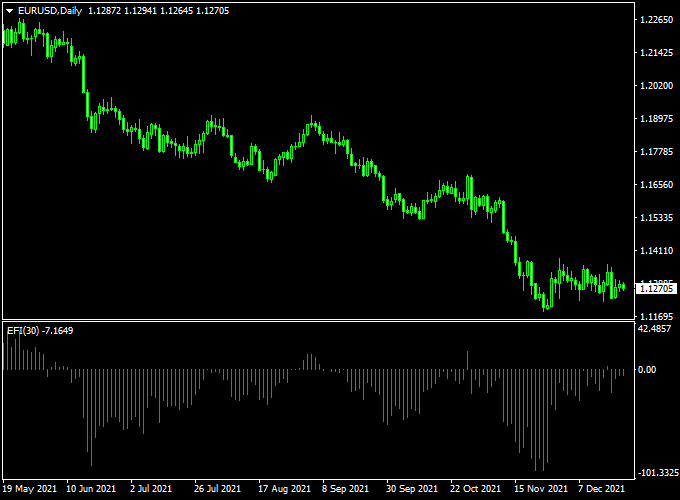
The chart below demonstrates the EFI Forex Signal Indicator in its MT4 window.
Purple bars oscillate above and below the 0.00 midpoint, providing clear entry signals for traders.
Bars turning above the midpoint suggest bullish momentum and potential buy opportunities.
Bars turning below the midpoint indicate bearish momentum and possible sell entries.
Guide to Trade with EFI Forex Signal Indicator
Buy Rules
- Enter a buy trade when the purple bars cross above the 0.00 midpoint
- Confirm the short-term trend aligns with the entry
- Use higher timeframe trend direction for additional confirmation
- Hold position until bars cross back below the midpoint or an opposite setup occurs
Sell Rules
- Enter a sell trade when the purple bars cross below the 0.00 midpoint
- Confirm the short-term trend is downward
- Combine with support/resistance levels or trend indicators for more accuracy
- Maintain position until bars cross back above the midpoint or a reversal signal appears
Stop Loss
- Place stop loss slightly beyond the recent swing high for sells or swing low for buys
- Adjust for market volatility and recent price swings
- Allow enough room to prevent normal fluctuations from triggering the stop
Take Profit
- Target nearby swing highs/lows or key support/resistance levels
- Consider partial exits as price approaches significant price zones
- Use trailing stops if the trend continues in your favor
Practical Tips
- Watch for clusters of bars turning near the midpoint for stronger signals
- Use alongside other oscillators or trend indicators for confirmation
EFI Signal Indicator + Hourly Pivot Points MT4 Intraday Strategy
This intraday strategy uses the EFI Forex Signal Indicator in combination with hourly pivot points indicator (support and resistance levels) to find high-probability entries within the trading day.
EFI gives a signal when momentum conditions favor a directional move.
Hourly pivots let you see key support/resistance zones where price often reacts intraday.
Together, they help you pick entries with structure, not blind signals.
The method is best on timeframes M15 and M30, although you can use M5 in very active pairs with tight spreads.
Use during active market hours (London, New York, overlap).
Pairs with liquidity and low spreads, like EURUSD, GBPUSD, USDJPY, and EURJPY work best.
Why It Works
EFI gives you a direction bias or signal when momentum supports a move.
The pivot points give context: price often stalls, reverses, or accelerates at pivot levels (R1, S1, etc.).
By combining them, you enter when momentum aligns and price is near structural zones, increasing the edge.
Buy Entry Rules
- EFI turns back above the zero level.
- Price should be above the pivot.
- Enter on the close of the confirmation candle after the EFI signal.
- Stop loss: place just under the nearest pivot support or a few pips below the recent swing low.
- Take profit: target at the next pivot resistance (e.g., R1, R2) or scale out part of the trade earlier (e.g., halfway to target).
- Alternatively, exit when EFI gives an opposite signal.
Sell Entry Rules
- EFI crosses back below the zero level.
- Price should be below the pivot.
- Enter on the close of the confirmation candle.
- Stop loss: place just above the nearby pivot or a few pips above the recent swing high.
- Take profit: target the next pivot support (S1, S2) or scale out. Or exit when EFI signals reverse.
Advantages
- Combines momentum (EFI) with structural zones (pivot levels) for context-sensitive entries.
- Cuts down on random signals by focusing only on pivot zones or when price tests key levels.
- Flexible exits: fixed pivot targets or dynamic exit on reverse signal.
- Works on many currency pairs with minimal adjustments.
Drawbacks
- In very range-bound sessions, the price may hover near pivots and trigger false signals.
- Spread and slippage can cut into profits, especially if entry is slightly off pivot margins.
- Pivot levels are lagging (calculated from prior periods), so they may not always align with sudden news moves.
Example Case Study 1 — EURUSD M15
Session: London morning. Price dipped close to the S1 pivot, then bounced.
EFI gave a buy signal shortly after. Price was above S1 and moving upward above the central pivot.
Trade: Entry was placed on the close of the confirmation candle.
Stop loss was just below S1. The take profit was set at the central pivot (Pivot) level.
The trade hit the target in under an hour. EFI did not reverse before the target.
Example Case Study 2 — GBPUSD M30
Session: Early US session. Price rallied to the R1 pivot and stalled.
EFI gave a sell signal while the price hovered near that pivot. Price began to reverse below the pivot.
Trade: Entry on confirmation candle close. Stop loss was placed just above R1.
Take profit set at S1 level.
Trade reached the target before midday, and volatility picked up.
Strategy Tips
- Stick to major pairs with low spreads for intraday entries.
- Trade only during active hours (London, New York, or overlap) when pivot interactions are more meaningful.
- If the price is far from any pivot (too extended), skip the signal—central pivot zones provide better context.
- Use modest position size since intraday trades accumulate many setups.
Download Now
Download the “efi-indicator.mq4” indicator for Metatrader 4
FAQ
What timeframe is best for the EFI Forex Signal Indicator?
The indicator works well on all timeframes. Short-term charts are ideal for scalpers and day traders, while higher timeframes can provide more reliable signals for swing trading.
Does it repaint signals?
No, the indicator generates signals in real-time based on the oscillator crossing the midpoint, providing actionable entries without retroactive adjustment.
Can it be combined with other indicators?
Yes, it can be used alongside moving averages, trendlines, or support/resistance indicators to confirm entries and enhance overall trading decisions.
Summary
The EFI Forex Signal Indicator for MT4 offers traders a reliable way to follow short-term trends using a purple oscillator.
Its clear signals above and below the midpoint make it an excellent tool for scalping and day trading.
It can be applied across all currency pairs and multiple timeframes, either as a primary entry tool or as a confirmation for other strategies.


