About the Entropy Math Indicator
The Entropy Math indicator for MetaTrader 4 is a free oscillator-type tool designed to help traders identify short-term price momentum for scalping currency pairs.
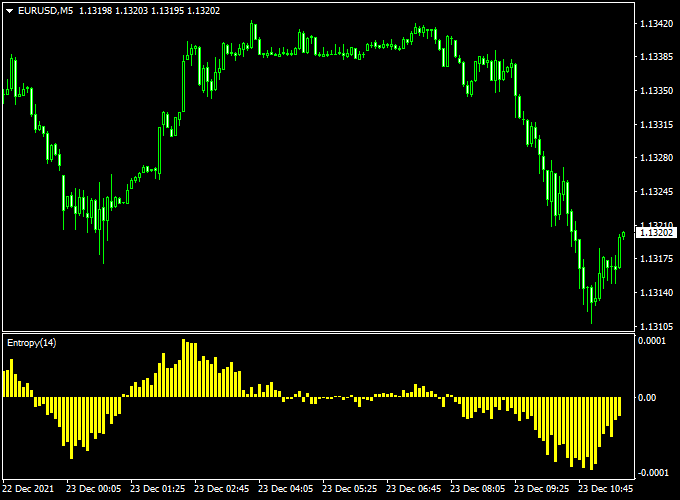
The indicator appears in a separate chart window as a yellow-colored oscillator, providing clear signals of bullish or bearish shifts.
It is particularly effective for fast-paced trading, helping traders spot entry opportunities with minimal lag.
The indicator works equally well on all currency pairs, including majors, minors, and exotic pairs.
While simple to use, it can also be combined with other scalping tools or trend indicators to improve trade confirmation and reduce false signals.
The Entropy Math indicator is ideal for intraday traders and scalpers who want to capture small, high-probability moves while keeping trading decisions straightforward and consistent.
Free Download
Download the “entropy-math.mq4” indicator for MT4
Key Features
- Oscillator displayed in a separate MT4 chart window
- Yellow-colored bars that highlight bullish and bearish momentum
- Zero-level crossover signals for precise trade entries
- Can be used alone or with additional scalping tools
- Optimized for scalping and short-term intraday strategies
Indicator Chart
The chart below shows the Entropy Math indicator in action.
Yellow bars oscillate above and below the zero level. Crosses above zero signal potential buy trades, while crosses below zero signal potential sell trades.
This simple visual makes it easier to time scalping entries.
Guide to Trade with Entropy Math Indicator
Buy Rules
- Yellow bars cross the zero level from bottom to top
- Confirm momentum is bullish on the timeframe you are trading
- Open a buy scalping trade aligned with the oscillator signal
- Prefer high-liquidity sessions like London and New York for better execution
Sell Rules
- Yellow bars cross the zero level from top to bottom
- Confirm momentum is bearish on the timeframe you are trading
- Open a sell scalping trade aligned with the oscillator signal
- Prefer high-volatility sessions for maximum profit potential
Stop Loss
- Use a fixed pip stop based on pair volatility (e.g., 10–25 pips)
- Adjust slightly for high-volatility sessions like London or New York
- Keep risk consistent by sizing positions accordingly
Take Profit
- Set a fixed pip target or exit when the oscillator crosses zero in the opposite direction
- Ensure risk-reward ratio is at least 1:1.5
- Adjust targets based on market momentum and timeframe
Entropy Math + Pips Hunter Forex Scalping Strategy for MT4
This scalping approach pairs the precise momentum reading of the Entropy Math Indicator for Forex Scalping (MT4) with the zone and bias signals of the Pips Hunter Indicator (MT4).
Together, they help you find quick, high-probability entries and exit them fast.
Use the system on 1-minute, 5-minute, and 15-minute charts. It suits active day traders and scalpers who accept small, frequent trades.
The Entropy Math gives low-lag momentum while Pips Hunter provides structural areas to place tighter stops and smarter targets.
Buy Entry Rules
- Entropy Math crosses back above the zero level.
- Pips Hunter displays a blue buy arrow.
- Confirm price is not trapped in a clear higher-timeframe resistance (check 1H).
- Enter on the close of a fresh bullish candle on your chosen timeframe once both indicators align.
- Stop loss: below the recent swing low or below the Pips Hunter support zone; typical range 6–20 pips on 5m depending on pair volatility.
- Take profit: aim 1.5x–2x your stop, or a fixed scalp of 8–30 pips depending on timeframe and spread.
Sell Entry Rules
- Entropy Math crosses back below the zero level.
- Pips Hunter displays a red sell arrow.
- Confirm price is not in a major higher-timeframe support area (check 1H).
- Enter on the close of a fresh bearish candle on your trading timeframe when both indicators agree.
- Stop loss: above the recent swing high or above the Pips Hunter resistance zone; typical range 6–20 pips on 5m adjusted for volatility.
- Take profit: aim 1.5x–2x your stop, or a fixed scalp of 8–30 pips depending on timeframe and spread.
Advantages
- Combines momentum with structure to reduce low-quality entries.
- Designed for quick trades with defined risk and reward.
- Adaptable across major pairs and sessions by tuning stop size.
- Easy to backtest on MT4 and to set alerts for indicator alignments.
Drawbacks
- False signals occur in choppy, low-trend conditions or during news spikes.
- Requires active monitoring on low timeframes or an alert system for part-time traders.
Example Case Study 1 — EURUSD, 5m
During the European session, entropy showed a steady shift from neutral into bullish momentum.
Pips Hunter displayed a blue arrow.
Entry at 1.0920 with a 10-pip stop under the swing low at 1.0910. Take profit set at 20 pips.
Price reached the target for a 2:1 reward.
This trade shows how momentum confirmation plus a nearby structural zone creates a clean scalp.
Example Case Study 2 — GBPUSD, 5m
At the London open, momentum dropped, and Entropy turned back below 0.
Pips Hunter showed a red sell arrow.
Short entry at 1.2700 used a 15-pip stop above the recent structure and a 25-pip take profit.
The pair moved in favor as momentum accelerated and TP was hit despite higher volatility.
The example highlights adjusting stop size for volatile pairs while keeping the core rules intact.
Strategy Tips
- Always check the economic calendar and avoid high-impact news within 15 minutes of entries.
- Adjust stop sizes for each pair and session. Widen stops for GBP/JPY and similar volatile crosses.
- Prefer majors and crosses with tight spreads. If the spread is wide, widen the TP or skip the pair.
- Use the 1-hour chart to determine the dominant bias. Prefer lower-timeframe trades that align with that bias.
Download Now
Download the “entropy-math.mq4” indicator for Metatrader 4
FAQ
Can Entropy Math be used alone?
Yes, the oscillator provides independent buy/sell signals, but combining it with other trend indicators may improve trade accuracy.
Is it suitable for scalping?
Yes, the indicator is designed for scalping, especially on low timeframes such as M5 or M15.
Summary
The Entropy Math indicator is a practical MT4 tool for scalping, helping traders identify short-term bullish and bearish momentum.
Its yellow oscillator bars provide easy-to-interpret zero-level cross signals, ideal for fast intraday trades.
By following the zero-level signals and using proper fixed stops and take profits, traders can create a disciplined scalping strategy that works across all currency pairs and trading sessions.





