
About the Entry Points Pro Indicator
The Entry Points Pro indicator for MT4 is a trend-following tool designed to deliver high-quality buy and sell signals directly on the chart.
It uses internal logic to track market momentum and highlight moments when price aligns with the active trend.
Once installed, the indicator plots blue arrows for buy signals and red arrows for sell signals.
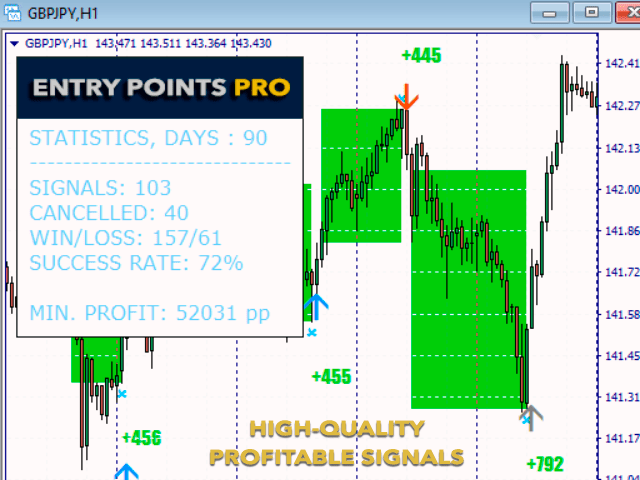
A built-in mini dashboard appears in the upper-left corner of the chart, displaying useful performance data such as total signals, winning versus losing trades, and the overall success rate for a selected period.
One of the key advantages of Entry Points Pro is that it does not repaint signals.
This allows traders to evaluate historical performance with confidence.
While it can be applied to many markets, the developer notes that the 15-minute timeframe often delivers the most balanced results.
Free Download
Download the “entry-points-pro-indicator.ex4” MT4 indicator
Key Features
- Trend-based buy and sell signals.
- Blue arrows for buy entries.
- Red arrows for sell entries.
- Mini dashboard with signal statistics.
- Displays win rate over custom periods.
- Works on forex, crypto, indices, and more.
Indicator Chart
Example chart showing the Entry Points Pro indicator applied to a live market.
The chart displays blue and red arrows plotted directly on price action.
The dashboard summarizes recent performance, helping traders quickly evaluate signal quality and market conditions.
Guide to Trade with Entry Points Pro
Buy Rules
- Wait for a blue arrow to appear on the chart.
- Open a buy trade at the close of the signal candle.
- Trade in the direction of the prevailing trend.
Sell Rules
- Wait for a red arrow to appear on the chart.
- Open a sell trade at the close of the signal candle.
- Trade in the direction of the prevailing trend.
Stop Loss
- Place the stop loss 2-3 pips below the most recent swing low for buy trades.
- Place the stop loss 2-3 pips above the most recent swing high for sell trades.
Take Profit
- Close the trade when an opposite arrow signal appears.
- Optionally scale out profits near recent support or resistance.
Entry Points Pro Indicator + SuperTrend NRP Forex Day Trading Strategy
This MT4 day trading strategy blends the Entry Points Pro Forex Indicator with the SuperTrend NRP Indicator to create a reliable and easy-to-follow trading setup.
The Entry Points Pro gives clear blue arrows for buy signals and red arrows for sell signals, allowing traders to react quickly when market momentum shifts.
The SuperTrend NRP adds confirmation by showing a green line during bullish conditions and an orange line during bearish conditions.
When both indicators align, traders can enter trades with more confidence, filtering out false signals and improving accuracy across different market sessions.
The idea is to trade in the direction of the trend and use the arrow signal for timing.
Because we’re day-trading, you’ll be trading higher-time-frame intraday charts (for example, 30 min or 1-hour) and holding trades only for the session (not overnight).
This makes it suitable for traders with moderate time to monitor charts and who want structured but not high-speed scalping.
Buy Entry Rules
- Confirm that the SuperTrend NRP line is green, indicating a bullish trend.
- Wait for the Entry Points Pro indicator to display a blue arrow, signalling a buy entry.
- Enter a buy trade on the close of the candle where the blue arrow appears, provided the SuperTrend line remains green.
- Place a stop loss a few pips below the recent swing low or recent support level—preferably below the low of the candle that triggered the arrow.
- Establish a take profit based on risk-reward ratio (e.g., risk 30 pips to target 60 pips) or exit when the SuperTrend line flips orange or a red arrow appears from Entry Points Pro.
Sell Entry Rules
- Ensure the SuperTrend NRP line is orange, indicating a bearish trend.
- Wait for the Entry Points Pro indicator to display a red arrow, signalling a sell entry.
- Enter a sell trade on the close of the candle where the red arrow appears, provided the SuperTrend line remains orange.
- Place a stop loss a few pips above the recent swing high or recent resistance level—preferably above the high of the candle that produced the arrow.
- Take profit when you reach a favourable risk-reward (e.g., 1:2) or when the SuperTrend line flips green or a blue arrow appears from Entry Points Pro.
Advantages
- Combines trend-filter (SuperTrend) with precise entry signals (arrows) so you trade with direction rather than against it.
- Structured trades with clear entry, stop-loss, and exit rules make it easier to follow discipline and manage risk.
- Day-trading timeframe reduces exposure to overnight risk and large gaps, making it more controllable.
- Works well on liquid major pairs and during active sessions when trend and momentum are stronger.
Drawbacks
- The arrow indicator may trigger late in the move, meaning you could enter after a large portion of the move is done and limit profit potential.
- In choppy or sideways markets, the SuperTrend filter may flip often, and arrows may give false signals, leading to whipsaws or multiple small losses.
- Large stop-losses may be required if the recent swing highs/lows are far from entry, which increases risk and means a larger target is needed to justify the trade.
- Since you’re holding trades for hours (not minutes), you may encounter periods of low momentum or retracements where the trade stalls or reverses before reaching the target.
Case Study 1: EURUSD 30-Minute Chart
During the London-New York overlap session, EURUSD produced a green SuperTrend line, signalling a bullish trend.
Later, the Entry Points Pro indicator flashed a blue arrow at 1.0980.
The trader entered a buy at 1.0980 with a stop at 1.0950 (30 pips risk).
Price moved steadily upward and touched 1.1040 (60 pips profit) before the SuperTrend line flipped orange, prompting exit.
Case Study 2: GBPJPY 1-Hour Chart
In an afternoon session, GBPJPY had an orange SuperTrend line (bearish).
A red arrow appeared from Entry Points Pro at 152.50, and the trader entered a short trade with a stop at 152.90 (40 pips risk).
The price fell to 151.70 (80 pips profit) before a blue arrow appeared and the SuperTrend line switched green, signalling the exit.
Strategy Tips
- Select major currency pairs (EURUSD, GBPUSD, USDJPY, GBPJPY, AUDUSD) where spreads are tighter and liquidity is higher.
- Prefer active trading times (London session, early New York session) when trends and momentum are stronger, and avoid low-volume hours where signals get noisy.
- Use proper risk management: keep risk per trade modest (e.g., 0.5-1% of account) and target at least a 1:2 reward-to-risk ratio where possible.
- Keep a trading journal: record pair, entry time, arrow type, trend line colour, outcome, and review which pairs/timeframes are performing best for you.
Download Now
Download the “entry-points-pro-indicator.ex4” for Metatrader 4
FAQ
What information does the dashboard provide?
The dashboard shows the total number of signals, the count of winning and losing trades, and the success rate over a selected time period.
Which timeframe is best for this indicator?
The 15-minute chart is recommended by the developer, but traders can experiment with other timeframes depending on their strategy.
Can Entry Points Pro be used on non-forex markets?
Yes. The indicator can be applied to cryptocurrencies, indices, and other supported MT4 instruments.
Are the signals suitable for manual trading?
Yes. Signals are designed for discretionary traders who want clear, on-chart entries without constant indicator adjustments.
Summary
The Entry Points Pro indicator for MT4 combines trend-based signals with a built-in performance dashboard, giving traders both entries and context.
Its non-repainting signals make it suitable for live trading and historical evaluation.
With clear arrows, flexible market support, and practical stop loss placement using recent swings, the indicator fits well into structured trading plans focused on consistency and disciplined execution.


