
About the Forex Invincible Signals Indicator
The Forex Invincible Signals MT4 indicator delivers actionable trading signals directly on the price chart while also displaying essential account information.
It combines technical signal generation with practical account awareness, allowing traders to manage trades without switching screens.
The indicator uses colored arrows to signal potential market entries.
A blue upward arrow suggests bullish conditions and a possible buy opportunity, while a red downward arrow points to bearish pressure and a potential sell setup.
These signals appear in real time as market conditions develop.
In addition to signals, Forex Invincible Signals shows key account and broker details on the chart.
Traders can monitor balance, equity, leverage, and margin levels at a glance.
The SR period setting allows customization of signal sensitivity, making the indicator adaptable to different trading styles and market conditions.
Free Download
Download the “forex-invincible-signals.mq4” MT4 indicator
Key Features
- Real-time buy and sell arrow signals on the main chart.
- Blue arrows for buy setups and red arrows for sell setups.
- Adjustable SR period to control signal behavior.
- Displays broker, account, and margin information.
- Designed for active and information-focused traders.
Indicator Chart
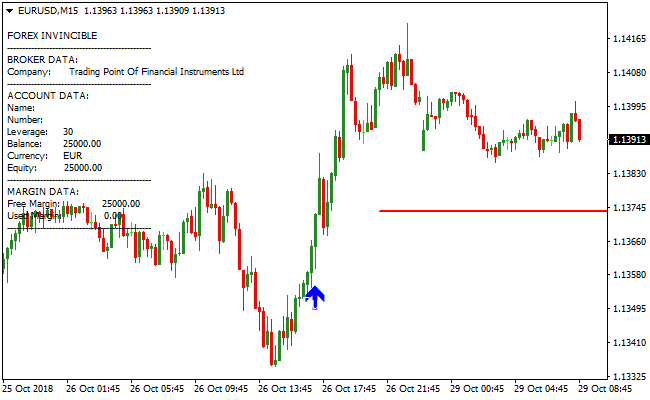
The image shows the Forex Invincible Signals MT4 indicator with colored arrows plotted on the main price chart.
Buy and sell signals appear alongside live account data, allowing traders to track trade opportunities and account status in one view.
Guide to Trade with Forex Invincible Signals Indicator
Buy Rules
- Wait for a blue upward arrow to appear on the chart.
- Confirm that recent price action supports bullish movement.
- Enter a buy trade at the close of the signal candle.
- Avoid entries during low-volume market conditions.
Sell Rules
- Wait for a red downward arrow to appear on the chart.
- Confirm bearish pressure with recent price movement.
- Enter a sell trade at the close of the signal candle.
- Avoid selling into strong support zones.
Stop Loss
- Place the stop loss beyond the nearest swing high or low.
- Allow room for normal price fluctuations.
- Adjust stop distance based on the active timeframe.
Take Profit
- Close all buy trades when a red sell arrow appears.
- Close all sell trades when a blue buy arrow appears.
- Alternatively, target nearby support or resistance.
- Secure profits before major market slowdowns.
Forex Invincible Signals and Flat Trend RSI MT4 Strategy
This strategy combines the Forex Invincible Signals MT4 Indicator and the Flat Trend RSI MT4 Indicator to identify strong trend moves.
The Forex Invincible Signals indicator provides blue arrows for buy entries and red arrows for sell entries.
The Flat Trend RSI indicator shows trend bias: blue histogram bars indicate a buy trend, while red bars indicate a sell trend.
By combining these two indicators, traders can confirm both trend direction and timing of entries.
This strategy works on multiple timeframes and is ideal for scalpers and intraday traders focusing on major currency pairs.
Buy Entry Rules
- The Flat Trend RSI histogram must be blue, indicating a buy trend.
- Wait for the Forex Invincible Signals indicator to draw a blue arrow for confirmation.
- Enter a buy trade at the open of the next candle after the blue arrow appears.
- Place a stop loss below the most recent swing low or below the start of the current trend on Flat Trend RSI.
- Take profit is set when the blue histogram turns red or set a fixed pip target, signaling trend weakening.
Sell Entry Rules
- The Flat Trend RSI histogram must be red, indicating a sell trend.
- Wait for the Forex Invincible Signals indicator to draw a red arrow for confirmation.
- Enter a sell trade at the open of the next candle after the red arrow appears.
- Place a stop loss above the most recent swing high or above the start of the current trend on Flat Trend RSI.
- Take profit is set when the red histogram turns blue or set a fixed pip target, signaling trend weakening.
Advantages
- Combining trend bias and precise entry signals increases reliability.
- Clear visual signals are easy to read, suitable for beginners and experienced traders.
- Can be used across multiple timeframes, allowing flexibility for scalping or intraday trading.
- Helps avoid false entries by confirming trend strength before entering a trade.
- Works on major currency pairs with high liquidity for better execution.
Drawbacks
- Performance may vary across currency pairs; low-liquidity pairs can have delayed or inconsistent signals.
- Strong reversals can occur before the histogram fades, causing trades to close prematurely or hit stop loss.
Case Study 1: EURUSD M5 Chart
During the London session, the Flat Trend RSI histogram was blue, confirming a buy trend.
The Forex Invincible Signals indicator generated a blue arrow.
A buy trade was entered at 1.10050 with a stop loss at 1.10000.
The trade was closed when the histogram changed from blue to red, signaling a possible trend reversal.
The trade captured 70 pips.
Case Study 2: GBPJPY M15 Chart
On the GBPJPY M15 chart, the Flat Trend RSI histogram was red, confirming a sell trend.
A red arrow appeared on the Forex Invincible Signals indicator.
A sell trade was opened at 153.50 with a stop loss at 153.90.
The trade was closed when the histogram turned from red to blue, indicating the trend may be reversing.
The trade netted 40 pips.
Strategy Tips
- Trade only when the histogram confirms the trend in the same direction as the signal arrow for higher probability trades.
- Focus on major pairs like EURUSD, GBPUSD, AUDUSD, and USDJPY for tighter spreads and better execution.
- Use multiple timeframes for trend confirmation. For example, check M15 or H1 for overall trend direction before entering on M5.
- Keep trades small and monitor them closely, especially on lower timeframes like M1 or M5.
- Combine this strategy with basic support and resistance levels to better judge entry points and anticipate potential reversals.
Download Now
Download the “forex-invincible-signals.mq4” Metatrader 4 indicator
FAQ
What does the SR period setting control?
The SR period adjusts how the indicator evaluates price movement.
Changing this setting can make signals more responsive or more selective.
Does the indicator display live account information?
Yes. It shows broker name, account details, balance, equity, leverage, and margin data directly on the chart.
Can Forex Invincible Signals be used on any timeframe?
The indicator works across all MT4 timeframes. Lower timeframes suit faster trading, while higher timeframes support broader setups.
Summary
The Forex Invincible Signals MT4 indicator combines real-time trade signals with on-chart account monitoring.
This dual-purpose design helps traders stay focused on both market opportunities and account health.
With adjustable settings, clear arrows, and live margin data, the indicator works well for traders who value efficiency and awareness.
Additional filtering tools could enhance precision, but its current setup already offers a practical trading companion.


