
About the Forex Market Hours MT4 Indicator
The Forex Market Hours MT4 indicator displays global forex trading sessions directly on your MetaTrader 4 platform.
It shows the opening and closing times of major currency markets in GMT, helping traders stay aware of when liquidity and volatility are most likely to increase.
The indicator presents all major sessions in a single, easy-to-read window, including Sydney, Tokyo, Frankfurt, London, and New York.
This overview allows traders to quickly identify which markets are active without checking external tools or converting time zones.
Forex Market Hours works especially well for intraday traders who depend on session-based volatility.
London and New York sessions typically generate the strongest price movement, making them ideal for scalping and day trading.
By using this indicator, traders can better time entries, avoid slow periods, and focus on sessions that match their strategy.
Free Download
Download the “forex-market-hours-gmt.ex4” MT4 indicator
Key Features
- Displays all major forex market sessions in GMT.
- Includes Sydney, Tokyo, Frankfurt, London, and New York.
- Shows active and inactive trading sessions in real time.
- Runs in a separate MT4 window for quick reference.
- Supports scalping, intraday, and session-based strategies.
Indicator Chart
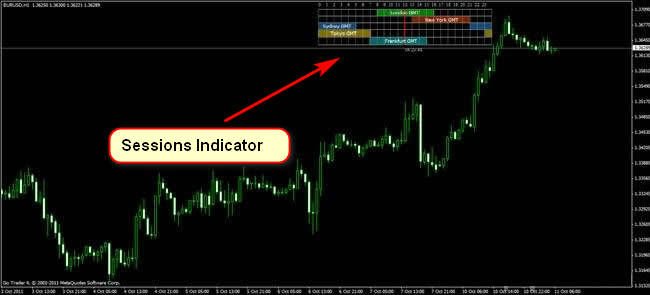
The image shows the Forex Market Hours MT4 indicator displaying global trading sessions in a dedicated window.
Active market sessions update in real time, allowing traders to track overlaps and high-activity periods.
This view helps identify when volatility is most likely to expand.
Guide to Trade with Forex Market Hours MT4 Indicator
Buy Rules
- Focus on buy setups during the London or New York session.
- Wait for the price to show bullish momentum after the session open.
- Confirm entries with price action or a momentum indicator.
- Avoid entering trades during low-activity sessions.
Sell Rules
- Look for sell setups during high-liquidity sessions.
- Wait for bearish price action near session highs.
- Confirm selling pressure with technical confirmation.
- Skip trades during market transitions or flat periods.
Stop Loss
- Place the stop loss beyond the most recent swing level.
- Allow room for volatility during active sessions.
- Avoid tight stops during session overlaps.
Take Profit
- Close all buy trades when session momentum fades.
- Close all sell trades near the end of the active session.
- Alternatively, target intraday support or resistance levels.
- Secure profits before low-liquidity periods begin.
Forex Market Hours and EMA Trend MT4 Strategy
This strategy combines the Forex Market Hours MT4 Indicator and the EMA Trend Forex MT4 Indicator to capture strong trend moves during active market sessions.
The Forex Market Hours indicator displays all key sessions in a single window, helping traders focus on periods of high liquidity.
The EMA Trend Forex indicator uses four EMAs to confirm strong trends.
A buy trade is opened when the price closes above all four EMAs, indicating a strong uptrend.
A sell trade is opened when the price closes below all four EMAs, indicating a strong downtrend.
This strategy works on multiple timeframes and is suitable for traders looking for reliable trend entries.
Buy Entry Rules
- Check the Forex Market Hours indicator to ensure the current session is active, ideally London or New York, for high volatility.
- Confirm that the price closes above all four EMAs on the EMA Trend Forex indicator.
- Enter a buy trade at the open of the next candle after the close above all EMAs.
- Set stop loss below the nearest swing low or below the lowest EMA to reduce risk.
- Take profit is set at a fixed 2:1 risk-to-reward ratio from the stop loss.
Sell Entry Rules
- Check the Forex Market Hours indicator to ensure the session is active, preferably London or New York.
- Confirm that the price closes below all four EMAs on the EMA Trend Forex indicator.
- Enter a sell trade at the open of the next candle after the close below all EMAs.
- Set stop loss above the nearest swing high or above the highest EMA to reduce risk.
- Take profit is set at a fixed 2:1 risk-to-reward ratio from the stop loss.
Advantages
- Clear trend signals from multiple EMAs increase the probability of profitable trades.
- The market session indicator allows traders to focus on high-liquidity periods.
- Works on multiple pairs and timeframes, giving flexibility to the trader.
- Helps maintain discipline by entering trades only when strong trends are confirmed.
- Combining trend and session filters reduces the risk of false signals.
Drawbacks
- Limited trading opportunities outside major sessions.
- EMA trend signals can lag slightly, resulting in later entries.
- Requires discipline to avoid entering trades during sideways markets.
- Profit targets are fixed, which may limit gains during strong trending moves.
Case Study 1: EURUSD H1 Chart
During the London session, the EURUSD price closed above all four EMAs on the H1 chart.
A buy trade was opened at 1.09850 with a stop loss at 1.09780.
Using the 2:1 risk-to-reward rule, the take profit was set at 1.09920.
The price moved strongly upward and reached take profit within three hours, netting 70 pips.
Case Study 2: GBPJPY H4 Chart
During the New York session, GBPJPY closed below all four EMAs on the H4 chart.
A sell trade was opened at 153.20 with a stop loss at 153.60.
Take profit was set at 152.80 according to the 2:1 risk-to-reward rule.
The price trended downward and hit take profit after six hours for a 40-pip gain.
Strategy Tips
- Focus on the London and New York sessions for better volatility and trend opportunities.
- Always confirm that the price closes above or below all EMAs before entering a trade.
- Use major pairs such as EURUSD, GBPUSD, AUDUSD, and GBPJPY for better liquidity and lower spreads.
- Keep a journal of trades to track performance and refine session timing.
- Avoid trading during news events that can cause extreme volatility and widen spreads.
- Adjust stop loss placement slightly based on market conditions to avoid getting stopped out by minor fluctuations.
Download Now
Download the “forex-market-hours-gmt.ex4” Metatrader 4 indicator
FAQ
Which market sessions are best for scalping?
The London and New York sessions generate the highest volatility and trading volume.
These sessions work great for scalping and fast intraday strategies.
Does the Forex Market Hours MT4 indicator adjust for daylight savings?
The indicator displays sessions in GMT.
Traders should account for seasonal time changes when comparing broker server time.
Can I use this indicator with any trading strategy?
Yes. The indicator supports any strategy that benefits from session awareness, including breakout, momentum, and trend-following setups.
Summary
The Forex Market Hours MT4 indicator gives traders a practical overview of global trading sessions directly inside MetaTrader 4.
By showing all major markets in GMT, it removes guesswork around timing and session overlaps.
The indicator performs strongly for scalpers and day traders who rely on volatility and volume.
With clear session visibility and simple integration, it offers a solid foundation for session-based trading and disciplined market timing.


