About the Forex Profit Supreme Meter
The Forex Profit Supreme Meter for MT4 is a powerful tool for quickly identifying market opportunities.
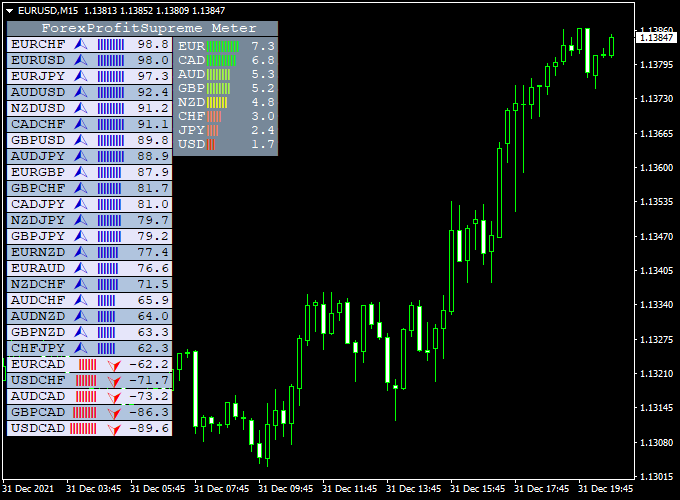
It displays all visible currency pairs in a compact dashboard, showing which pairs are trending and which are moving sideways.
The indicator also provides currency strength readings, helping traders gauge market momentum at a glance.
This tool works on all timeframes and is ideal for scalping, day trading, or swing trading.
You can adjust the dashboard appearance via the inputs to fit your personal preferences.
It is suitable for both beginners and experienced traders who want a fast way to see which pairs are active and strong.
Free Download
Download the “ForexProfitSupreme Meter.mq4” indicator for MT4
Key Features
- Displays bullish and bearish trends for all market watch pairs
- Identifies sideways or weak pairs to avoid
- Shows currency strength for major currencies
- Customizable dashboard layout and colors
- Works on any timeframe and currency pair
- Ideal for scalping, intraday, and swing trades
Indicator Chart
The dashboard shows each currency pair’s trend direction and strength.
Green highlights indicate bullish momentum, red indicates bearish, and neutral colors mark sideways movement.
Traders can quickly spot strong opportunities without switching charts.

Guide to Trade with Forex Profit Supreme Meter
Buy Rules
- Buy pairs showing strong green trend bars
- Avoid pairs with mixed or neutral signals
Sell Rules
- Sell pairs showing strong red trend bars
- Avoid pairs with mixed or neutral signals
Stop Loss
- Set stop slightly below the recent swing low for buys
- Set stop slightly above the recent swing high for sells
- Use smaller stops during low volatility
- Widen stops if the market is choppy or during news events
- Always adjust risk to a small % of your account
Take Profit
- Close buy trades when the trend bar turns red
- Close sell trades when the trend bar turns green
- Take partial profits near recent support for buys
- Take partial profits near recent resistance for sells
- Use a trailing stop to lock profits during strong trends
- Exit trades after a fixed pip target if preferred
Practical Tips
- Use it to quickly scan multiple pairs before trading
- Combine with trend or momentum indicators for confirmation
- Avoid trading during low liquidity periods
- Focus on pairs with strong, consistent signals
- Adjust dashboard colors and layout for easier reading
Day Trading Strategy: Forex Profit Supreme Meter + ZeroLag RVI (MT4)
This strategy combines the Forex Profit Supreme Meter and the ZeroLag RVI Indicator to identify trending currency pairs and confirm entry signals for day trading.
The Forex Profit Supreme Meter highlights trending pairs, showing both bullish and bearish momentum.
The ZeroLag RVI displays a green cloud for buy signals and a red cloud for sell signals on a separate chart.
This strategy works best on 15-minute to 1-hour charts during high-liquidity trading sessions.
Buy Entry Rules
- Check the Forex Profit Supreme Meter for pairs showing strong bullish trends.
- Confirm the buy signal with a green cloud on the ZeroLag RVI indicator.
- Enter a buy trade at the close of the confirming candle on the chart of the selected pair.
- Set the stop loss below the most recent swing low or a nearby support level.
- Set take profit at a 1:2 reward-to-risk ratio, or exit if the ZeroLag RVI cloud turns red or the trend on the Supreme Meter weakens.
Sell Entry Rules
- Check the Forex Profit Supreme Meter for pairs showing strong bearish trends.
- Confirm the sell signal with a red cloud on the ZeroLag RVI indicator.
- Enter a sell trade at the close of the confirming candle on the chart of the selected pair.
- Set the stop loss above the most recent swing high or a nearby resistance level.
- Set take profit at a 1:2 reward-to-risk ratio, or exit if the ZeroLag RVI cloud turns green or the trend on the Supreme Meter weakens.
Advantages
- Identifies the strongest trending pairs, reducing the chance of trading in weak markets.
- Combining trend meter with RVI confirmation increases the probability of successful trades.
- Non-repainting indicators provide reliable signals for intraday trading.
- Clear entry and exit rules help traders maintain discipline.
- Works across multiple currency pairs and intraday timeframes.
Drawbacks
- Some signals may conflict if the trend meter shows moderate momentum, requiring additional confirmation.
- Not ideal for scalping on very low timeframes due to indicator lag and noise.
Case Study 1
On the GBP/USD 30-minute chart, the Forex Profit Supreme Meter indicated a strong bullish trend.
The ZeroLag RVI displayed a green cloud.
A buy trade was entered at 1.3450, with a stop loss at 1.3435 and a take profit at 1.3485.
The trade reached take profit within 2 hours, yielding a 35-pip gain.
Case Study 2
On the EUR/JPY 1-hour chart, the Forex Profit Supreme Meter indicated a bearish trend.
The ZeroLag RVI displayed a red cloud.
A sell trade was entered at 147.50, with a stop loss at 147.80 and a take profit at 147.00.
The trade reached take profit in 3 hours, capturing a 50-pip gain.
Strategy Tips
- Use currency pairs with tight spreads such as EUR/USD, GBP/USD, USD/JPY, and AUD/USD.
- Use trailing stops to lock in profits during strong trending moves.
- Limit trades per day to maintain focus and prevent overtrading.
- Check multiple timeframes to ensure trades align with higher timeframe trends.
- Be patient and wait for both indicators to fully confirm a trade before entering.
- Focus on pairs showing strong trending behavior rather than choppy sideways markets.
Download Now
Download the “ForexProfitSupreme Meter.mq4” indicator for Metatrader 4
FAQ
Which pairs can I use it on?
It works on all major and minor currency pairs visible in MT4 market watch.
Does it repaint?
No. Trend and strength readings are updated in real time without repainting past signals.
Can it be used for scalping?
Yes, the dashboard allows quick identification of strong trending pairs for short-term trades.
Can the dashboard be customized?
Yes, you can modify colors, layout, and visible pairs through the indicator’s inputs.
Summary
The Forex Profit Supreme Meter for MT4 is a fast and practical tool for monitoring multiple currency pairs at once.
It shows trends, sideways markets, and currency strength directly on a single dashboard.
Perfect for scalping, day trading, and swing trading, it helps traders identify high-probability trades quickly.
Customizable settings and clear trend signals make it useful for both beginners and experienced traders.


