
About the Forex Status Monitor Indicator
Forex Status Monitor is a free mt4 (Metatrader 4) indicator that provides real-time market info in a bottom window of the trading platform.
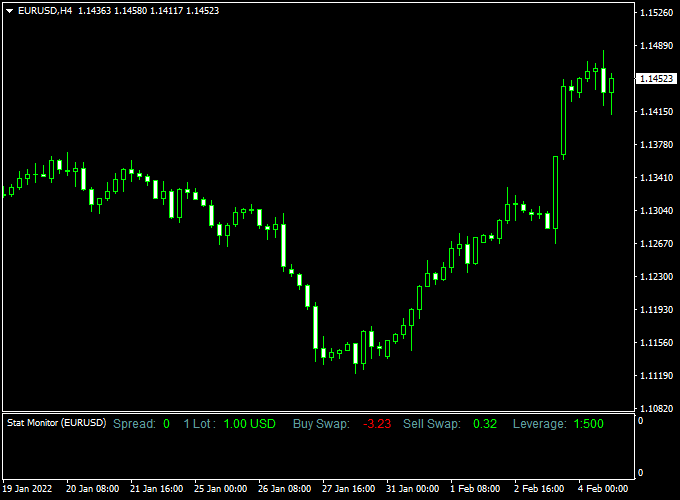
It displays the current spread, lot size, buy swap, sell swap, and your account leverage directly on the chart.
Having this information visible at all times is particularly useful for news traders and scalpers who need to monitor fluctuating spreads in real-time.
Please note that the indicator itself does not generate any buy or sell signals; rather, it serves as a vital monitoring tool to ensure you are trading under the best possible conditions.
Free Download
Download the “Status Monitor.mq4” indicator for MT4
Key Features
- It provides a live display of the current spread to help traders avoid high-cost entries.
- The indicator lists the buy and sell swap rates, which is crucial for long-term swing traders.
- It identifies your current account leverage to assist in accurate margin calculations.
- The tool displays the active lot size to prevent accidental over-leveraging of positions.
Indicator Chart
The Forex Status Monitor indicator chart features a separate data panel located at the bottom of the MT4 screen.
Unlike trend indicators that plot lines on price, this tool uses clear text labels to communicate current market conditions.
By checking this monitor before every trade, a trader can instantly see if the spread has widened beyond an acceptable limit or if the swap rates have changed significantly.
Guide to Trade with the Forex Status Monitor Indicator
While this tool does not provide entries, it is used to filter out trades that are too expensive due to market conditions.
Buy Rules
- Check the monitor to ensure the current spread is within your strategy’s limits.
- Verify the buy swap rate if you plan on holding the position overnight.
- Ensure your account leverage and lot size are correctly configured for the trade.
- Execute your buy entry only when your other primary indicators align with these healthy status readings.
Sell Rules
- Monitor the spread during high-volatility events to ensure it isn’t too wide for a sell entry.
- Review the sell swap data to understand the cost or credit of holding the trade long-term.
- Confirm that your account balance can support the intended lot size based on the displayed leverage.
- Open your sell position once the status monitor confirms favorable trading conditions.
Stop Loss
- Calculate your stop loss distance by factoring in the live spread shown on the monitor.
- Place your stop loss at a structural level on the chart while ensuring it provides enough room for spread fluctuations.
- Adjust your risk per trade based on the account info provided by the monitor.
- Maintain a disciplined approach to risk by respecting the leverage limits of your account.
Take Profit
- Set your take profit target at a level that covers the spread cost and provides a positive reward.
- Use the lot size data to ensure your profit targets align with your overall financial goals.
- Consider closing positions before the daily swap is charged if the rates are unfavorable.
- Target major horizontal levels while keeping an eye on the monitor for any sudden spread spikes.
Intraday Forex Strategy for MT4: Forex Status Monitor + MA Candles Trend Indicator
This strategy combines the Forex Status Monitor MT4 and the MA Candles Forex Trend Indicator MT4.
The Forex Status Monitor provides essential real-time market information, including current spread, lot size, buy/sell swaps, and account leverage, which helps traders make informed decisions.
The MA Candles indicator shows trend direction using colored candles: blue for buy signals and red for sell signals.
This strategy is designed for short-term trading on M1, M5, and M15 charts, allowing traders to scalp small movements while following the market trend.
It works best during high-liquidity sessions such as London and New York.
Buy Entry Rules
- Check that the MA Candles are blue, indicating a bullish trend.
- Confirm favorable trading conditions using the Forex Status Monitor (tight spread, appropriate lot size, and swaps).
- Enter a buy trade at the close of the blue candle.
- Place a stop loss below the recent swing low or nearby support level.
- Take profit targets: 5-12 pips on M1, 10-20 pips on M5, 20-35 pips on M15 charts.
Sell Entry Rules
- Check that the MA Candles are red, indicating a bearish trend.
- Confirm favorable trading conditions using the Forex Status Monitor (tight spread, appropriate lot size, and swaps).
- Enter a sell trade at the close of the red candle.
- Place a stop loss above the recent swing high or nearby resistance level.
- Take profit targets: 5-12 pips on M1, 10-20 pips on M5, 20-35 pips on M15 charts.
Advantages
- Provides both trend confirmation (MA Candles) and market conditions (Forex Status Monitor).
- Suitable for multiple intraday time frames: M1, M5, and M15.
- Helps identify the best conditions for entry, avoiding trades during high spreads or unfavorable swaps.
- Clear buy/sell signals reduce confusion for fast decision-making.
- Adaptable to multiple currency pairs with active liquidity.
Drawbacks
- Profit potential is limited per trade due to short-term targets.
- Spread and slippage can significantly affect profitability on smaller pip targets.
- Requires monitoring both trend signals and market conditions simultaneously, which may be challenging for beginners.
Case Study 1: EURUSD M5 – London Session
During the London session, EURUSD showed blue MA Candles on the M5 chart, signaling a bullish trend.
The Forex Status Monitor indicated a low spread of 0.8 pips and favorable swaps.
A buy trade was entered at 1.1025 with a stop loss at 1.1015.
Price moved up to 1.1040 within 25 minutes, capturing 15 pips profit.
Trend confirmation and monitoring market conditions provided a strong intraday setup.
Case Study 2: USDCHF M15 – New York Session
USDCHF on the M15 chart displayed red MA Candles, indicating a bearish trend.
The Forex Status Monitor showed a tight spread and neutral swaps.
A sell trade was entered at 0.9235 with a stop loss at 0.9250.
Price fell to 0.9208 within 40 minutes, resulting in 27 pips profit.
Aligning trend and market conditions increased trade accuracy.
Strategy Tips
- Only take trades when both trend direction and market conditions are favorable.
- Avoid trading during major news releases, as spreads may widen and slippage can occur.
- Adjust take profit and stop loss levels based on the selected time frame.
- Focus on high-liquidity pairs for best results, such as EURUSD, GBPUSD, USDJPY, and USDCHF.
- Keep risk per trade small (1-2% of account balance) due to the fast-paced nature of scalping.
- Consider trading multiple time frames simultaneously to capture more opportunities.
Download Now
Download the “Status Monitor.mq4” indicator for Metatrader 4
FAQ
Why is it important to see the spread in real-time?
The spread is the difference between the buy and sell price, representing your immediate cost of entering a trade.
During news events or the market rollover period, spreads can widen significantly.
By using the Forex Status Monitor, you can avoid entering trades during these high-cost periods, which is especially important for scalpers who target small price moves.
What does the “Swap” information tell me?
The swap is the interest paid or earned for holding a position overnight.
If the swap is negative, you will lose a small amount of money every day the trade stays open.
Seeing this on your chart helps you decide whether a long-term swing trade is worth the cost, or if you should aim to close your position before the daily server reset.
Can I move the data to a different corner of the chart?
Most utility indicators like the Forex Status Monitor allow for some customization in the settings menu.
You can often choose which corner of the chart the data appears in or change the font color to make it more readable against your specific template.
Summary
The Forex Status Monitor for MT4 is an effective utility tool that assists in determining the appropriate timing for market entries by providing transparency on trading costs.
By offering a constant view of account leverage and live spreads, it helps you maintain a professional level of awareness over your trading capital.
This tool helps traders maintain a consistent routine by highlighting the practical data needed to manage every trade effectively.
Using this indicator allows you to filter high-risk trades that may be compromised by poor market conditions or incorrect lot sizing.


