
About the Gann Signal Indicator
The Gann Signal Indicator for MT4 is a trading tool that converts classic Gann chart pattern logic into clear buy and sell arrows.
It removes the complexity normally associated with Gann analysis and makes these patterns accessible to traders of all experience levels.
Instead of manually plotting angles or interpreting historical price geometry, the indicator automatically detects Gann-based conditions and displays them directly on the chart.
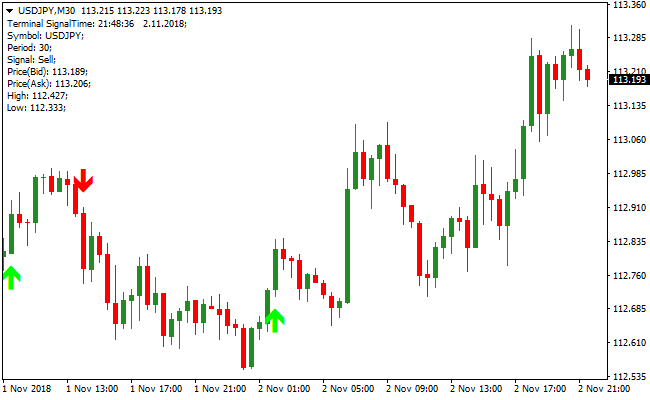
A green arrow signals a bullish setup, while a red arrow signals a bearish setup.
The Gann Signal Indicator performs best when used in the direction of the prevailing trend.
By filtering trades with a trend-following indicator such as a moving average or Bollinger Bands, traders can focus on higher-probability setups and ignore countertrend signals.
Free Download
Download the “gann-signal-indicator.mq4” MT4 indicator
Key Features
- Automatically identifies Gann-based trading signals.
- Clear arrow signals for buy and sell opportunities.
- Eliminates the need for manual Gann calculations.
- Works well with trend-following indicators.
- Compatible with all MT4 timeframes and markets.
Indicator Chart
The Gann Signal Indicator chart displays directional arrows plotted directly on price action.
Green arrows highlight bullish Gann setups, while red arrows indicate bearish conditions.
The chart helps traders align entries with the dominant trend and avoid conflicting signals.
Guide to Trade with the Gann Signal Indicator
Buy Rules
- Confirm that the overall market trend is bullish.
- Ignore red arrows during an uptrend.
- Wait for a green Gann arrow to appear.
- Open a buy trade at the close of the signal candle.
Sell Rules
- Confirm that the overall market trend is bearish.
- Ignore green arrows during a downtrend.
- Wait for a red Gann arrow to appear.
- Open a sell trade at the close of the signal candle.
Stop Loss
- Place the stop loss below the last confirmed swing low for buy trades.
- Place the stop loss above the last confirmed swing high for sell trades.
- Use a small fixed buffer beyond the swing point.
Take Profit
- Close all buy orders if a red Gann arrow prints while the trade is active.
- Close all sell orders if a green Gann arrow prints while the trade is active.
- Alternatively, target the next higher timeframe support or resistance level.
Gann Signal + Zero Lag MA Forex Day Trading Strategy
This MT4 day trading strategy combines the precise entry arrows of the Gann Signal Indicator with the trend-following Zero Lag Moving Average Indicator.
The Gann Signal provides green arrows for buy entries and red arrows for sell entries.
The Zero Lag MA confirms trend direction: price above the MA is bullish, price below the MA is bearish.
Using both indicators together helps day traders take trades aligned with the market trend and improves the probability of success.
This strategy works best on M5, M15, and M30 charts and is ideal for major forex pairs with high liquidity, such as EURUSD, GBPUSD, and USDJPY.
Buy Entry Rules
- Price is trading above the Zero Lag MA, confirming a bullish trend.
- Gann Signal displays a green arrow.
- Enter long at the open of the candle following the green arrow.
- Place a stop loss below the Zero Lag MA or the most recent swing low.
- Close the trade when the Gann Signal arrow changes color.
Sell Entry Rules
- Price is trading below the Zero Lag MA, confirming a bearish trend.
- Gann Signal displays a red arrow.
- Enter short at the open of the candle following the red arrow.
- Place a stop loss above the Zero Lag MA or the most recent swing high.
- Close the trade when the Gann Signal arrow changes color.
Advantages
- Combines clear entry signals with trend confirmation for higher probability trades.
- Easy-to-read arrows reduce decision-making stress for day traders.
- Flexible across multiple timeframes for intraday trading.
- Helps traders avoid counter-trend trades and false breakouts.
Drawbacks
- Requires attention to timing during fast-moving sessions.
- Not all Gann arrows result in extended moves, so patience is needed.
Case Study 1: AUDJPY M15
During the London session, AUDJPY was trading above the Zero Lag MA, confirming a bullish trend.
A green Gann arrow appeared at 91.25, signaling a buy.
A long trade was opened at 91.28 with a stop at 91.10.
Price rose steadily, and the trade was closed when the Gann arrow changed color at 91.52, securing a 24 pip gain.
Case Study 2: GBPUSD M5
GBPUSD was trading below the Zero Lag MA during the New York session, showing a bearish trend.
A red Gann arrow appeared at 1.2235, triggering a sell entry at 1.2232 with a stop at 1.2250.
The price fell to 1.2205, and the trade was closed when the Gann arrow flipped green, resulting in a 27 pip profit.
Strategy Tips
- Only take trades that align with the Zero Lag MA trend; ignore arrows against the trend.
- Use proper risk management and position sizing to limit drawdowns.
- Monitor the Gann arrow for color changes to exit trades dynamically.
- Adjust stop losses according to recent swings and volatility.
Download Now
Download the “gann-signal-indicator.mq4” Metatrader 4 indicator
FAQ
Do I need to understand Gann theory to use this indicator?
No. The indicator automates Gann pattern recognition and presents signals in a simple arrow format.
Which indicators pair well with the Gann Signal?
Trend-following tools such as moving averages, Bollinger Bands, or trend channels work well as filters.
Can this indicator be used for scalping?
Yes. It can be applied to lower timeframes, though filtering trades with the broader trend remains important.
Summary
The Gann Signal MT4 Indicator simplifies classic Gann chart patterns into actionable trading signals.
By presenting clear arrows and removing technical complexity, it allows traders to focus on trend alignment and execution.
Used with a trend filter and clear risk rules, the indicator supports more consistent trade decisions.


