
About the Jevel Trend Bar Indicator
The Jevel Trend Bar indicator for MT4 is a simple and effective tool for spotting short-term market momentum using histogram bars.
It plots colored bars in a separate window to indicate the prevailing trend.
Green bars signal bullish momentum, while orange bars indicate bearish momentum.
This makes it easy to identify entry and exit points at a glance.
It can function as a standalone indicator or be combined with other analysis tools for confirmation.
By focusing on momentum shifts, the Jevel Trend Bar simplifies the process of following market direction and executing timely trades.
Free Download
Download the “jevel-histogram.mq4” MT4 indicator
Key Features
- Histogram bar signals that indicate market momentum.
- Green bars show bullish trends and potential buy opportunities.
- Orange bars show bearish trends and potential sell opportunities.
- Can be used alone or with other technical indicators.
- Compatible with any timeframe, from M1 to D1.
- Easy to interpret, ideal for beginners and experienced users alike.
Indicator Chart
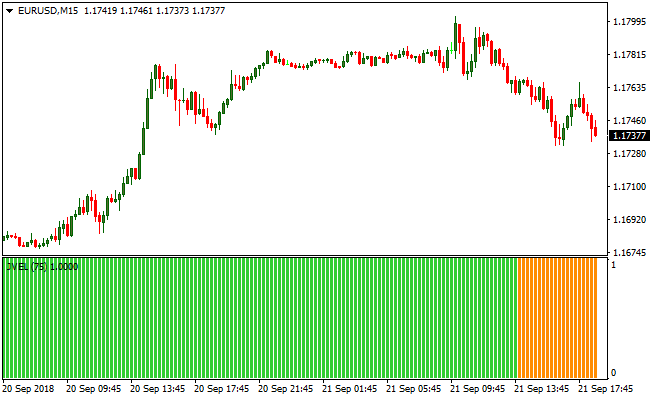
The chart displays the Jevel Trend Bar indicator in action on an active currency pair.
Green bars appear during bullish momentum, while orange bars appear during bearish momentum.
This visual representation helps identify potential trade entries and exits quickly.

Guide to Trade with the Jevel Trend Bar Indicator
Buy Rules
- Wait for a green histogram bar to appear in the indicator window.
- Confirm that recent price action supports upward movement.
- Open a buy position at the next candle open.
- Optionally, combine with other indicators for trend confirmation.
Sell Rules
- Wait for an orange histogram bar to appear in the indicator window.
- Check that price action is moving downward.
- Open a sell position at the next candle open.
- Optionally, use a secondary indicator to filter false signals.
Stop Loss
- Place the stop loss below the most recent swing low for buy trades.
- Place the stop loss above the most recent swing high for sell trades.
- Use a fixed pip distance based on the timeframe and volatility.
- Move the stop along new bars to lock in profits as the trend develops.
Take Profit
- Close buy positions when an orange bar appears in the histogram.
- Close sell positions when a green bar appears in the histogram.
- Consider taking partial profits near nearby support or resistance levels.
- Trail stops while the trend remains aligned with the histogram color.
Jevel Trend Bar + EW Trend Scalper MT4 Scalping Strategy
This scalping strategy combines two useful MT4 indicators: the Jevel Trend Bar Indicator for MT4 and the EW Trend Indicator for MT4.
The Jevel Trend Bar shows green histogram bars when market sentiment is bullish and orange bars when bearish.
The EW Trend Indicator gives precise momentum signals.
When its line jumps above the zero level you get a buy trigger, and when it falls below the zero level you get a sell trigger.
By combining these two tools you get a double-confirmation scalping system.
The Jevel Trend Bar filters the trend. The EW Trend indicator provides entry triggers based on quick reversals or fresh momentum shifts.
This system works well on M1, M5, or M15 charts during high-liquidity sessions.
Buy Entry Rules
- The Jevel Trend Bar histogram bars turn green, showing bullish trend pressure.
- The EW Trend Indicator line jumps above 0.00. This triggers a buy signal.
- Enter a buy order immediately after the signal candle closes or at the open of the next candle.
- Place a stop loss a few pips below the recent swing low or below the low of the signal candle.
- Take profit after a small fixed pip gain of 8 to 20 pips depending on the pair and spread.
- Alternatively, exit when either the Jevel Trend Bar turns orange or the EW Trend drops below 0.00, whichever happens first.
Sell Entry Rules
- The Jevel Trend Bar histogram bars turn orange, showing bearish trend pressure.
- The EW Trend Indicator line jumps below 0.00. This triggers a sell signal.
- Enter a sell order immediately after the signal candle closes or at the open of the next candle.
- Place a stop loss a few pips above the recent swing high or above the high of the signal candle.
- Take profit after a small fixed pip drop of 8 to 20 pips.
- Alternatively, exit when the Jevel Trend Bar turns green or the EW Trend crosses above 0.00, whichever happens first.
Advantages
- Double confirmation reduces false signals with trend filter and momentum trigger.
- Simple and visual, easy to monitor on lower timeframes without complexity.
- Frequent signals on liquid pairs, ideal for active scalpers wanting many opportunities.
- Quick entries and exits capture short-term moves without long-term exposure.
- Flexible, works on M1, M5, M15 depending on time availability and trading style.
Drawbacks
- Small profit targets require several winning trades to offset spread and slippage.
- Requires constant attention and fast execution, not suitable for slow traders.
- Frequent trades increase transaction costs, so tight risk control is essential.
Example Case Study 1
On EURUSD M5 during the London session, the Jevel Trend Bar showed green bars, indicating bullish trend pressure.
The EW Trend Indicator line crossed above 0.00 at 1.0982.
After the candle closed, a buy order was placed at 1.0983 with a stop loss at 1.0975.
Price moved up quickly and reached 1.1001 within 12 minutes.
The trade was closed at 1.0999 for a gain of 16 pips before any reversal signal appeared.
Example Case Study 2
On USDCHF M15 during the New York session, the Jevel Trend Bar turned orange, showing bearish pressure.
The EW Trend Indicator then dropped below 0.00 at 0.8925.
A sell entry was taken at 0.8924 with a stop loss at 0.8932.
The pair slid lower and reached 0.8908.
The trade was closed at 0.8909, capturing 15 pips before any reversal appeared.
Strategy Tips
- Use major currency pairs with good liquidity to reduce spread and slippage.
- Trade during high activity periods such as the London or New York sessions, for stronger momentum.
- Avoid scalping during quiet sessions or around major news releases to reduce unpredictability.
- Keep stop losses small and take profit targets fixed to maintain consistent scalping results.
- Only enter trades when both indicators align to avoid emotional or impulsive trades.
- Track trades to see which pairs and timeframes provide the best results and refine strategy over time.
Download Now
Download the “jevel-histogram.mq4” Metatrader 4 indicator
FAQ
Can the Jevel Trend Bar be used for scalping?
Yes, it works well on lower timeframes where momentum shifts frequently.
Is it suitable for all currency pairs?
Yes, it can be applied to any forex pair across multiple timeframes.
Should it be used alone or with other indicators?
It can function independently, but combining it with trend or momentum indicators can improve trade timing.
Summary
The Jevel Trend Bar indicator provides a clear, visual method for identifying bullish and bearish momentum using histogram bars.
It is easy to use, works across all timeframes, and can be combined with other analysis tools to refine entries and exits.
This makes it a practical tool for anyone looking to follow short-term trends and act quickly on market movements.





