About the Kase Permission Stochastic Histogram Indicator
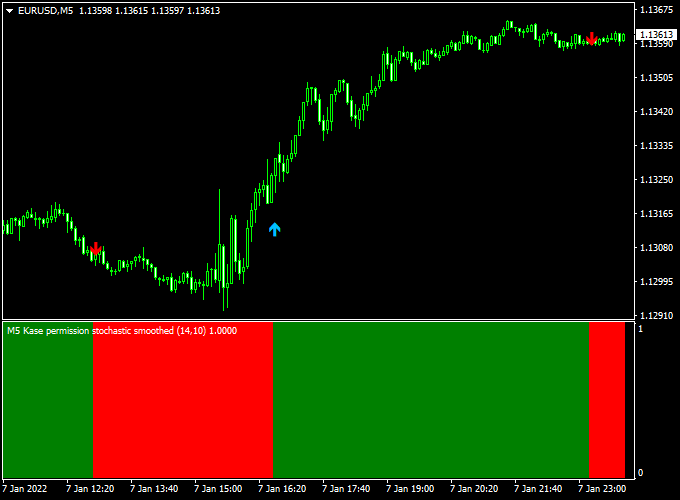
The Kase Permission Stochastic Histogram Indicator for Metatrader 4 is a signal-based trading tool that combines directional arrows with a trend-confirming histogram.
It is designed to help traders identify momentum shifts while staying aligned with the broader market direction.
Unlike standard stochastic indicators, this version applies permission-based logic to filter weaker setups.
Buy and sell arrows appear only when momentum and trend conditions align, which helps reduce premature or low-quality entries.
The indicator is displayed in both the main MT4 chart window and a separate sub-window.
Arrow signals appear directly on price, while the histogram in the sub-window reflects bullish and bearish pressure.
This dual-display approach allows traders to confirm signals visually before executing trades.
Free Download
Download the “kase-permission-stochastic-histogram.mq4” indicator for MT4
Key Features
- Buy and sell signal arrows plotted on the price chart
- Trend-following histogram displayed in a sub-window
- Permission-based stochastic logic to filter weak signals
- Supports both trade entry and trade exit decisions
- Works as a standalone tool or trend filter
- Compatible with all MT4 currency pairs
Indicator Chart
The indicator chart shows the Kase Permission Stochastic Histogram with arrow signals on the main price chart and a colored histogram below.
Blue arrows mark potential buy opportunities, while red arrows highlight sell opportunities.
The histogram helps confirm whether momentum supports the direction of the arrow signal.

Guide to Trade with Kase Permission Stochastic Histogram Indicator
Buy Rules
- Wait for a blue buy arrow to appear on the chart.
- Enter a buy trade at the opening of the next candle.
Sell Rules
- Wait for a red sell arrow to appear on the chart.
- Enter a sell trade at the opening of the next candle.
Stop Loss
- For buy trades, place the stop loss below the most recent swing low.
- For sell trades, place the stop loss above the most recent swing high.
- Stops can also be adjusted based on recent volatility for tighter control.
Take Profit
- Set take profit near the next support or resistance level.
- Exit trades when an opposite arrow signal appears.
- Partial profits can be taken as the histogram starts losing momentum.
Practical Tips
- Use higher timeframes to define direction and lower ones for execution.
- Combine with basic price action for improved timing.
- Stick to one market initially to learn the signal behavior.
Kase Permission Stochastic Histogram + Legacy Trader MT4 Scalping Strategy
This MT4 scalping strategy combines the Kase Permission Stochastic Histogram Indicator and the Legacy Trader MT4 Indicator to capture fast intraday price movements.
The Kase Histogram shows the trend direction with green bars for bullish momentum and red bars for bearish momentum.
The Legacy Trader provides clear entry signals through colored lines, with a blue line indicating a buy and a magenta line signaling a sell.
This strategy is designed for scalpers on M1, M5, and M15 charts, making it suitable for traders who want to capture quick market movements.
Buy Entry Rules
- Confirm the Kase Histogram is green, indicating a bullish trend.
- Wait for a blue line signal from the Legacy Trader, confirming a buy opportunity.
- Enter a buy trade at the close of the candle where the blue line appears.
- Place a stop loss below the most recent swing low or 10–15 pips below the entry point for lower timeframes.
- Set a take profit target of 15–25 pips for M1, 25–40 pips for M5, or trail the stop if momentum continues strongly.
Sell Entry Rules
- Confirm the Kase Histogram is red, indicating a bearish trend.
- Wait for a magenta line signal from the Legacy Trader, confirming a sell opportunity.
- Enter a sell trade at the close of the candle where the magenta line appears.
- Place a stop loss above the most recent swing high or 10–15 pips above the entry point for lower timeframes.
- Set a take profit target of 15–25 pips for M1, 25–40 pips for M5, or trail the stop if the trend continues.
Advantages
- Combining trend and signal indicators increases the probability of successful trades.
- Clear buy and sell signals simplify decision-making for scalpers.
- Works well on multiple timeframes, providing flexibility for different trading styles.
- Defined stop loss and take profit levels improve risk management.
- Adaptable to multiple currency pairs during active market hours.
Drawbacks
- High-frequency trading may increase spread costs and reduce net gains.
- Sudden news events can cause early stop-outs.
Case Study 1: AUD/USD M5 Chart
The Kase Histogram turned green, showing bullish momentum.
Shortly after, a blue line appeared on the Legacy Trader indicator, signaling a buy.
A trade was entered at 0.6750 with a stop loss at 0.6740 and a take profit at 0.6765.
The trade reached its target within 18 minutes, earning 15 pips.
This demonstrates how the combination of trend and signal indicators provides fast scalping opportunities.
Case Study 2: USD/JPY M1 Chart
The Kase Histogram turned red, indicating bearish momentum.
A magenta line appeared on the Legacy Trader, signaling a sell opportunity.
A sell trade was entered at 145.80 with a stop loss at 145.95 and a take profit at 145.65.
The trade hit its target within 12 minutes, capturing 15 pips.
This shows the strategy works effectively on very short timeframes for quick intraday gains.
Strategy Tips
- Always confirm the trend direction with the Kase Histogram before taking signals from the Legacy Trader.
- Avoid trading during major economic news events to reduce the risk of sudden volatility.
- Adjust stop loss and take profit levels based on the currency pair and timeframe.
- Consider trailing the stop when the trade moves strongly in your favor to lock in profits.
Download Now
Download the “kase-permission-stochastic-histogram.mq4” indicator for Metatrader 4
FAQ
Can the indicator be used on its own?
Yes, the arrow signals combined with the histogram allow it to function as a complete trading tool for entries and exits.
What role does the histogram play?
The histogram reflects momentum strength and helps confirm whether arrow signals align with the prevailing trend.
Which timeframes are most suitable?
The indicator works on all timeframes, but M15 to H1 often provide a good balance between signal frequency and reliability.
Does the Kase Permission Stochastic Histogram repaint?
Signals are generated on closed candles and remain fixed once they appear.
Summary
The Kase Permission Stochastic Histogram Indicator for MT4 offers a balanced approach to signal-based trading.
Combining directional arrows with a momentum histogram helps traders confirm entries and manage exits with greater confidence.
The indicator is flexible, easy to interpret, and suitable for different trading styles.
It also combines well with trend-following or confirmation indicators, allowing traders to build a more selective and disciplined trading strategy.


