
About the Low Pass Bands Sync Filter Forex Signal Indicator
The Low Pass Bands Sync Filter Forex Signal Indicator for Metatrader 4 is a scalping-focused tool that combines a dynamic channel with clear buy and sell signals to help traders capture small, frequent gains.
It displays both the channel bands and signal dots directly on the main MT4 chart window.
Instead of relying on lagging averages or complex conditions, this indicator uses synchronized low-pass bands to filter noise and highlight meaningful price moves.
When price interacts with the channel, the indicator generates a signal dot to suggest high-probability entry points.
Buy signals appear as magenta dots, while sell signals are shown as aqua dots.
Traders can capture multiple 6–20 pip moves per session by entering on these signals and using the channel bands as dynamic exit references.
This approach is particularly well-suited to active scalpers who want an objective way to spot short bursts of momentum in the market.
Free Download
Download the “low-pass-bands-sync-filters-mtf.mq4” indicator for MT4
Key Features
- Displays a dynamic channel on the MT4 chart
- Magenta dots for buy signals and aqua dots for sell signals
- Designed for scalping small intraday moves
- Works on all currency pairs
- Generates signals that align with short-term momentum
- Suitable for multiple sessions per day
Indicator Chart
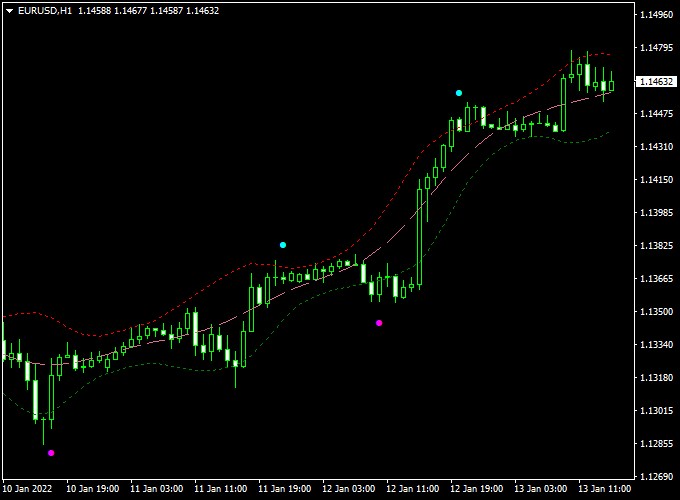
The chart shows the Low Pass Bands Sync Filter Forex Signal Indicator applied to an MT4 price chart.
The channel bands outline the active price range while magenta and aqua dots mark high-probability entry signals during intraday moves.
Guide to Trade with Low Pass Bands Sync Filter Forex Signal Indicator
Buy Rules
- Wait for a magenta dot to appear at or near the lower channel band
- Enter a buy trade at the close of the signal candle
- Confirm that the channel slope supports upward movement
Sell Rules
- Wait for an aqua dot to appear at or near the upper channel band
- Enter a sell trade at the close of the signal candle
- Confirm that the channel slope supports downward movement
Stop Loss
- Place a stop loss just beyond the opposite channel band
- For buy trades, set the stop just below the lower band
- For sell trades, set the stop just above the upper band
Take Profit
- Exit the trade when the price touches the opposite channel band
- Partial profits can be taken as price nears the opposite band
- Adjust targets based on volatility and session range
Practical Tips
- Use on timeframes where 6–20 pip moves are common
- Avoid signals during low liquidity periods
- Combine with session timing to catch active market phases
Low Pass Bands Sync Filter and ZWinner Trend MT4 Scalping Strategy
This MT4 scalping strategy combines the Low Pass Bands Sync Filter Forex Signal Indicator and the ZWinner Trend Forex Indicator to capture quick intraday price movements.
The Low Pass Bands Sync Filter identifies short-term market direction using rising or declining channels and colored dots for buy or sell signals.
The ZWinner Trend Indicator confirms the trend with a green histogram for bullish momentum and a red histogram for bearish momentum.
This strategy is ideal for traders looking for fast, reliable scalping opportunities on 1-minute, 5-minute, or 15-minute charts.
Buy Entry Rules
- Wait for a rising channel on the Low Pass Bands Sync Filter indicator combined with a magenta dot, signaling a buy.
- Confirm that the ZWinner Trend histogram is green, indicating a bullish trend.
- Enter the buy trade immediately after both indicators align.
- Place a stop loss just below the recent minor swing low.
- Set a take profit target between 5 and 12 pips for quick scalping gains, or use a trailing stop based on the indicator movement.
Sell Entry Rules
- Wait for a declining channel on the Low Pass Bands Sync Filter indicator, combined with an aqua dot, signaling a sell.
- Confirm that the ZWinner Trend histogram is red, indicating a bearish trend.
- Enter the sell trade immediately after both indicators align.
- Place a stop loss just above the recent minor swing high.
- Set a take profit target between 5 and 12 pips, or use a trailing stop to capture small intraday reversals.
Advantages
- Clear trading signals for fast scalping entries.
- Combines trend confirmation with precise buy/sell signals for higher accuracy.
- Works on lower timeframes for quick intraday trades.
- Easy to follow for both beginner and experienced traders.
- Helps manage risk by providing small, controlled targets per trade.
Drawbacks
- False signals can occur during highly volatile or ranging markets.
- Requires constant monitoring due to fast-moving scalping trades.
- Profit potential is limited due to small pip targets.
Case Study 1
On the EUR/USD 5-minute chart, a magenta dot appeared with a rising channel, while the ZWinner Trend histogram turned green.
The trader entered a buy position, placed a 7-pip stop loss, and set a 10-pip take profit.
The price moved quickly in favor, hitting the take profit in under 20 minutes, demonstrating the effectiveness of trend confirmation combined with the channel signal.
Case Study 2
On the GBP/USD 1-minute chart, an aqua dot appeared with a declining channel, and the ZWinner Trend histogram was red.
The trader entered a sell position with a 5-pip stop loss and an 8-pip take profit.
The price moved in favor immediately, reaching the take profit target within 12 minutes.
Strategy Tips
- Use this strategy during high liquidity periods, such as the London and New York sessions.
- Combine with support and resistance levels to avoid entering trades near strong price barriers.
- Adjust lot sizes according to account balance and risk tolerance.
- Consider using a small trailing stop to capture extra pips if the trend extends.
- Keep an eye on economic news releases that may cause sudden spikes, as they can affect scalping trades significantly.
Download Now
Download the “low-pass-bands-sync-filters-mtf.mq4” indicator for Metatrader 4
FAQ
Does the indicator repaint its signals?
Signals are generated on candle close, which helps reduce repainting issues that occur with real-time tick updates.
Which timeframe is best for this indicator?
Lower timeframes like M5 and M15 are commonly used for scalping with this indicator.
Can this indicator be used for longer trades?
It’s optimized for short scalping moves; using it for longer trades may reduce signal effectiveness.
Should I use this alone or with other tools?
It can work on its own, but confirming signals with trend or volatility filters can improve results.
Summary
The Low Pass Bands Sync Filter Forex Signal Indicator for MT4 offers scalpers a disciplined way to enter and exit trades using precise channel interactions.
Its magenta and aqua signal dots make spotting opportunities fast and objective.
Ideal for capturing multiple intraday moves, this indicator also complements other tools in a broader strategy to improve timing and reduce emotional decision-making.


