About the MACD Currency Monitor v0.8 Indicator
The MACD Currency Monitor v0.8 Indicator for MetaTrader 4 is a simple yet powerful tool that displays trading signals directly on your main chart.
Instead of interpreting MACD lines or histograms for multiple currency pairs, this indicator consolidates momentum information into easy-to-read messages in the upper-left corner of your chart.
Buy and sell signals are displayed as “CROSS UP” for bullish momentum and “CROSS DN” for bearish momentum.
Traders can act immediately when a signal appears, allowing for faster entry decisions.
This makes the indicator ideal for intraday trading and short-term strategies.
Free Download
Download the “MACD Currency Monitor_v0.8.mq4” indicator for MT4
Key Features
- Displays buy and sell signals in the upper-left of the MT4 chart
- Signals are based on MACD momentum crossovers
- Instantly identifies bullish (“CROSS UP”) and bearish (“CROSS DN”) opportunities
- Optimized for intraday and short-term trading
Indicator Chart
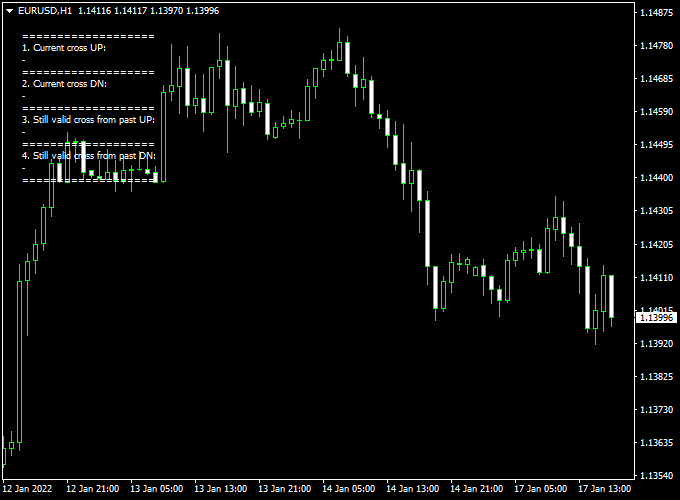
The chart below shows the MACD Currency Monitor v0.8 Indicator in action.
Buy signals appear as “CROSS UP” in the upper-left corner, while sell signals are displayed as “CROSS DN.”
These messages reflect short-term momentum changes, helping traders focus on the right opportunities without analyzing multiple charts.
Guide to Trade with MACD Currency Monitor v0.8 Indicator
Buy Rules
- Wait until “CROSS UP” appears in the upper-left corner of the chart
- Confirm that the price shows bullish behavior or is above recent support
Sell Rules
- Wait until “CROSS DN” appears in the upper-left corner of the chart
- Check that the price is showing bearish momentum or is below recent resistance
Stop Loss
- Place a stop loss just beyond the last swing high for sell trades
- Place a stop loss just beyond the last swing low for buy trades
- This ensures risk aligns with recent price action and market volatility
Take Profit
- Target the next intraday support or resistance level
- Close the trade when the opposite signal appears (“CROSS UP” for sells or “CROSS DN” for buys)
- Partial profits can be taken during high volatility sessions
Practical Tips
- Focus on major currency pairs during the London and New York sessions
- Avoid trading during major economic news announcements
MACD Currency Monitor + Trend Finder Intraday MT4 Strategy
This strategy is built for intraday trading using the MACD Currency Monitor v0.8 Indicator and the Trend Finder Indicator.
The MACD Currency Monitor shows “CROSS UP” for a buy signal and “CROSS DN” for a sell signal.
The Trend Finder shows a rising channel (or blue line crossing red, depending on version) for a bullish trend and a declining channel (or red line) for a bearish trend.
This setup is designed for active intraday traders working on M15 or M30 charts who want structured entries based on momentum and trend alignment.
Buy Entry Rules
- Confirm that the Trend Finder indicator is showing a bullish trend channel (rising channel) or that the blue line is above the red line.
- Wait until the MACD Currency Monitor displays “CROSS UP” in the upper-left of the chart.
- Enter a buy trade at the close of the signal candle (or at the open of the next candle for confirmation).
- Place the stop loss just below the recent swing low or just below the lower boundary of the trend channel.
- Set a take profit target roughly 1.5 to 2 times your risk (for example, if stop loss is 15 pips, aim for 22-30 pips)
- OR exit when the MACD shows “CROSS DN” or the Trend Finder channel turns bearish.
Sell Entry Rules
- Confirm that the Trend Finder indicator is showing a bearish trend channel (declining channel) or the red line is above the blue line.
- Wait until the MACD Currency Monitor displays “CROSS DN” in the upper-left of the chart.
- Enter a sell trade at the close of the signal candle (or next candle open for confirmation).
- Place the stop loss just above the recent swing high or just above the upper boundary of the trend channel.
- Set the take profit target at about 1.5 to 2× your risk
- OR exit when the MACD displays “CROSS UP” or the trend channel flips bullish.
Advantages
- Aligned momentum (MACD signal) and trend (Trend Finder channel) filters out a lot of false entries.
- Simple visual cues (CROSS UP / CROSS DN + rising/declining channel) make decision-making faster for intraday trades.
- Works well in active sessions when currencies are trending and moving with momentum—ideal for M15, M30 charts.
- Structured risk/reward rules help keep trade management disciplined during fast intraday moves.
Drawbacks
- In sideways or low-volatility markets, the channel may oscillate, and the signals can whipsaw.
- The MACD-based monitor signal will lag the beginning of moves somewhat, so the entry may be slightly delayed compared to pure breakout methods.
- Intraday timeframes require faster execution and stricter discipline; spreads and commissions matter more when targeting smaller moves.
Case Study 1: EURJPY M15 Buy Example
During the European session on EURJPY, the Trend Finder channel began rising, showing a bullish trend.
Shortly after, the MACD Currency Monitor displayed “CROSS UP” at 140.25.
A buy trade was entered at 140.27 with a stop loss at 140.10 (17 pips risk) and a take profit set at ~140.60 (≈33 pips target).
Price followed the bullish trend and progressed steadily, hitting the TP within about 40 minutes.
Case Study 2: GBPCHF M30 Sell Example
In the London-US overlap, GBPCHF formed a declining channel identified by Trend Finder.
The MACD Currency Monitor indicated “CROSS DN” at 1.2235.
A sell was placed at 1.2232 with a stop loss at 1.2252 (20 pips) and take profit at 1.2200 (~32 pips target).
The pair dropped quickly in line with the bearish channel and reached the TP in about 35 minutes.
The clear bearish trend confirmation helped filter the momentum entry and secure profit within the intraday window.
Strategy Tips
- Trade during high-liquidity sessions—the European session and the London–New York overlap give the best trending moves.
- Stick to major and liquid currency pairs (e.g., EURUSD, EURJPY, GBPCHF, USDJPY) so spread and slippage are minimized.
- If the Trend Finder channel is flat or very narrow (indicating a weak trend), skip the trade even if a “CROSS UP” or “CROSS DN” appears.
- Focus on consistency rather than chasing big gains.
Download Now
Download the “MACD Currency Monitor_v0.8.mq4” indicator for Metatrader 4
FAQ
How does the MACD Currency Monitor determine signals?
The indicator monitors MACD crossovers for each currency pair and displays a signal when momentum shifts above or below the zero line.
“CROSS UP” signals bullish momentum, while “CROSS DN” signals bearish momentum.
Can I rely solely on the signals for trading?
While the signals provide clear guidance, combining them with price action, support and resistance, or session timing improves reliability.
This helps filter out false crossovers during low-volatility periods.
Are alerts included with this indicator?
Yes. The indicator can notify traders as soon as a new signal appears, allowing you to act promptly without constantly watching the charts.
Which currency pairs are best for this indicator?
It works best on major pairs like EUR/USD, GBP/USD, and USD/JPY where liquidity is high.
Minor pairs can also be used, but signals may be less frequent or more volatile.
Summary
The MACD Currency Monitor v0.8 Indicator for MT4 converts traditional MACD crossovers into simple, actionable buy and sell signals displayed directly on your chart.
“CROSS UP” indicates bullish momentum, and “CROSS DN” indicates bearish momentum, allowing traders to focus on high-probability setups.
By consolidating multiple pair signals in one place and adding optional alerts, the indicator is ideal for intraday and short-term trading.
It simplifies decision-making, saves time, and helps traders act quickly during active sessions while still allowing room for price-action confirmation and risk management.


