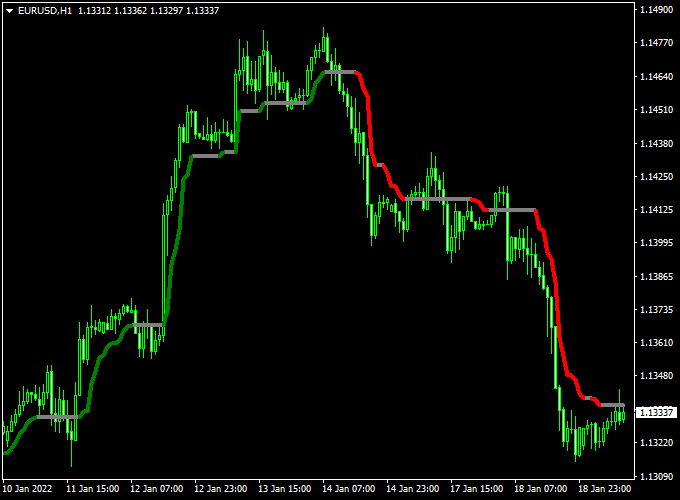
About the Magic Trend Forex Indicator
Magic Trend Forex Indicator for MT4 highlights potential trend shifts using colored lines on your chart.
Green lines suggest upward momentum, red lines indicate downward moves, and gray lines show consolidation periods.
This system simplifies decision-making by visually marking trends and neutral zones.
Traders can spot entry and exit points faster without analyzing multiple indicators.
It is especially helpful for tracking market direction and spotting trend reversals.
Unlike complex setups, Magic Trend provides immediate insight into current price action.
It helps traders identify whether to enter, hold, or wait, making it a practical tool for active trading sessions.
Free Download
Download the “Magic_Trend.mq4” indicator for MT4
Key Features
- Colored lines showing market direction: green for bullish, red for bearish, gray for neutral
- Alerts traders to potential trend reversals
- Helps avoid trades during consolidation phases
- Supports fast decision-making for short-term trading
- Enhances trade timing without cluttering charts
Indicator Chart
The chart below illustrates the Magic Trend Forex Indicator.
Green lines mark potential buy opportunities, red lines show potential sell trades, and gray lines highlight sideways market conditions.
Traders can use this to enter trades when momentum is strongest.
Guide to Trade with Magic Trend Forex Indicator
Buy Rules
- Enter a long trade when the line turns green
- Hold until a red line appears, signaling potential reversal
Sell Rules
- Enter a short trade when the line turns red
- Hold until a green line appears, indicating a possible trend change
Stop Loss
- Place stops 3 pips below the nearest swing low for buys
- Place stops 3 pips above the nearest swing high for sells
- For smaller timeframes, use the last gray zone as a tight stop reference
Take Profit
- Close positions when the opposite colored line appears
- Consider key price levels for partial profit-taking
- Use trailing stops if the trend shows strong momentum
Practical Tips
- Wait until the line fully changes color before entering a trade
- Monitor short-term price action near gray zones for better entries
- Be patient and avoid trading when signals appear too frequently
Scalping Strategy: Magic Trend Indicator & Free Forex Scalping Indicator (MT4)
This scalping strategy combines the Magic Trend Forex Indicator and the Free Forex Scalping Indicator on MetaTrader 4 (MT4).
The Magic Trend indicator identifies the trend with a green line for bullish trends and a red line for bearish trends.
The Free Forex Scalping indicator provides entry signals with a green histogram for buy signals and a red histogram for sell signals.
This strategy works best on M1 and M5 charts and is ideal for currency pairs like EUR/USD, GBP/USD, AUD/USD, NZD/USD, and USD/CHF.
Buy Entry Rules
- Wait for the Magic Trend indicator to display a green line, indicating a bullish trend.
- Confirm a green histogram on the Free Forex Scalping Indicator as a buy signal.
- Enter a buy trade at the close of the bar that meets both conditions.
- Set a stop loss below the recent swing low or a fixed pip amount (e.g., 10-15 pips).
- Set a take profit at a 1:1.5 or 1:2 risk-to-reward ratio, or exit when the Free Forex Scalping histogram turns red.
Sell Entry Rules
- Wait for the Magic Trend indicator to display a red line, indicating a bearish trend.
- Confirm a red histogram on the Free Forex Scalping Indicator as a sell signal.
- Enter a sell trade at the close of the bar that meets both conditions.
- Set a stop loss above the recent swing high or a fixed number of pips (e.g., 10-15 pips).
- Set a take profit at a 1:1.5 or 1:2 risk-to-reward ratio, or exit when the Free Forex Scalping histogram turns green.
Advantages
- Combines trend direction and precise entry signals for higher probability trades.
- Clear visual signals make it easy to scalp on fast timeframes.
- Works effectively on M1 and M5 charts for quick intraday trades.
- Suitable for highly liquid major pairs and currency crosses like AUD/USD, NZD/USD, GBP/JPY, and USD/CHF.
Drawbacks
- Requires constant monitoring and fast execution, especially on M1 charts.
- Performance may drop during major news events or sudden market spikes.
- Less effective on exotic or low-liquidity pairs.
- Scalping can be stressful for traders without quick decision-making skills.
Case Study 1: AUD/USD M1 Buy
On the AUD/USD M1 chart, the Magic Trend line turned green, and the Free Forex Scalping histogram displayed green.
A buy trade was entered at 0.6755.
Stop loss was set at 0.6745 (-10 pips) and take profit at 0.6770 (+15 pips).
The trade reached the take profit level, yielding +15 pips.
Case Study 2: NZD/USD M5 Sell
On the NZD/USD M5 chart, the Magic Trend line turned red, and the Free Forex Scalping histogram displayed red.
A sell trade was entered at 0.6280.
Stop loss was set at 0.6295 (+15 pips) and take profit at 0.6265 (-15 pips).
The trade successfully hit the take profit, resulting in +15 pips.
Strategy Tips
- Use M1 and M5 charts to capture quick scalping opportunities.
- Focus on highly liquid pairs for tighter spreads.
- Confirm trend direction with the Magic Trend indicator before entering trades.
- Wait for candle close confirmation to reduce false signals.
- Implement strict risk management, limiting trades to 1-2% of account balance.
- Consider using a trailing stop to lock in profits during favorable moves.
Download Now
Download the “Magic_Trend.mq4” indicator for Metatrader 4
FAQ
Does Magic Trend repaint?
No. Once the line changes color, the signal is fixed and does not repaint. Traders can rely on historical signals for analysis.
Can it work with other indicators?
Yes. It can be used to confirm trend signals from other systems, adding clarity to trade decisions.
Which sessions give the strongest signals?
Active sessions like London and New York provide the clearest trend signals. Sideways or quiet sessions may produce more gray lines.
How should beginners approach this indicator?
Focus on the color changes and avoid overtrading. Start with small position sizes and combine with basic support/resistance analysis for better results.
Does it suit scalpers or longer trades?
It works for both. Short-term traders can follow fast line changes, while swing traders can use longer timeframes to capture bigger trends.
Summary
Magic Trend Forex Indicator simplifies trend detection with green, red, and gray lines.
It helps traders identify when momentum shifts, when the market is consolidating, and when to enter or exit trades.
The indicator reduces guesswork by highlighting trends visually.
Used with proper risk management and careful observation of trend signals, it supports faster, more confident trading decisions for both short-term and medium-term strategies.


