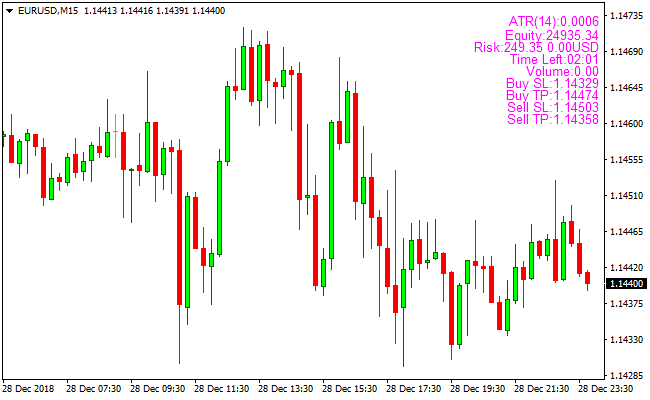
About the Money Management Position Size Indicator
The Money Management Position Size MetaTrader 4 indicator is a trade-planning tool designed to help traders calculate position size, stop loss, and take profit levels automatically.
The indicator is built around the Average True Range (ATR), allowing it to adapt its calculations to current market volatility.
Once attached to the chart, the indicator uses your account equity and chosen risk percentage to generate precise trade parameters.
All calculations are displayed clearly, making it easier to prepare trades without manual lot-size formulas.
To configure the indicator, open the inputs menu and adjust the Input Risk % value.
The default setting is 0.01, which corresponds to risking 1% of account equity per trade.
Traders are advised not to exceed 2% risk per open position.
Free Download
Download the “pos_size.mq4” MT4 indicator
Key Features
- ATR-based stop loss calculation.
- Automatic lot size calculation based on equity.
- Suggested take profit levels derived from volatility.
- Simple risk percentage input.
- Clear on-chart display of trade parameters.
Indicator Chart
The chart shows the Money Management Position Size indicator applied to a live price chart.
The indicator displays calculated lot size, stop loss, and take profit levels directly on the chart.
These values adjust automatically as market volatility and account equity fluctuate.
Guide to Trade with Money Management Position Size
Buy Rules
- Identify a valid buy setup using your trading strategy.
- Confirm current market volatility through price movement.
- Apply the suggested lot size from the indicator.
- Enter the buy trade with the calculated stop loss and take profit.
Sell Rules
- Identify a valid sell setup using your trading approach.
- Review the indicator’s suggested position size.
- Use the calculated lot size when placing the sell order.
- Apply the recommended stop loss and take profit levels.
Stop Loss
- Use the stop loss level calculated by the indicator.
- The stop distance is based on current ATR values.
- The stop adapts to changes in market volatility.
- Apply the stop loss immediately after entering the trade.
Take Profit
- Use the take profit level suggested by the indicator.
- The target is derived from volatility conditions.
- Adjust manually if your strategy requires it.
- Review targets if volatility changes significantly.
MT4 Money Management Position Size + Cynthia’s Trend Bars Scalping Strategy
This scalping strategy combines the Money Management Position Size MT4 Forex Indicator with Cynthia’s Trend Bars MT4 Forex Indicator.
The Cynthia’s Trend Bars indicator provides clear buy and sell signals: green bars indicate bullish conditions and purple bars indicate bearish conditions.
The Money Management Position Size indicator calculates optimal lot size, stop loss, and take profit based on your account equity and the Average True Range (ATR), allowing precise risk management.
By combining these two indicators, scalpers can enter trades with defined risk and profit targets while following the trend direction.
This strategy works well on M1 and M5 charts and suits traders looking for quick intraday trades.
Buy Entry Rules
- Cynthia’s Trend Bars must show green bars, indicating a bullish trend.
- Enter long at the open of the next candle after the green bar appears.
- Use the Money Management Position Size indicator to set stop loss, lot size, and take profit according to ATR and equity.
- Maintain the trade as long as Cynthia’s Trend Bars remain green or until stop loss or take profit is hit.
Sell Entry Rules
- Cynthia’s Trend Bars must show purple bars, indicating bearish trend.
- Enter short at the open of the next candle after the purple bar appears.
- Use the Money Management Position Size indicator to set stop loss, lot size, and take profit according to ATR and equity.
- Maintain the trade as long as Cynthia’s Trend Bars remain purple or until the stop loss or take profit is hit.
Advantages
- Clear visual trend signals make entries straightforward for scalping.
- Money Management Position Size ensures precise risk control per trade.
- Defined stop loss and take profit reduces emotional decision-making.
- Works on short timeframes for fast intraday trading opportunities.
- Suitable for multiple currency pairs with sufficient liquidity and volatility.
Drawbacks
- In sideways or choppy markets, trend bars may produce false signals, leading to small losses.
- On very volatile pairs or during news events, stop losses may be hit unexpectedly even if the trend remains valid.
- Strategy performance can be affected if ATR-based position sizing is not adjusted for unusually high volatility.
Case Study 1
On EURJPY M1 during the London session, Cynthia’s Trend Bars turned green after a small retracement.
The trader entered long at the next candle using the Money Management Position Size indicator to determine stop loss 6 pips below the recent swing low, take profit 12 pips above, and an appropriate lot size for equity.
Within 12 minutes, the trade reached take profit for a clean 12-pip scalp.
The trend bars remained green throughout, and the trade followed the bullish momentum perfectly.
Case Study 2
On AUDUSD M5 during the New York session, Cynthia’s Trend Bars turned purple, indicating bearish momentum.
The trader entered short at the next candle, setting stop loss 10 pips above the recent swing high, take profit 20 pips below, and lot size based on ATR and account equity.
Over 25 minutes, the price moved down steadily and hit the take profit for a 20-pip gain.
The trend bars remained purple, confirming the continuation of the bearish trend.
Strategy Tips
- Trade during active sessions when volatility is sufficient for clear trend movements.
- Avoid trading when trend bars change color frequently in sideways markets, as this increases the risk of false signals.
- Adjust ATR-based position sizing if the market experiences unusually high volatility to prevent excessive risk.
- Maintain discipline and do not override recommended stop loss or take profit levels from the Money Management indicator.
- Backtest the strategy on different pairs and timeframes to identify the most reliable setups.
Download Now
Download the “pos_size.mq4” Metatrader 4 indicator
FAQ
What information does this indicator display on the chart?
It shows lot size, stop loss distance, and take profit levels based on equity and ATR.
How is the lot size calculated?
The lot size is calculated using account equity, the selected risk percentage, and ATR-based stop loss distance.
Can this indicator be used on any currency pair?
Yes. It works on all currency pairs and across all timeframes.
Do I need another indicator to use this tool?
No. It is designed to support trade sizing and can be combined with any entry method.
Summary
The Money Management Position Size MT4 indicator simplifies trade preparation by automating position sizing and exit level calculations.
It removes the need for manual formulas while adapting to changing market volatility.
This indicator is a valuable addition for traders who want consistent trade sizing and efficient pre-trade planning across different market conditions.





