About the Nicholas Forex Trend Trading Dashboard
The Nicholas Forex Trend Trading Dashboard is a free MT4 indicator designed to help traders follow strong and consistent market trends.
It combines three popular technical tools, EMA, MACD, and Stochastic, into a single dashboard that highlights trend strength across multiple timeframes.
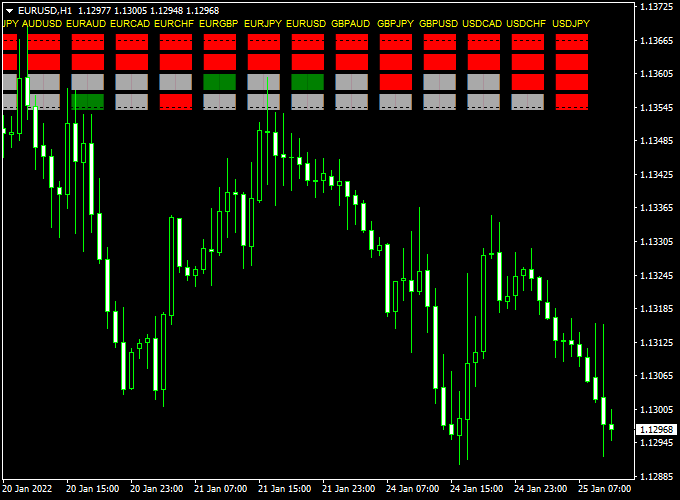
The indicator appears directly in the main MetaTrader 4 chart window as a dashboard with colored boxes.
Each box represents a specific timeframe and shows whether the trend is bullish, bearish, or neutral.
Green boxes signal strong buying pressure, while red boxes indicate strong selling pressure.
By combining multiple indicators and timeframes, the Nicholas Forex Trend Trading Dashboard helps traders avoid weak or conflicting setups.
It also allows full control over monitored markets, as currency pairs can be added or removed easily from the input settings.
The indicator works across Forex, indices, stocks, cryptocurrencies, and commodities.
Free Download
Download the “nicholas.mq4” indicator for MT4
Key Features
- Multi-timeframe trend dashboard in the main MT4 chart.
- Combines EMA, MACD, and Stochastic analysis.
- Green boxes indicate strong buy trends.
- Red boxes indicate strong sell trends.
- Supports Forex, indices, stocks, crypto, and commodities.
- Customizable list of currency pairs.
Indicator Chart
The chart shows the Nicholas Forex Trend Trading Dashboard displayed in the main MT4 window.
Colored boxes form a clear overview of trend direction across several timeframes.
When most boxes turn green, the dashboard signals bullish trend alignment.
When most boxes turn red, it highlights bearish trend dominance.
Guide to Trade with Nicholas Forex Trend Trading Dashboard
Buy Rules
- Apply the indicator to the desired market.
- Wait for the majority of timeframe boxes to turn green.
- Confirm that higher timeframes support the buy trend.
- Open a buy trade in the direction of the dashboard signal.
Sell Rules
- Ensure the dashboard is visible on the chart.
- Wait for the majority of timeframe boxes to turn red.
- Confirm trend alignment across multiple timeframes.
- Open a sell trade following the dashboard direction.
Stop Loss
- Place the stop loss beyond the most recent trend structure.
- Use higher timeframe levels for stronger protection.
- Avoid placing stops too close during trending markets.
Take Profit
- Target previous highs or lows in the trend direction.
- Trail profits as long as dashboard boxes remain aligned.
- Exit partially when lower timeframes weaken.
- Close trades when dashboard signals lose consensus.
Nicholas Trend Dashboard + Figurelli Series Forex Scalper Strategy
This scalping strategy combines the Nicholas Forex Trend Trading Dashboard MT4 with the Figurelli Series Scalper Indicator MT4.
The Nicholas Dashboard displays trend directions for multiple currency pairs using green for buy trends and red for sell trends.
The Figurelli Series Scalper provides precise entry signals with a red histogram above zero for buy signals and below zero for sell signals.
This strategy works best on M1, M5, and M15 charts for intraday scalpers looking to catch quick moves aligned with multi-pair trend strength.
Why This Strategy Works
By combining a broad market trend dashboard with a fast-reacting scalper, you can enter trades in the direction of strong momentum across multiple pairs.
The Nicholas Dashboard ensures you only trade with the dominant trend, while the Figurelli Series Scalper pinpoints high-probability entry points.
This reduces false signals and increases the likelihood of catching profitable intraday moves.
Buy Entry Rules
- Confirm that the Nicholas Dashboard shows a green trend for the currency pair you want to trade.
- Wait for the Figurelli Series Scalper histogram to rise above zero.
- Enter a buy trade at the next candle open after both conditions align.
- Set stop loss below the recent swing low or a few pips below the last consolidation zone.
- Take profit when:
- The Figurelli histogram drops below zero, or
- The Nicholas Dashboard turns red, or
- A short-term pip target is reached (10–25 pips depending on the timeframe).
Sell Entry Rules
- Confirm that the Nicholas Dashboard shows a red trend for the currency pair.
- Wait for the Figurelli Series Scalper histogram to drop below zero.
- Enter a sell trade at the next candle open after both signals align.
- Set stop loss above the recent swing high or a few pips above the last consolidation zone.
- Take profit when:
- The Figurelli histogram rises above zero, or
- The Nicholas Dashboard turns green, or
- Pip target is reached (10–25 pips for M1/M5, 20–35 for M15).
Advantages
- Combines multi-pair trend confirmation with precise entry signals.
- Reduces false trades by only following dominant trends.
- Works on very short timeframes for quick scalps.
- Clear visual cues from the dashboard and histogram make entries straightforward.
- Allows traders to quickly scan multiple pairs for opportunities.
Drawbacks
- Dashboard may lag slightly on fast-moving pairs.
- Requires constant monitoring on lower timeframes.
- Spread and slippage can affect profits on small targets.
Case Study 1: EURUSD M5
On the EURUSD 5-minute chart, the Nicholas Dashboard displayed a green trend.
The Figurelli Series Scalper histogram rose above zero at 1.0810.
A buy trade was placed at the next candle, stop loss below 1.0800.
Price climbed steadily, and the trade was closed when the histogram fell below zero, capturing +18 pips in 25 minutes.
Case Study 2: GBPJPY M1
On the GBPJPY 1-minute chart, the Nicholas Dashboard showed a red trend while the Figurelli histogram fell below zero.
A sell trade was taken at the next candle open at 149.42, with a stop loss above 149.50.
Price dropped quickly, and the trade was exited when the histogram turned positive, yielding +12 pips in 15 minutes.
Strategy Tips
- Only enter trades when both the dashboard and scalper align.
- Adjust stop loss and take profit based on the timeframe and volatility.
- Avoid trading during major news releases to reduce whipsaws.
- Use liquid currency pairs such as EURUSD, GBPUSD, and USDJPY for the best results.
- Consider partial exits for longer moves to secure profits.
- Monitor multiple pairs, but avoid overtrading to maintain discipline.
Download Now
Download the “nicholas.mq4” indicator for Metatrader 4
FAQ
How many timeframes does the dashboard monitor?
The dashboard tracks multiple timeframes simultaneously, giving traders a broader view of trend alignment without switching charts.
Can I trade non-Forex assets with this indicator?
Yes, the indicator works on indices, stocks, cryptocurrencies, and commodities, as long as they are supported by MT4.
Is the dashboard suitable for trend trading only?
It is best suited for trend-following strategies, as it focuses on sustained directional movement rather than short-term scalping.
Can I customize the markets shown on the dashboard?
Yes, currency pairs and assets can be added or removed directly through the indicator input settings.
Summary
The Nicholas Forex Trend Trading Dashboard for MT4 offers traders a practical way to identify strong trends using a multi-timeframe approach.
By combining EMA, MACD, and Stochastic data, it delivers a clear overview of market direction.
The dashboard is easy to read, flexible across asset classes, and efficient for traders who prefer trading with trend confirmation.
When paired with disciplined risk management, it can become a reliable tool for identifying high-quality trend trading opportunities.


