
About the Pips Volatility Sessions Indicator
The Pips Volatility Sessions Indicator is a session-based volatility tool built for MetaTrader 4 traders who focus on intraday price behavior.
It measures and displays volatility in pips for the most active forex sessions, including Tokyo, Frankfurt, and New York.
All information is presented directly on the chart in a clear and practical format.
The indicator draws session high and session low boxes for each trading session.
Inside each box, it shows the total number of pips price has moved during that specific session.
This allows traders to quickly evaluate how active a session has been and whether meaningful price movement is still likely.
Customization is another strong point of this indicator.
Traders can adjust session start and end times to match their broker settings and personal trading hours.
Box colors can also be modified, making it easier to visually separate sessions and focus on the most relevant market periods.
Free Download
Download the “Auto_Sessions_v_1.9.ex4” MT4 indicator
Key Features
- Displays volatility in pips for Tokyo, Frankfurt, and New York sessions.
- Draws session high and session low boxes on the chart.
- Shows exact pip movement for each trading session.
- Customizable session times to match broker settings.
- Editable box colors for better visual clarity.
- Ideal for intraday and session-based trading strategies.
Indicator Chart
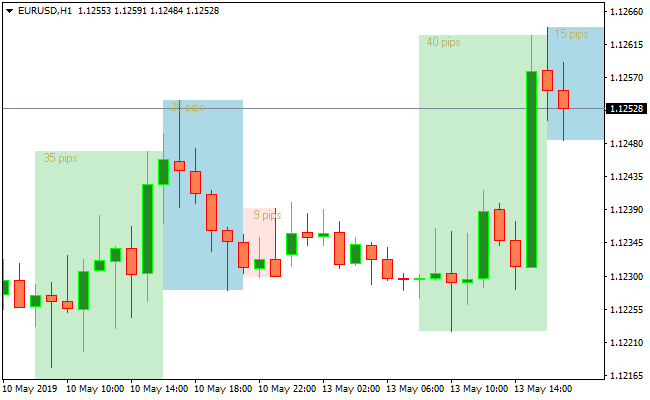
The Pips Volatility Sessions Indicator chart highlights each major trading session with a dedicated price box.
Each box marks the session high and low while displaying the total pip range achieved.
This layout helps traders identify which sessions are most active and where price expansion or contraction occurs.
Guide to Trade with Pips Volatility Sessions
Buy Rules
- Identify a session showing strong bullish expansion in pips.
- Confirm price is holding above the session midpoint.
- Look for continuation setups near the session high.
- Enter a buy trade during active session hours.
Sell Rules
- Identify a session showing strong bearish expansion.
- Confirm price is holding below the session midpoint.
- Look for rejection near the session low.
- Enter a sell trade while volatility remains elevated.
Stop Loss
- Place the stop loss outside the current session high or low.
- Set the stop based on a fraction of the session pip range.
- Tighten the stop once the session nears its close.
- Avoid wide stops during low-volatility sessions.
Take Profit
- Target a percentage of the session’s average pip movement.
- Use prior session highs or lows as profit objectives.
- Scale out profits as the session range becomes exhausted.
- Close remaining positions before the session transition.
Session Volatility and Arrow Signal Forex Scalping Strategy
This MT4 strategy blends the Pips Volatility Sessions Indicator for MT4 with the Best Forex Scalping Indicator for MT4.
It is created for traders who want fast and accurate entries during the most active market sessions.
The first indicator measures the volatility in pips for the Tokyo, Frankfurt and New York sessions.
The second indicator generates clear buy and sell signals with its blue and red arrows.
This system works best on M1, M5 and M15 time frames.
It is ideal for scalpers who want structure and consistency while avoiding low-volatility moments that often cause false signals.
By combining session volatility with directional arrow signals, the strategy helps filter out slow markets and focus only on the times when the price has enough movement to scalp safely.
Why This Strategy Works
The Pips Volatility Sessions Indicator shows how many pips each market session is producing.
When volatility rises, spreads tighten, and price moves more cleanly, which is perfect for scalping.
The arrow signals then identify precise buy or sell moments inside these active periods.
When both indicators agree, the probability of capturing a quick price burst increases.
Buy Entry Rules
- Trade only when the current or upcoming session shows above-average volatility on the indicator.
- Wait for a blue arrow to appear from the scalping indicator.
- Enter a buy trade once the candle with the blue arrow closes.
- Place the stop loss a few pips below the previous short-term swing low.
- Take profit at 5 to 15 pips, depending on the time frame and volatility strength.
Sell Entry Rules
- Trade only when volatility is rising in the Frankfurt or New York session.
- Wait for a red arrow from the scalping indicator.
- Enter a sell trade after the arrow candle has closed.
- Place the stop loss a few pips above the recent swing high.
- Take profit at 5 to 15 pips or at the next micro support level.
Advantages
- Filters trades based on true session volatility.
- Arrow signals create simple and fast entry rules.
- Works well for active scalpers who want quick profits.
- Reduces the risk of trading in flat or quiet markets.
- Suitable for beginners and experienced traders.
Drawbacks
- Low volatility sessions will not produce many entries.
- Requires fast execution and discipline with stop loss placement.
Example Case Study 1
During the Frankfurt open, the volatility indicator showed a sharp rise as EURUSD gained momentum.
A blue arrow formed on the M1 chart after a small pullback.
The trade was taken at the close of the signal candle with a tight stop loss.
The pair quickly pushed upward for 9 pips before slowing down, hitting the take profit target in less than two minutes.
Example Case Study 2
During the New York session, GBPUSD showed increased pip activity.
A red arrow appeared after a short consolidation break.
The trade was opened on the candle close, and the stop loss was placed just above the small range.
Price dropped rapidly as volatility expanded and produced a clean 12 pip move, reaching the target without retracing.
Strategy Tips
- Focus on Frankfurt and New York sessions for the highest probability setups.
- Avoid trading when pip volatility is flat or decreasing.
- Use a fixed 1:1 or 1:2 risk reward for consistent scalping results.
- Consider closing the trade early if volatility drops suddenly.
- Pairs like EURUSD, GBPUSD and XAUUSD work best with this strategy.
Download Now
Download the “Auto_Sessions_v_1.9.ex4” Metatrader 4 indicator
FAQ
Which trading sessions does the indicator track?
The indicator tracks Tokyo, Frankfurt, and New York sessions.
These sessions represent the most liquid and active periods in the forex market.
Can session times be adjusted?
Yes, session start and end times can be modified from the inputs tab.
This ensures accurate alignment with broker server time.
Does the indicator predict direction?
No, it focuses on volatility rather than direction.
Directional bias should be determined using price action or trend indicators.
Summary
The Pips Volatility Sessions Indicator helps traders understand how price behaves during key market sessions.
By visualizing session ranges and pip movement, it becomes easier to choose the right time to trade.
This session-focused insight supports better timing, more realistic trade expectations, and improved awareness of market activity throughout the trading day.
For traders who plan entries around volatility cycles, this indicator adds valuable context to any MT4 trading setup.





