About the Professional Forex Swing Indicator
The Professional Forex Swing indicator for Metatrader 4 is built for traders who focus on higher time frame swing opportunities.
Its main goal is to pinpoint well-timed entries that align with broader market movement.
Instead of chasing short-term noise, the indicator concentrates on meaningful price swings.
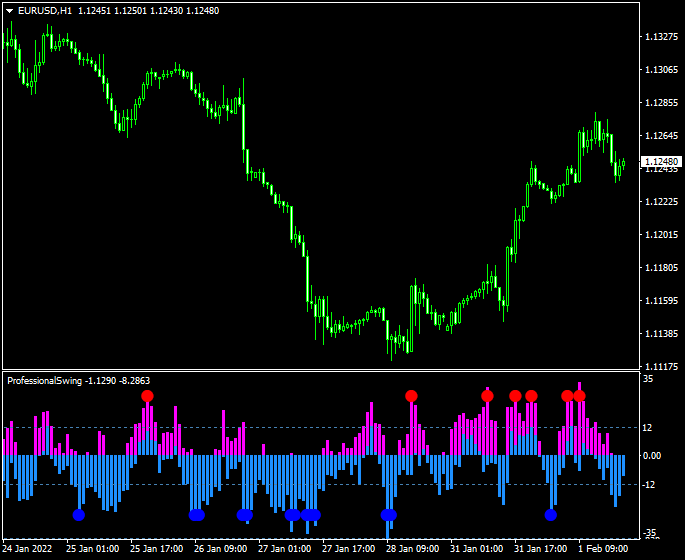
The indicator is displayed in a separate MT4 window as an oscillator.
A red circle arrow signals a potential buying opportunity.
A blue circle arrow signals a potential selling opportunity.
These signals are designed to appear near swing turning points rather than late trend entries.
Traders often use it as a primary entry tool combined with disciplined risk management.
Free Download
Download the “ProfessionalSwing.mq4” indicator for MT4
Key Features
- Designed specifically for swing trading strategies.
- Displays buy and sell signals in a separate oscillator window.
- Optimized for higher time frames such as H1, H4, and D1.
- Helps identify potential market turning points.
- Works across all major and minor currency pairs.
Indicator Chart
The Professional Forex Swing indicator chart shows an oscillator beneath the main price chart.
Red circle arrows appear when bullish swing conditions begin to form.
Blue circle arrows appear when bearish swing conditions start to develop.
The chart helps traders focus on directional bias without clutter.

Guide to Trade with Professional Forex Swing Indicator
Buy Rules
- Wait for a red circle arrow to appear in the oscillator window.
- Confirm that price is holding above a recent support area.
- Enter a buy trade at the close of the signal candle.
Sell Rules
- Wait for a blue circle arrow to appear in the oscillator window.
- Confirm that price is reacting below a resistance zone.
- Enter a sell trade at the close of the signal candle.
Stop Loss
- Place the stop loss below the last confirmed swing low for buy trades.
- Place the stop loss above the last confirmed swing high for sell trades.
- Allow room for normal swing-level price fluctuations.
Take Profit
- Target the next major support or resistance zone.
- Use a risk-to-reward ratio of at least 1:2.
- Consider partial exits as price approaches key levels.
Professional Swing Indicator + XTC Forex Trend MT4 Scalping Strategy
This scalping strategy combines the clear signal precision of the Professional Forex Swing Indicator with the strong momentum confirmation from the XTC Forex Trend Indicator.
It’s ideal for traders who prefer fast-paced setups and want to capture quick intraday profits with low drawdown.
The Professional Forex Swing Indicator plots red circle arrows for buy entries and blue circle arrows for sell entries, signaling potential short-term reversals.
The XTC Forex Trend Indicator filters out weak trades by confirming the underlying trend direction—blue histogram bars indicate bullish momentum, while red bars confirm bearish momentum.
Together, they offer a simple yet powerful scalping system that thrives in volatile market conditions.
Buy Entry Rules
- Wait for the Professional Forex Swing Indicator to display a red circle arrow.
- Confirm that the XTC Forex Trend Indicator shows blue histogram bars.
- Enter a buy trade once both signals align on the same candle or within one candle apart.
- Set a stop loss 10–15 pips below the recent swing low.
- Take profit at 20–30 pips or when the XTC histogram changes to red.
Sell Entry Rules
- Wait for the Professional Forex Swing Indicator to show a blue circle arrow.
- Confirm that the XTC Forex Trend Indicator histogram turns red.
- Open a sell position when both signals confirm the bearish trend.
- Set a stop loss 10–15 pips above the last swing high.
- Take profit at 20–30 pips or close when the histogram turns blue.
Advantages
- Simple visual confirmation using arrows and color-coded histograms.
- Fast signals suitable for 1-minute to 15-minute scalping setups.
- Helps traders avoid counter-trend trades by combining signal and momentum filters.
- Effective on all major and cross pairs such as EUR/USD, GBP/JPY, and AUD/CHF.
Drawbacks
- Requires constant chart monitoring due to the short-term nature.
- Performance may vary across pairs with low volatility.
Example Case Study 1 – AUD/USD
On the 5-minute chart, the Professional Forex Swing Indicator printed a red circle arrow near 0.6628, signaling a potential bullish reversal.
The XTC histogram confirmed the move with blue bars.
A buy order was placed at 0.6630 with a 12-pip stop loss and a 25-pip take profit.
Within 40 minutes, the price rallied to 0.6655, hitting the profit target for a +25 pips gain.
Example Case Study 2 – GBP/JPY
During the Tokyo session, a blue circle arrow appeared near 191.85, followed by red histogram bars on the XTC indicator.
A sell position was opened at 191.80 with a 15-pip stop loss and 30-pip target.
The pair dropped sharply to 191.50 within an hour, achieving the take profit with +30 pips.
Strategy Tips
- Focus on pairs with consistent volatility, such as GBP/USD, EUR/JPY, and AUD/JPY, for sharper scalping moves.
- Use the 5-minute or 15-minute charts for the most accurate combination of signal and trend confirmation.
- Avoid trading during major news announcements to reduce sudden price spikes and spread widening.
- Wait for both indicators to fully confirm the setup before entering—avoid guessing or preempting signals.
- Use a trailing stop once your trade is in profit to lock in gains while allowing room for extended runs.
- Combine this system with a session timer indicator to focus only on high-volume trading hours.
- When in doubt, trade in the direction of the XTC histogram and ignore counter-trend signals from the swing indicator.
- End your trading session after reaching your daily target to avoid emotional overtrading.
Download Now
Download the “ProfessionalSwing.mq4” indicator for Metatrader 4
FAQ
Which trading style suits this indicator best?
This indicator is best suited for swing traders.
It focuses on medium to long-term price movements rather than quick scalps.
Does the indicator generate frequent signals?
Signals are selective by design.
Fewer signals help filter out low-quality setups and market noise.
Can it be used on lower time frames?
While possible, lower time frames may produce less reliable signals.
The indicator performs best on M30 and above.
Is the indicator suitable for trade reversals?
Yes, opposite signals can be used to close and reverse positions.
This works well during strong swing transitions.
Summary
The Professional Forex Swing indicator for MT4 offers a disciplined approach to swing trading.
Focusing on higher time frames helps traders avoid overtrading and emotional decisions.
Its oscillator-based signals aim to capture meaningful price movements rather than short-lived fluctuations.
The indicator is easy to interpret and integrates well with support and resistance analysis.
It suits traders who prefer patience, planning, and structured execution.
Its lightweight performance makes it practical for daily use across multiple charts.


