
About the Quadrilateral Forex Indicator
The Quadrilateral Forex Indicator for Metatrader 4 is a non-repaint, price action based technical tool designed to highlight bullish and bearish trading patterns directly on the chart.
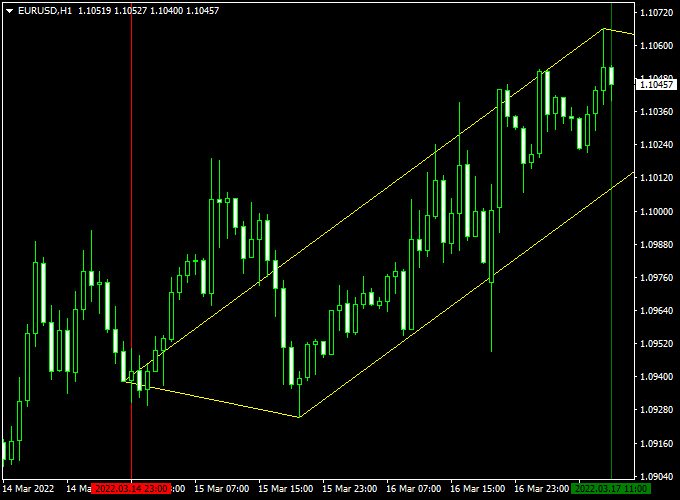
It automatically draws a yellow quadrilateral-style channel that wraps around price, allowing traders to visualize market swings without relying on lagging indicators.
This indicator focuses on raw price behavior and pattern geometry.
By analyzing how price expands and contracts within the channel, traders can anticipate potential continuation or reversal areas.
The Quadrilateral Forex Indicator is particularly useful for traders who prefer chart-based decision making and want early insight into possible trade locations.
Because it does not repaint, all drawn patterns remain fixed once formed.
This makes the indicator reliable for backtesting, forward testing, and live trading across multiple currency pairs and timeframes.
Free Download
Download the “quadrilateral-indicator.ex4” MT4 indicator
Key Features
- Draws bullish and bearish price action patterns.
- Non-repaint behavior for consistent signals.
- Displays a yellow trading channel on the main chart.
- Useful for identifying potential trade entry and exit zones.
- Works across different markets and timeframes.
Indicator Chart
The Quadrilateral Forex Indicator is displayed directly on the main price chart as a yellow pattern channel surrounding candlestick movement.
The chart highlights potential buy zones near the lower boundary and sell zones near the upper boundary, helping traders align entries with pattern direction.

Guide to Trade with Quadrilateral Forex Indicator
Buy
- Wait for the price to approach or touch the lower yellow trading pattern line.
- Confirm that the Quadrilateral channel is sloping upwards.
- Open a buy trade after price shows rejection within the pattern.
Sell
- Wait for the price to approach or touch the upper yellow trading pattern line.
- Confirm that the Quadrilateral channel is sloping downwards.
- Open a sell trade after price reacts within the pattern.
Stop Loss
- Place the stop loss below the lower trading pattern for buy trades.
- Place the stop loss above the upper trading pattern for sell trades.
- Allow extra space during volatile market sessions.
Take Profit
- Exit buy trades near the upper yellow trading pattern line.
- Exit sell trades near the lower yellow trading pattern line.
- Partial profits can be secured at mid-pattern levels.
Quadrilateral + Free Forex Scalping Indicator MT4 Strategy
This short-term trading method combines the Quadrilateral Forex Indicator for MT4 and the Free Forex Scalping Indicator for MT4.
It’s built for traders who enjoy fast intraday setups and quick profits, using a blend of channel direction and momentum confirmation.
The Quadrilateral Indicator identifies the overall market bias through the slope of its dynamic channel — when the channel is rising, the trend is bullish, and when it’s falling, the trend is bearish.
The Free Forex Scalping Indicator refines timing by signaling momentum shifts through color-coded histograms — green for buy strength, red for sell strength.
This strategy works best on M1 to M15 charts, ideal for pairs with tight spreads such as EURUSD, GBPUSD, and USDJPY.
Scalpers who thrive in active markets like London and New York sessions will find this setup especially effective, as it capitalizes on short bursts of directional movement.
Buy Entry Rules
- Confirm that the Quadrilateral channel is sloping upward, indicating a bullish trend.
- Wait for the Free Forex Scalping Indicator to turn green, showing a buy momentum signal.
- Open a buy trade at the start of the next candle once both conditions align.
- Place a stop loss 10–15 pips below the lower Quadrilateral channel boundary.
- Take profit near the next resistance level or after achieving a 1:1.5 risk-reward ratio.
Sell Entry Rules
- Ensure the Quadrilateral channel is sloping downward, showing a bearish market phase.
- Wait for the Free Forex Scalping Indicator to turn red, confirming downside pressure.
- Enter a sell position at the opening of the next candle after the confirmation.
- Set a stop loss 10–15 pips above the upper Quadrilateral channel boundary.
- Take profit near support or aim for at least a 1:1.5 reward relative to the stop loss.
Advantages
- Fast and simple setup with clear visual confirmation.
- Ideal for traders who prefer short holding periods.
- Minimizes false entries by combining trend direction and momentum.
- Works efficiently on high-liquidity forex pairs during peak hours.
Drawbacks
- Frequent signals can lead to overtrading if discipline is lacking.
- Requires precise execution due to tight stop losses.
- Performance may weaken during flat or consolidating markets.
Case Study 1 – EURUSD M5
During the early London session, the Quadrilateral channel sloped upward while the Free Forex Scalping histogram turned green.
A buy entry was placed at 1.0765 with a 12-pip stop and a 20-pip target.
Price rallied to 1.0785 within 25 minutes, delivering +20 pips profit before momentum faded.
This trade showcased how quickly alignment between both indicators can capture clean intraday bursts.
Case Study 2 – GBPUSD M15
In a bearish move during the New York session, the Quadrilateral channel pointed down, and the scalping histogram switched to red.
A short trade at 1.2730 hit a 25-pip gain at 1.2705 before the price rebounded.
The setup offered a low-risk, high-clarity entry that worked perfectly for a 1:2 risk-reward scalp.
Strategy Tips
- Always trade in the direction of the channel slope — avoid countertrend setups.
- Wait for histogram color confirmation before entering any trade.
- Use pairs with tight spreads to reduce slippage during volatile periods.
- Avoid trading during low-volume hours, such as between sessions.
- For extra confirmation, monitor price action near channel edges to fine-tune entries.
- Consider partial profit-taking at key levels to lock in gains while leaving a portion to run.
Download Now
Download the “quadrilateral-indicator.ex4” MT4 indicator
FAQ
Does the Quadrilateral Forex Indicator repaint?
No, once a pattern is drawn, it remains fixed, making it suitable for reliable trade planning.
Is this indicator suitable for beginners?
Yes, the visual pattern channels make it easy to understand price movement without complex calculations.
Can it be combined with other tools?
It works well with support and resistance, candlestick analysis, and momentum oscillators.
Which timeframe works best?
The indicator performs well on both lower and higher timeframes, depending on your trading style.
Summary
The Quadrilateral Forex Indicator for MT4 offers a practical way to trade pure price action using non-repaint pattern channels.
Its ability to highlight structured market movement helps traders identify potential entries, exits, and risk zones with confidence.
Whether used as a standalone tool or alongside other technical methods, this indicator provides valuable insight into price behavior while remaining lightweight and easy to use.





