About the Simpler Trend Indicator
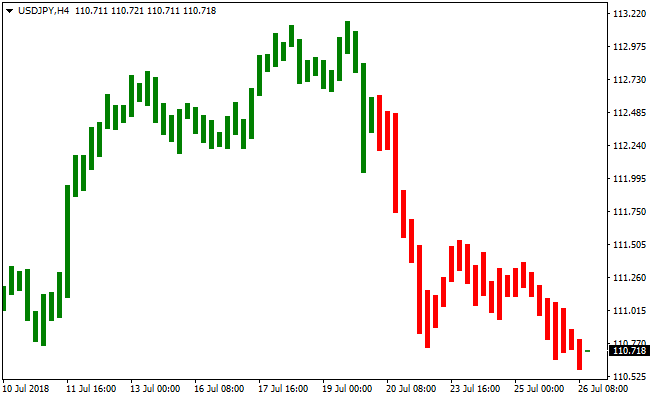
The Simpler Trend indicator for MT4 is a trend-following tool that visually highlights market direction by coloring price candlesticks.
Instead of plotting separate lines or panels, it changes the candle colors directly on the price area, making trend identification fast and intuitive.
Green candlesticks indicate bullish conditions, while red candlesticks signal bearish momentum.
This approach allows traders to instantly recognize whether buyers or sellers are in control without additional confirmation tools.
Traders can use it as a standalone trend filter or combine it with oscillators and other technical tools to refine entries.
By focusing purely on trend direction, the Simpler Trend indicator helps traders avoid countertrend setups and maintain discipline in changing market conditions.
Free Download
Download the “Simpler Trend.mq4” MT4 indicator
Key Features
- Colors candlesticks based on active trend direction.
- Green candles highlight bullish momentum.
- Red candles highlight bearish momentum.
- Can be combined with oscillators for refined entries.
Indicator Chart
The Simpler Trend indicator appears beneath the main price area by coloring the candlesticks green or red based on current trend conditions.
The display clearly shows trend shifts as candle colors change, helping traders spot buy and sell opportunities without relying on separate indicators.

Guide to Trade with Simpler Trend Indicator
Buy Rules
- Wait for the first green Simpler Trend candlestick to appear.
- Confirm price is not in a major resistance area.
- Optionally check an oscillator for oversold conditions.
- Open a buy trade aligned with the green candle trend.
Sell Rules
- Wait for the first red Simpler Trend candlestick to appear.
- Confirm price is not sitting at major support.
- Optionally check an oscillator for overbought conditions.
- Open a sell trade aligned with the red candle trend.
Stop Loss
- Place the stop 3 pips below the recent swing low for buy trades.
- Place the stop 3 pips above the recent swing high for sell trades.
Take Profit
- Close buy trades when the first red candle appears.
- Close sell trades when the first green candle appears.
- Exit early if momentum weakens significantly.
- Optionally target nearby support or resistance levels.
Simpler Trend Indicator and Digital MACD V2 Forex Day Trading Strategy for MT4
The Simpler Trend Indicator and the Digital MACD V2 Indicator are combined in this MT4 day trading strategy to create a clean and trend-aligned intraday approach.
The Simpler Trend indicator provides an immediate visual understanding of market direction by coloring candlesticks green during bullish trends and red during bearish trends.
The Digital MACD V2 complements this by confirming momentum strength through its position relative to the zero line.
When MACD is above zero, bullish momentum is present. When MACD is below zero, bearish pressure dominates. This confirmation reduces false entries and improves timing.
The setup works best on M15, M30, and H1 timeframes where intraday price direction is easier to read and signals tend to stay more reliable.
The objective is to capture strong intraday price movements and exit trades before major session closes or clear trend reversals occur.
Buy Entry Rules
- Simpler Trend candlesticks must be green, indicating a bullish trend.
- Digital MACD V2 histogram must be above zero to confirm bullish momentum.
- Wait for a pullback to a recent support level, pivot, or minor consolidation area within the trend.
- Enter a buy trade at the close of the next candle that remains green after the pullback.
- Place a stop loss a few pips below the most recent swing low or below a key support area.
- Set take profit at a predefined target such as 15 to 50 pips depending on pair volatility, or trail stop using previous swing lows.
Sell Entry Rules
- Simpler Trend candlesticks must be red, indicating a bearish trend.
- Digital MACD V2 histogram must be below zero to confirm bearish momentum.
- Wait for a pullback to a recent resistance level or short retracement within the trend.
- Enter a sell trade at the close of the next candle that remains red after the pullback.
- Place a stop loss a few pips above the most recent swing high or above a key resistance area.
- Set take profit at a predefined target such as 15 to 50 pips depending on session activity, or use a trailing stop across lower highs.
Advantages
- Trend direction is immediately visible thanks to the colored candlesticks, which reduces hesitation and overanalysis.
- Digital MACD V2 adds objective momentum confirmation, filtering out many weak or low quality setups.
- The strategy encourages trading in the direction of intraday market flow rather than guessing reversals.
Drawbacks
- In sideways or low volatility markets, trend color changes can occur too frequently and reduce accuracy.
- MACD confirmation may lag during very fast price movements, causing slightly later entries.
Case Study 1
On EURUSD H1 during the London session, the Simpler Trend candlesticks turned consistently green as price broke above a key intraday resistance zone.
The Digital MACD V2 histogram crossed above zero, confirming bullish momentum.
After a minor retracement to near a pivot support, a fresh green candle formed.
A buy entry was taken and price moved strongly higher for 25 pips before hitting the take profit target.
The stop loss had been placed below the recent swing low, keeping risk controlled and aligning with intraday structure.
Case Study 2
On GBPUSD M30 in the early New York session, the Simpler Trend shifted to red, signaling a bearish shift after a failed attempt to break higher.
The Digital MACD V2 indicator dropped below zero, reinforcing bearish momentum.
After a small pullback toward a prior intraday resistance, a red candle closed confirming continuation.
A sell trade was entered and price quickly dropped for 43 pips before reaching the planned exit area.
The stop loss was placed above the recent swing high, protecting against false moves.
Strategy Tips
- Focus on the first strong trend move of the session, as signals tend to be cleaner and more reliable.
- If Simpler Trend changes color frequently within a short period, step aside until the direction becomes stable.
- Allow the Digital MACD V2 to remain above or below zero for at least one full candle before committing to a trade.
- Close trades before the major session ends to avoid reversals caused by declining liquidity.
Download Now
Download the “Simpler Trend.mq4” Metatrader 4 indicator
FAQ
How does the Simpler Trend indicator determine candle color?
The indicator analyzes recent price behavior to detect directional momentum.
Candles turn green when bullish pressure dominates and red when bearish pressure takes control.
Can Simpler Trend be used as a trade confirmation tool?
Yes. Many traders use it to confirm overall direction before executing entries based on other signals such as oscillators or price action.
Does Simpler Trend generate early or delayed signals?
Signals appear as soon as trend conditions change.
On lower timeframes this can feel fast, while higher timeframes provide smoother transitions.
Summary
The Simpler Trend indicator provides a straightforward way to stay aligned with market direction by coloring price candlesticks based on trend momentum.
This removes unnecessary guesswork and allows traders to focus on higher-quality setups.
Its flexibility across all timeframes and compatibility with other tools make it a practical choice for both discretionary and systematic traders.


