
About the Sniper Buy & Sell Scalper Indicator
The Sniper Buy & Sell Scalper Indicator for MT4 is designed for traders who focus on fast and accurate market entries.
It works directly on the main Metatrader 4 chart and displays colored arrow signals that highlight potential buy and sell opportunities.
The indicator analyses short-term price behavior and momentum to spot moments where price is likely to react quickly.
This scalper indicator is well suited for lower timeframes such as M1, M5, and M15.
It helps traders stay disciplined by removing guesswork and focusing only on high-probability setups.
Instead of cluttering the chart with multiple tools, the Sniper Buy & Sell Scalper keeps everything simple and actionable.
Its main strength lies in timing, allowing traders to enter trades closer to short-term reversals or momentum bursts.
Free Download
Download the “forex-buy-sell-indicator.ex4” indicator for MT4
Key Features
- White arrow signals for buy scalper opportunities
- Red arrow signals for sell scalper opportunities
- Appears directly on the main MT4 chart window
- Optimized for fast-paced scalping strategies
- Works on most currency pairs and volatile sessions
- Helps reduce emotional and late entries
Indicator Chart
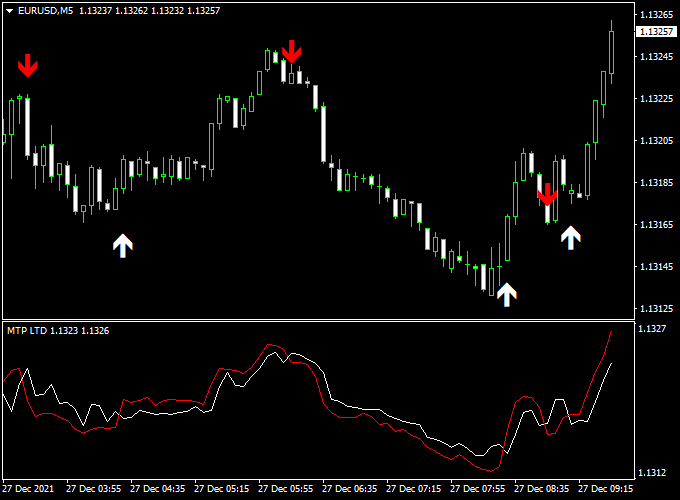
The chart below shows the Sniper Buy & Sell Scalper Indicator applied to a live MT4 price chart.
White arrows mark potential buy entries, while red arrows highlight sell opportunities.
The signals appear close to the price, making it easy to react quickly and manage trades efficiently.
Guide to Trade with the Sniper Buy & Sell Scalper Indicator
Buy Rules
- Wait for a white colored arrow to appear on the chart
- Confirm price is not strongly bearish on the higher timeframe
- Enter a buy trade at the opening of the next candle
Sell Rules
- Wait for a red colored arrow to appear on the chart
- Confirm price is not strongly bullish on the higher timeframe
- Enter a sell trade at the opening of the next candle
Stop Loss
- Place the stop loss below the most recent swing low for buy trades
- Place the stop loss above the most recent swing high for sell trades
- Keep stops tight to maintain a healthy risk profile
Take Profit
- Target the nearest intraday support or resistance level
- Alternatively, use a fixed 1:1.5 or 1:2 risk-to-reward ratio
- Partial profits can be taken during strong momentum moves
Practical Tips
- Use the indicator in the direction of the higher timeframe trend to improve the win rate
- Stick to one or two currency pairs to better understand their behavior with this scalper
- Do not chase late entries if the price has already moved strongly after the arrow appeared
- Limit risk per trade to a small percentage to handle consecutive scalping trades calmly
- Backtest the indicator on your preferred timeframe before using it on a live account
Sniper & ZWinner MT4 Scalping Strategy
This MT4 scalping strategy combines the powerful signals from the Sniper Buy Sell Scalper Indicator and the ZWinner Trend Forex Indicator.
By using these two indicators together, traders can capture high-probability intraday moves with clear trend confirmation.
The Sniper indicator provides precise entry signals with arrows, while ZWinner confirms the trend using colored histogram bars.
This strategy works best on 5-minute and 15-minute charts and is ideal for active scalpers seeking quick, consistent profits.
Buy Entry Rules
- Enter a buy trade when the Sniper indicator displays a white arrow pointing up.
- Confirm the trade with the ZWinner Trend indicator showing green histogram bars, indicating bullish momentum.
- Place the stop loss just below the most recent swing low to protect against sudden reversals.
- Set the take profit at a 1:1.5 or 1:2 risk-to-reward ratio, or exit when ZWinner turns red, signaling a trend reversal.
Sell Entry Rules
- Enter a sell trade when the Sniper indicator displays a red arrow pointing down.
- Confirm the trade with the ZWinner Trend indicator showing red histogram bars, indicating bearish momentum.
- Place the stop loss just above the most recent swing high to limit risk.
- Set the take profit at a 1:1.5 or 1:2 risk-to-reward ratio, or exit when ZWinner turns green, signaling a trend reversal.
Advantages
- Clear entry and exit signals reduce decision-making stress for scalpers.
- Combining trend confirmation with precise arrow signals increases win probability.
- Works effectively on lower timeframes, ideal for intraday trading.
- Flexible stop loss and take profit settings allow adaptation to different currency pairs.
Drawbacks
- Requires active monitoring of charts to manage trades effectively.
- Spread and slippage can affect profitability on very short timeframes.
Case Study 1: EUR/USD 5-Minute Chart
On the 5-minute EUR/USD chart, a white Sniper arrow appeared at 09:15.
The ZWinner histogram confirmed bullish momentum with green bars.
A buy trade was opened at 1.1010 with a stop loss at 1.1000.
The trade reached a take profit at 1.1025, yielding 15 pips within 30 minutes.
The trend remained strong, and the trade aligned perfectly with the scalping strategy.
Case Study 2: GBP/USD 15-Minute Chart
On the 15-minute GBP/USD chart, a red Sniper arrow appeared at 13:45.
The ZWinner histogram confirmed bearish momentum with red bars.
A sell trade was opened at 1.3150 with a stop loss at 1.3160.
The take profit was reached at 1.3130, yielding 20 pips in under an hour.
The combination of the arrow signal and trend confirmation prevented entering too early and helped capture the move efficiently.
Strategy Tips
- Use a low spread broker to reduce costs on short-term trades.
- Avoid trading during major economic news to reduce volatility risk.
- Always wait for both Sniper arrow and ZWinner histogram confirmation to avoid false entries.
- Consider scaling out profits for larger moves while keeping some position open for extended trends.
- Practice proper risk management; risk only 1-2% of your account per trade.
Download Now
Download the “forex-buy-sell-indicator.ex4” indicator for Metatrader 4
FAQ
Which timeframes work best with this indicator?
The Sniper Buy & Sell Scalper performs best on M1, M5, and M15 charts.
These timeframes provide enough price movement for scalping while keeping signals frequent.
Does the indicator repaint its signals?
No, the arrows are based on closed candle conditions.
Once a buy or sell arrow appears, it does not move or disappear.
Can it be used during news sessions?
It can be used during high volatility, but spreads and slippage should be considered.
Many traders prefer using it before or after major news releases.
Summary
The Sniper Buy & Sell Scalper Indicator for MT4 offers a focused and efficient approach to Forex scalping.
Its arrow-based signals help traders react faster and stay aligned with short-term price movements.
The indicator is easy to use, lightweight, and fits well into active trading sessions.
For even better results, many traders combine it with a simple trend filter or higher timeframe analysis.
Used together with disciplined money management, this indicator can become a reliable part of a professional scalping workflow.


