
About the Sniper Stop indicator
The Sniper Stop indicator for MT4 is a stop-and-reverse trading tool that shows trend direction with colored dots above and below candlesticks.
Blue dots indicate an upward trend and red dots indicate a downward trend.
Traders can use the indicator to enter trades in the direction of the trend or reverse positions when the dot color changes.
It works as a standalone tool or alongside other indicators such as oscillators to improve scalp trade timing.
It allows traders to act quickly on trend reversals and highlights potential entry and exit points clearly on the chart.
Free Download
Download the “sniper-stop-indicator.mq4” MT4 indicator
Key features
- Stop-and-reverse indicator with colored dots for trend direction.
- Can be used as a standalone indicator or with oscillators for scalping.
- Simple and easy-to-read chart signals.
Indicator chart
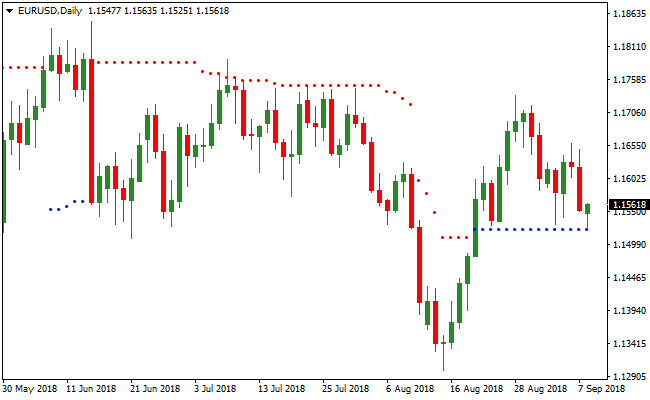
The image below shows the Sniper Stop indicator displayed on the main chart.
Blue dots appear below candlesticks signaling a bullish trend, and red dots appear above candlesticks signaling a bearish trend.
Guide to trade with the Sniper Stop indicator
Buy rules
- Open a buy trade when a blue dot appears below the candlestick.
- Enter at the close of the blue dot candlestick.
- Focus on strong bullish trend conditions for higher probability trades.
Sell rules
- Open a sell trade when a red dot appears above the candlestick.
- Enter at the close of the red dot candlestick.
- Focus on strong bearish trend conditions for higher probability trades.
Stop loss
- Place the stop a few pips below the last blue dot for buy trades.
- Place the stop a few pips above the last red dot for sell trades.
- Close trades immediately if an opposite dot appears before reaching your target.
Take profit
- Close the trade when an opposite dot appears, signaling a trend reversal.
- Optionally scale out partial positions for risk management.
- Use trailing stops to lock in profits during strong trends.
- Adjust exits based on market conditions or support/resistance levels.
MT4 Strategy: Sniper Stop + Bull Bear Signals Dashboard Day Trading Method
This MT4 day trading strategy combines the Sniper Stop Indicator and the Bull Bear Signals Dashboard Indicator to capture reliable intraday moves.
The Sniper Stop uses blue dotted lines for buy signals and red dotted lines for sell signals.
The Bull Bear Signals Dashboard provides a quick view of multiple currency pairs and indicates bullish (BULL) or bearish (BEAR) trends for each pair, allowing traders to focus on pairs with strong trend alignment.
This strategy works best on M15, M30, and H1 charts where intraday trend momentum is more stable.
By combining Sniper Stop entries with dashboard trend confirmation, traders can avoid counter trend trades and focus on high probability setups.
It is suitable for both beginners and experienced traders looking for structured day trading opportunities.
The strategy emphasizes following the trend indicated by the dashboard while using Sniper Stop signals for precise entry points.
This helps capture strong intraday moves while managing risk with clearly defined stop loss levels.
Buy Entry Rules
- The Bull Bear Signals Dashboard shows BULL for the chosen currency pair.
- A blue dotted line appears on the chart from the Sniper Stop indicator.
- Enter the trade immediately after the Sniper Stop confirmation.
- Place a stop loss below the nearest swing low.
- Take profit at the next intraday resistance level or when the Sniper Stop blue line changes to red.
Sell Entry Rules
- The Bull Bear Signals Dashboard shows BEAR for the chosen currency pair.
- A red dotted line appears on the chart from the Sniper Stop indicator.
- Enter the trade immediately after the Sniper Stop confirmation.
- Place a stop loss above the nearest swing high.
- Take profit at the next intraday support level or when the Sniper Stop red line changes to blue.
Advantages
- The trading signals make it easy to identify intraday buy and sell opportunities.
- Dashboard allows monitoring multiple pairs at a glance to focus on strong trends.
- Combining trend confirmation and entry signals reduces the risk of false trades.
- Works on multiple timeframes suitable for day trading.
- Stop loss and take profit levels are clearly defined, simplifying risk management.
- Helps traders capture structured intraday moves with minimal guesswork.
Drawbacks
- Dashboard trends can lag slightly on fast price moves.
- Requires discipline to avoid trading pairs that show conflicting signals.
- Not suitable for long-term swing trades due to focus on intraday momentum.
- Stop loss placement may occasionally be hit by sudden news spikes.
Case Study 1: EURJPY M30
During the London session, the Bull Bear Signals Dashboard showed BULL for EURJPY.
A blue dotted line appeared on the chart from the Sniper Stop indicator, confirming a buy entry.
The trade was placed with a stop below the nearest swing low.
Price moved upward over the next few hours, and the trade was closed when the blue line changed to red, capturing a 35 pip gain.
The dashboard and Sniper Stop alignment provided a reliable intraday setup.
Case Study 2: AUDNZD H1
AUDNZD displayed BEAR on the Bull Bear Signals Dashboard during the early New York session.
A red dotted line from the Sniper Stop indicator appeared, confirming a sell trade.
The stop loss was placed above the recent swing high.
The price declined steadily and the trade was closed automatically when the red line changed to blue, producing a 42 pip profit.
The strategy efficiently captured the intraday bearish trend.
Strategy Tips
- Always check the dashboard trend before taking Sniper Stop signals to ensure alignment with the prevailing trend.
- Do not take trades against strong dashboard trends to avoid low probability setups.
- Place stop losses at logical swing points to minimize risk.
- Take profit can be automated by monitoring Sniper Stop color changes for a simple exit rule.
- Limit the number of pairs monitored at the same time to maintain focus and discipline.
Download Now
Download the “sniper-stop-indicator.mq4” Metatrader 4 indicator
FAQ
How does the Sniper Stop indicator work?
The indicator paints blue and red dots above or below candlesticks to show short-term trend direction and potential reversal points.
Can it be used on multiple timeframes?
Yes. It works effectively on all timeframes, from 1-minute charts for scalping to hourly charts for day trading.
How can it be combined with other indicators?
Traders can use it alongside oscillators, moving averages, or trend-following tools to confirm entries and improve trade timing.
Summary
The Sniper Stop indicator for MT4 helps traders identify trend direction and reversal points using colored dots.
Blue dots signal bullish conditions and red dots signal bearish conditions, making it easy to act on trend changes.
It is useful for scalping, day trading, and short-term trend trades.
Traders can combine it with oscillators for more precise entries or use it standalone for quick stop-and-reverse setups.





