

About the Stalin Forex Signal Indicator
The Stalin Forex Signal indicator for Metatrader 4 uses a secret trading strategy that generates accurate buy and sell signals on the trading chart with minimal delay.
The indicator appears in the main MT4 chart window as simple, blue, and pink colored signal arrows, ensuring that even fast-moving price action remains readable.
Because the Stalin indicator works for both beginners and seasoned traders, it has become a popular choice for those looking to enhance their existing strategy with a reliable momentum filter.
Free Download
Download the “Stalin.mq4” indicator for MT4
Key Features
- It provides instant visual confirmation of trend reversals through color-coded arrows.
- The indicator utilizes a proprietary logic to identify the start of high-momentum price swings.
- It works effectively across all timeframes, from 1-minute scalps to daily swing trades.
- The clean interface ensures that the arrows do not obstruct other price action patterns.
Indicator Chart
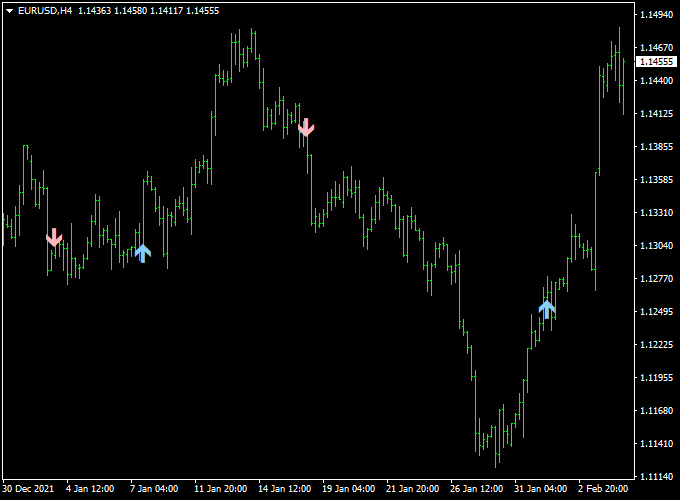
The Stalin Forex Signal indicator chart features price candles accompanied by colored arrows that appear at strategic locations.
A blue arrow appearing below a candle represents a bullish momentum shift, while a pink arrow placed above a candle indicates bearish pressure.
By observing the placement of these arrows near key support and resistance zones, a trader can easily validate the strength of a potential trade setup.
Guide to Trade with Stalin Forex Signal Indicator
Trading with this tool involves waiting for the arrows to manifest and confirming the move with basic price action principles.
Buy Rules
- Monitor the chart for signs of a bullish reversal or a continuation of an existing uptrend.
- Open a buy trade when a blue arrow is printed on the chart.
- Confirm the signal by ensuring the current candle closes above the arrow’s position.
- Verify that the broader market sentiment on a higher timeframe is also bullish.
Sell Rules
- Watch for a transition where the market begins to show signs of bearish exhaustion.
- Open a sell trade when a pink arrow is printed on the chart.
- Confirm the entry by waiting for the candle to close to ensure the signal is locked in.
- Check for a bearish rejection at a recent price peak on the main chart.
Stop Loss
- Secure your buy entry by placing the stop loss a few pips below the blue signal arrow.
- Protect your sell trade by positioning the stop loss slightly above the pink signal arrow.
- Adjust your stop placement based on the average volatility of the chosen currency pair.
- Always follow a fixed risk management plan to ensure long-term sustainability.
Take Profit
- Exit the trade as soon as an opposite signal arrow appears on the trading chart.
- Target a 1:2 risk-to-reward ratio to maintain a positive statistical edge.
- Consider closing the position near major historical support or resistance levels.
- You can also trail your stop loss to lock in profits as the price moves in your favor.
Stalin Signal Super Forex Trend MT4 Strategy
This strategy combines the Stalin Forex Signal Indicator MT4 and the Winning Super Trend Forex Indicator MT4.
The Stalin indicator uses arrows for entries: a blue arrow indicates a buy signal and a pink arrow a sell signal.
The Winning Super Trend indicator shows the trend with a green line for bullish trend bias and a red line for bearish trend bias.
You can apply this strategy to any time frame—from M1 to H4 — depending on how long you want to hold trades.
The key is to wait for both an arrow signal (entry) and the trend‑line confirmation (bias) to align before entering.
Buy Entry Rules
- Ensure the Winning Super Trend line is green, indicating a bullish trend bias.
- Wait for a blue arrow from the Stalin indicator to appear on the chart.
- Enter a buy trade at the close of the candle where the blue arrow appears.
- Place a stop‑loss just below the recent swing low or a recent support level.
- Take profit based on time‑frame: for shorter time‑frames (M5-M15), aim for 15-30 pips
- For longer time‑frames (H1-H4), aim for 40-80 pips or more, depending on volatility.
Sell Entry Rules
- Ensure the Winning Super Trend line is red, indicating a bearish trend bias.
- Wait for a pink arrow from the Stalin indicator to appear.
- Enter a sell trade at the close of the candle where the pink arrow appears.
- Place a stop‑loss just above the recent swing high or a recent resistance level.
- Take profit similar to the buy side: 15-30 pips on shorter time‑frames, 40-80 pips or more on longer ones.
Advantages
- Clear visual entry signals (arrows) and trend bias (colour line) reduce ambiguity in trade decisions.
- Works across different time frames, making it flexible for day trading or longer trades.
- Trend confirmation helps avoid counter-trend trades, increasing the probability of success.
- A clear stop-loss and take-profit structure helps maintain disciplined risk management.
Drawbacks
- The arrow signals may lag in very fast markets, meaning entry may come after part of the move has already occurred.
- In choppy or sideways markets, trend-bias lines may flip frequently, and arrows may give false entries.
Case Study 1: USDJPY H1 – Swing Trade
On the H1 chart, USDJPY showed the Winning Super Trend line in green, signalling a sustained bullish bias.
At 149.52, the Stalin indicator produced a blue arrow.
A buy trade was entered with a stop-loss at 149.10 (just under the recent swing low).
Within the next two sessions price climbed to 150.45, yielding approximately 93 pips.
The alignment of trend bias and entry arrow produced a high-probability trade.
Case Study 2: AUDUSD M15 – Day Trade
On the M15 chart, AUDUSD displayed the Winning Super Trend line in red, signalling a bearish bias.
At 0.6793, the Stalin indicator gave a pink arrow.
A sell trade was entered with a stop-loss at 0.6805.
Price dropped to 0.6758 within one trading session, resulting in a 35-pip profit.
Clear signal and trend bias helped capture a strong intraday move.
Strategy Tips
- Always trade with the dominant trend bias from the Winning Super Trend before following arrow signals.
- Avoid trading when the trend line is flat or frequently flipping colours; this usually indicates a range-bound market.
- Consider waiting for a pullback (minor retracement) after the arrow before entry to improve risk/reward.
- Maintain risk at a fixed percentage of account (e.g., 1-2%) per trade; scale stop-loss and take-profit accordingly across time-frames.
- Back-test the strategy on the specific pairs and time frames you trade to find where it performs best.
- Consider combining with support/resistance levels or price-action confirmation for added trade quality.
Download Now
Download the “Stalin.mq4” indicator for Metatrader 4
FAQ
Is this indicator suitable for scalping during the London session?
Yes, the Stalin indicator is highly effective for scalping because it reacts quickly to the high volume typically found during the London and New York overlaps.
It helps identify the “first impulse” of a new move, which is exactly what scalpers need to capture quick 10-20 pip gains.
Always ensure you are trading in a liquid environment for the best results.
Can I use this alongside other indicators?
While the Stalin indicator provides strong standalone signals, combining it with a moving average or a volume indicator can further increase its accuracy.
For instance, only taking blue buy signals when the price is above a 50-period moving average helps you avoid counter-trend trades and keeps you aligned with the dominant market flow.
Summary
The Stalin for mt4 is an effective momentum tool that assists in determining the appropriate timing for market entries.
By offering a simplified visual guide to buyer and seller strength, it helps you stay focused on high-conviction opportunities.
This tool helps traders maintain a consistent routine by highlighting levels where the market is statistically likely to expand.
Using this indicator allows you to filter high-risk trades and focus on high-conviction momentum shifts.





