
About the Stochastic Forex Indicator
The Stochastic indicator (STO) for Metatrader 4 is a popular technical oscillator used to predict possible trend reversals with high accuracy.
It can also be used to identify overbought and oversold price levels, helping you avoid entering a trade when a move is already exhausted.
The Stochastic oscillator is scaled between 0 (oversold) and 100 (overbought), providing a standardized way to read market energy regardless of the asset being traded.
It serves as an excellent standalone tool or as a secondary filter for your existing strategy.
Whether you are scalping or swing trading, this indicator provides the data needed to navigate the forex market successfully.
Free Download
Download the “Stochastic.mq4” indicator for MT4
Key Features
- It utilizes two signal lines (%K and %D) to provide clear crossover entry signals.
- The indicator features a fixed scale of 0 to 100 for easy interpretation of price extremes.
- It helps traders identify bullish and bearish divergences that often lead to major reversals.
- The tool is effective across all timeframes, from 5-minute scalps to monthly trend analysis.
- The sub-window layout allows for easy comparison between price momentum and actual price movement.
Indicator Chart
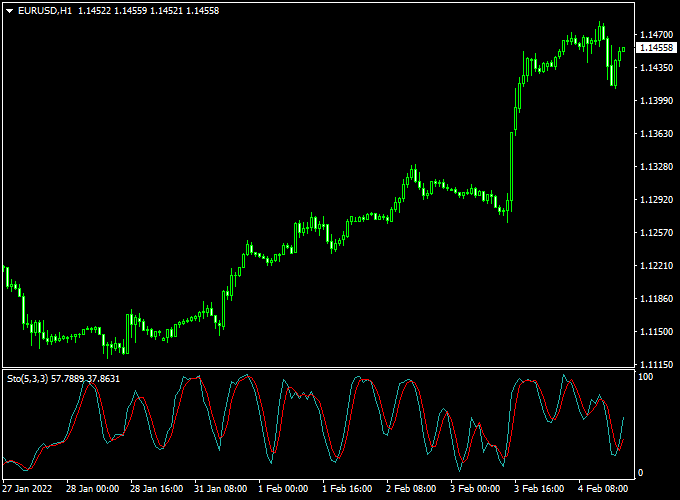
The Stochastic indicator chart features a dedicated window below the main trading screen containing two oscillating lines.
The area above the 80 level is considered the overbought zone, while the area below 20 is the oversold zone.
By watching how these lines interact with the 20 and 80 boundaries, a trader can easily determine if a pair is currently overextended and likely to pull back.
Guide to Trade with Stochastic Forex Indicator
Trading with this tool involves using the overbought and oversold levels to confirm that a correction or reversal is beginning.
Buy Rules
- Monitor the oscillator to see if the signal lines have dropped below the 20 level.
- Open a buy trade when the Stochastic oscillator turns back above 20 from below and the market is in an uptrend.
- Confirm the entry by ensuring the %K line has crossed above the %D line within the oversold zone.
- Verify that the main price chart shows a bullish rejection or support bounce at the same time.
Sell Rules
- Watch for the signal lines to climb into the overbought region above the 80 level.
- Open a sell trade when the Stochastic oscillator turns back below 80 from above and the market is in a downtrend.
- Confirm the signal by identifying a bearish crossover where the faster line moves below the slower line.
- Check the higher timeframe trend to ensure you are trading in alignment with broader market flow.
Stop Loss
- Secure your buy entry by placing the stop loss a few pips below the most recent swing low.
- Protect your sell trade by positioning the stop loss slightly above the most recent swing high.
- Adjust your stop distance to account for the current market spread and intraday volatility.
- Always follow a disciplined risk management plan to protect your trading capital from sudden spikes.
Take Profit
- Exit the trade when the Stochastic lines reach the opposite extreme level (80 for buy, 20 for sell).
- Target a 1:2 risk-to-reward ratio to maintain a positive statistical edge over time.
- Consider closing the position if the signal lines begin to flatten out or cross back against your trade.
- You can also trail your stop loss to lock in gains as the momentum continues to push in your favor.
Stochastic Forex Indicator + MACD Trend Histogram Bars Scalping Strategy
This scalping strategy combines the Stochastic Forex Indicator MT4 with the MACD Trend Histogram Bars MT4.
The Stochastic oscillator signals overbought and oversold conditions: a buy is triggered when the oscillator rises above 20 from below in an uptrend, while a sell occurs when it drops below 80 from above in a downtrend.
The MACD Trend Histogram confirms the market trend, showing green bars for bullish trends and red bars for bearish trends.
By combining trend confirmation with momentum signals, traders can capture small intraday moves with higher accuracy.
Buy Entry Rules
- Confirm the MACD Trend Histogram shows green bars, indicating a bullish trend.
- Wait for the Stochastic oscillator to cross back above 20 from below, indicating bullish momentum.
- Enter a buy trade at the close of the confirming candle.
- Place a stop loss below the recent swing low or nearby support.
- Take profit: 5–12 pips on M1, 10–20 pips on M5, 15–25 pips on M15 charts.
Sell Entry Rules
- Confirm the MACD Trend Histogram shows red bars, indicating a bearish trend.
- Wait for the Stochastic oscillator to cross back below 80 from above, indicating bearish momentum.
- Enter a sell trade at the close of the confirming candle.
- Place a stop loss above the recent swing high or nearby resistance.
- Take profit: 5–12 pips on M1, 10–20 pips on M5, 15–25 pips on M15 charts.
Advantages
- Combines trend confirmation and momentum signals for higher-probability trades.
- Clear and visual entry signals reduce indecision.
- Works across multiple short-term time frames for scalping opportunities.
- Applicable to multiple currency pairs with strong liquidity.
- Helps reduce false entries by waiting for trend confirmation before taking trades.
Drawbacks
- Small pip targets make profits sensitive to spreads and slippage.
- Trend reversals can occur quickly, triggering stop losses before momentum continues.
- Accuracy depends on proper Stochastic and MACD settings; misconfiguration may reduce effectiveness.
Case Study 1: EURUSD M5 – London Session
During the London session, EURUSD showed green MACD histogram bars, indicating a bullish trend.
The Stochastic oscillator crossed back above 20 at 1.1015.
A buy trade was entered with a stop loss at 1.1008.
Price moved to 1.1030 within 20 minutes, capturing 15 pips.
Trend alignment and momentum confirmation contributed to a successful scalping trade.
Case Study 2: USDJPY M1 – Tokyo Session
USDJPY on the M1 chart displayed red MACD histogram bars, confirming a bearish trend.
The Stochastic oscillator crossed below 80 at 149.72.
A sell trade was entered with a stop loss at 149.80.
Price fell to 149.60 in 15 minutes, resulting in a 12 pip profit.
Combining trend and oscillator signals helped capture a fast intraday move.
Strategy Tips
- Only enter trades when both the MACD trend and Stochastic momentum signals align.
- Focus on highly liquid pairs during active trading sessions for reliable scalping signals.
- Avoid trading during major news events to reduce the risk of slippage and spread widening.
- Adjust stop loss and take profit levels based on time frame and market volatility.
- Consider monitoring multiple time frames to spot early trend momentum before entry.
Download Now
Download the “Stochastic.mq4” indicator for Metatrader 4
FAQ
What is the difference between the %K and %D lines?
The %K line is the “fast” Stochastic line, which reflects the current price relative to the range.
The %D line is a moving average of %K, acting as the “signal” or “slow” line.
When the fast line crosses the slow line, it indicates a momentum shift.
These crossovers are most powerful when they happen at the extreme 20 or 80 levels.
Can I change the overbought and oversold levels?
Yes, while 80 and 20 are the standard settings, some traders prefer 70 and 30 for a more sensitive reading, or 90 and 10 to catch only the most extreme reversals.
You can easily adjust these levels in the MT4 indicator settings to better suit the specific volatility of the currency pair you are trading.
How do I avoid false signals in a strong trend?
In a very strong trend, the Stochastic can stay in the overbought or oversold zone for a long time.
To avoid “selling too early” in an uptrend, only take sell signals when the price is also hitting a major resistance level.
Using the indicator as a confirmation tool rather than a standalone signal generator is the best way to increase your accuracy.
Summary
The Stochastic for MT4 is an effective momentum tool that assists in determining the appropriate timing for market entries.
By offering a clear visual of price extremes, it helps you avoid the common mistake of buying at the top or selling at the bottom of a cycle.
This tool helps traders maintain a consistent routine by highlighting levels where the market is statistically likely to reverse or correct.
Using this indicator allows you to filter high-risk trades and focus on high-conviction momentum reversals.





