About the Super Trend Signal MTF Indicator
The Super Trend Signal MTF is a trend-following forex indicator designed for MetaTrader 4 traders who want simple and actionable buy and sell signals.
It uses a dual colored signal line that changes based on market direction, making it easy to follow active trends without overloading the chart.
When the market shifts into an uptrend, the signal line turns green and marks potential buying opportunities.
When momentum shifts lower, the line turns orange and signals selling pressure.
This color-based logic helps traders stay aligned with trend direction and avoid emotional decision-making.
One of the key advantages of this indicator is its multi-timeframe functionality.
You can analyze higher or lower timeframes directly from a single chart, which helps confirm trend strength and timing.
This makes the Super Trend Signal MTF suitable for intraday traders, swing traders, and those who prefer higher timeframe confirmation.
Free Download
Download the “supertrend_nrp_new_mtf_2.ex4” MT4 indicator
Key Features
- Dual colored signal line for clear trend direction.
- The green line indicates bullish momentum and buy opportunities.
- Orange line highlights bearish momentum and sell setups.
- Multi-timeframe analysis directly from the indicator inputs.
Indicator Chart
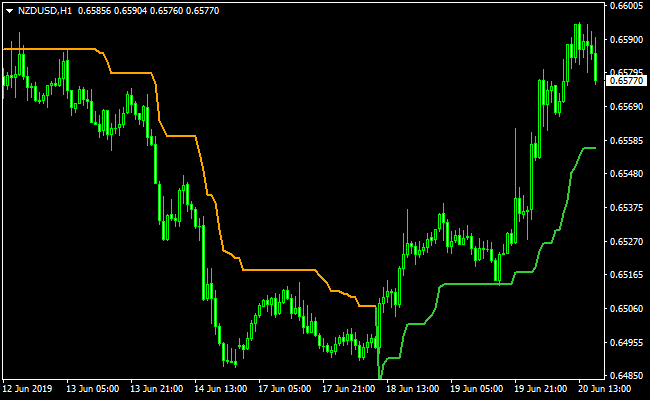
The Super Trend Signal MTF chart displays a colored signal line that follows price action closely.
The chart highlights buy signals when the line turns green and sell signals when it turns orange.
This visual approach helps traders spot trend changes and manage open positions with confidence.

Guide to Trade with Super Trend Signal MTF
Buy Rules
- Wait for the Super Trend Signal MTF line to change from orange to green.
- Confirm price is trading above the signal line.
- Check the higher timeframe trend using the MTF setting.
- Enter a buy trade at the opening of the next candle.
Sell Rules
- Wait for the Super Trend Signal MTF line to change from green to orange.
- Confirm price is trading below the signal line.
- Use the selected higher timeframe to confirm bearish momentum.
- Enter a sell trade at the opening of the next candle.
Stop Loss
- Place the stop loss below the most recent swing low for buy trades.
- Place the stop loss above the most recent swing high for sell trades.
- Adjust the stop loss if the signal line moves significantly.
Take Profit
- Set take profit at a nearby support or resistance level.
- Use a fixed risk to reward ratio such as 1:2 or higher.
- Trail profits while the signal line keeps its color.
- Close the trade when the signal line changes color.
SuperTrend MTF + Elite PRO Scalper Day Trading Strategy (MT4)
This trading strategy combines the SuperTrend MTF Indicator with the Elite PRO Scalper Indicator.
The SuperTrend MTF gives a clear directional context by plotting a green line for a bullish trend and an orange line for a bearish trend.
The Elite PRO Scalper adds precise entry arrows: blue arrows for buy and red arrows for sell.
Using these together on M5 and M15 timeframes helps you capture intraday trend moves with well-timed entries.
This strategy suits day traders who want structured setups with trend filtering and clear signals.
It works best during the London and New York sessions, on moderately volatile currency pairs like EUR/USD, GBP/JPY, USD/CAD, or NZD/USD.
By combining trend direction with arrow signal confirmation, you reduce the risk of entering against the trend or taking weak signals.
Buy Entry Rules
- On M5 or M15, check that the SuperTrend MTF line is green, signaling a bullish trend.
- Wait for the Elite PRO Scalper to show a blue arrow.
- Enter a long trade at the close of the candle with the blue arrow, only if the SuperTrend line remains green.
- Place a stop loss just below the recent swing low or below the arrow candle.
- Take profit target: 10 to 25 pips on M5, or 20 to 40 pips on M15, depending on session volatility.
- Optionally, trail your stop using the SuperTrend line. Exit if the line turns orange or the price closes below it.
Sell Entry Rules
- Check that the SuperTrend MTF line is orange, indicating a bearish trend.
- Wait for a red arrow from the Elite PRO Scalper.
- Enter a short trade at the close of the arrow candle, only if the SuperTrend line remains orange.
- Place a stop loss just above the recent swing high or above the arrow candle.
- Take profit target: 10 to 25 pips on M5, or 20 to 40 pips on M15.
- Trail the stop using the SuperTrend line. Close the trade if it turns green or the price closes above it.
Advantages
- Trend filtering ensures trades align with the broader trend.
- Precise arrow entries make timing easy for intraday trades.
- Works well on both M5 and M15 charts, allowing flexibility for scalping or short-term day trades.
- Adaptable profit targets based on pair volatility and session activity.
- Trailing stop with SuperTrend helps lock in profits and manage risk.
Drawbacks
- The SuperTrend line may lag slightly, causing delayed entry or exit signals.
- Tight stop losses may get hit during volatile spikes, especially on M5.
Case Study 1
On GBP/JPY M15 during the New York session, the SuperTrend MTF line was green, indicating a strong uptrend.
After a small pullback, the Elite PRO Scalper produced a blue arrow.
The trader entered long at the close of the candle and placed a stop just below the latest swing low.
The pair moved steadily upward, reaching a 30 pip target.
The SuperTrend line stayed green, giving confidence to hold the trade.
Partial profit was taken at 25 pips, and the remaining position was closed when the SuperTrend line changed color.
Case Study 2
On EUR/USD M5 during the London session, the SuperTrend MTF line turned orange, signaling a bearish trend.
Shortly after, a red arrow appeared from the Elite PRO Scalper.
A short position was entered at the candle close, with a stop above the arrow candle.
Price dropped quickly, reaching a 15 pip target.
The histogram stayed orange, allowing the trader to trail the stop and capture additional pips before exiting the trade.
Strategy Tips
- Use moderately volatile currency pairs such as EUR/USD, GBP/JPY, USD/CAD, and NZD/USD.
- Keep position sizes moderate to reduce risk with tight stop losses.
- Avoid trading around major news events, which can cause the SuperTrend line to flip frequently.
- Take partial profits at the first target and trail the remaining position with the SuperTrend line.
- Test on a demo account first to get familiar with timing and trade execution.
Download Now
Download the “supertrend_nrp_new_mtf_2.ex4” Metatrader 4 indicator
FAQ
How does the Super Trend Signal MTF identify trend changes?
The indicator identifies trend changes by shifting the signal line color.
A move to green reflects bullish pressure, while a switch to orange signals bearish momentum.
These changes are calculated using price movement and trend sensitivity settings.
Which timeframe works best with this indicator?
The Super Trend Signal MTF performs well on M15, H1, and H4 charts.
Using the multi-timeframe feature allows traders to confirm higher timeframe direction while trading lower charts.
Can the indicator be used for trade exits?
Yes, the color change of the signal line is an effective exit method.
Closing a trade when the line switches color helps protect profits and limit drawdowns during reversals.
Summary
The Super Trend Signal MTF is a practical trend-following indicator for MT4 traders who value simplicity and confirmation.
Its color-based signals remove guesswork and help traders stay focused on the dominant market direction.
The multi-timeframe feature adds flexibility and improves decision-making by aligning trades with higher timeframe trends.
With proper risk management and disciplined execution, this indicator can become a reliable part of a professional forex trading strategy.


