
About the Trend Direction Force Indicator
The Trend Direction Force indicator for MT4 is a momentum-driven trend-following oscillator designed to highlight directional strength in the market.
It focuses on identifying when price momentum shifts from neutral back into a trending phase.
The oscillator operates within a fixed range, with extreme values fluctuating between 1 and -1.
This bounded behavior makes it easier to judge when bullish or bearish pressure is returning after a pullback or consolidation.
Trend signals are generated when the red oscillator line crosses key horizontal reference levels.
A bullish trend is identified when the line moves back above the central 0.00 level, while bearish trends emerge when it drops back below that level.
These transitions often coincide with renewed momentum in the prevailing direction.
It is best used as a trend confirmation tool alongside price action, support and resistance, or higher timeframe bias.
Free Download
Download the “trend-direction-force-index-indicator.ex4” MT4 indicator
Key Features
- Trend-following oscillator with fixed value range.
- Clear bullish and bearish trend transitions.
- Helps identify momentum continuation after pullbacks.
- Suitable for confirmation within broader strategies.
Indicator Chart
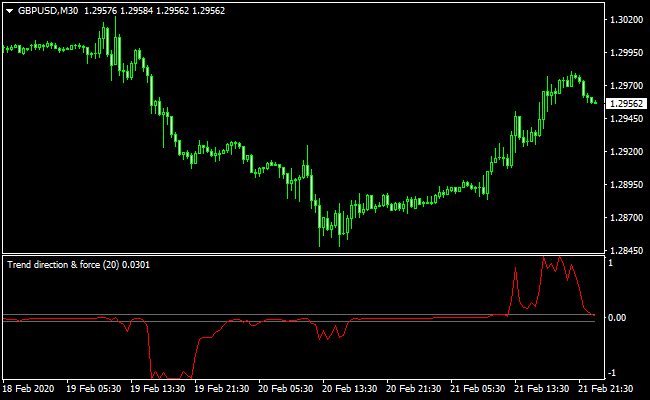
The chart shows the Trend Direction Force indicator plotted in a separate MT4 window.
The red oscillator line fluctuates around the 0.00 level.
Moves back above or below this reference line signal potential trend continuation zones, helping traders align entries with momentum.
Guide to Trade with Trend Direction Force Indicator
Buy Rules
- Open a buy trade when the red oscillator line rises back above the 0.00 level from below.
- Confirm that price action supports bullish continuation.
- Prefer buy signals during established uptrends.
Sell Rules
- Open a sell trade when the red oscillator line falls back below the 0.00 level from above.
- Confirm that price action supports bearish continuation.
- Prefer sell signals during established downtrends.
Stop Loss
- Place the stop loss beyond the most recent swing point.
- Use nearby support or resistance as a logical stop reference.
- Apply volatility-based stops during fast market conditions.
- Keep stop placement consistent across similar setups.
Take Profit
- Set take profit at previous highs or lows in the trend direction.
- Use fixed risk to reward ratios such as 1:2 or higher.
- Trail stops as momentum remains strong.
Scalping Strategy Using Trend Direction Force + SuperTrend MTF Indicator (MT4)
This scalping strategy uses the Trend Direction Force indicator together with the SuperTrend MTF indicator.
These two tools work well in combination because one identifies momentum shifts and the other confirms the direction of the trend.
This creates a clean and structured approach for fast scalping on MT4.
The Trend Direction Force generates a buy trend when the red oscillator signal line rises above the upper gray 0.00 horizontal line after coming from below.
A sell trend occurs when the red line falls below the lower 0.00 gray line after coming from above.
The SuperTrend MTF indicator confirms trends with a green line for bullish conditions and a red line for bearish conditions.
Combined, they provide a fast and reliable approach for scalping on M1, M5, and M15 charts.
Buy Rules
- Trend Direction Force red line crosses upward above the upper 0.00 gray line.
- SuperTrend MTF line turns green.
- Enter the buy trade on the next candle after both conditions appear.
- Place a stop loss below the nearest local swing low.
- Take profit when the SuperTrend MTF line flips from green to red, or when the Trend Direction Force red line drops back below the 0.00 level.
Sell Rules
- Trend Direction Force red line crosses downward below the lower 0.00 gray line.
- SuperTrend MTF line turns red.
- Enter the sell trade on the next candle after both signals align.
- Place a stop loss above the nearest local swing high.
- Take profit when the SuperTrend MTF line flips from red to green, or when the Trend Direction Force red line rises back above the 0.00 level.
Case Study 1: GBPJPY M5 London Session Scalping
During the London session, GBPJPY showed strong early momentum.
The Trend Direction Force red line rose from below and crossed above the upper 0.00 line, signaling a bullish trend shift.
Shortly afterward, the SuperTrend MTF line turned green, confirming the uptrend.
A buy trade was entered at 196.42 once both signals aligned.
Price moved steadily upward without retracing to the stop loss.
The trade was closed when the SuperTrend line turned red at 196.79, capturing a clean scalp.
Profit: 37 pips achieved within a short time frame.
Case Study 2: AUDUSD M15 Midday Trend Scalping
On the AUDUSD M15 chart during the midday session, the Trend Direction Force red line fell from above and crossed below the lower 0.00 line, indicating a new bearish trend.
The SuperTrend MTF line then turned red, confirming the downward trend.
A sell trade was taken at 0.6638 after both conditions aligned.
The pair moved gradually lower, and the trade was exited when the SuperTrend line flipped to green at 0.6609.
Profit: 29 pips.
Strategy Advantages
- Provides clear and objective buy and sell signals using two complementary indicators.
- Combines momentum detection (Trend Direction Force) with trend confirmation (SuperTrend MTF) for higher probability trades.
- Works well on lower timeframes (M1, M5, M15) for fast scalping opportunities.
- Dynamic exit strategy based on indicator changes rather than fixed pip targets, allowing flexibility in capturing profits.
- Easy stop-loss placement using recent swing highs and lows improves risk management.
- Suitable for multiple instruments, including Forex pairs, indices, and commodities with intraday volatility.
- Reduces subjectivity by providing mechanical entry and exit signals.
Strategy Drawbacks
- Trend Direction Force may generate early or false signals during low volatility or sideways markets.
- Scalping on very small timeframes can be affected by spread and slippage, especially on low-liquidity pairs.
- Profit targets rely on indicator flips, so rapid reversals can sometimes cut gains short.
Strategy Tips
- Focus on pairs with consistent movement, such as GBPJPY, EURUSD, USDJPY, and Gold.
- If the Trend Direction Force red line hesitates near the 0.00 level, skip the trade. This usually means the market is in consolidation.
- Use partial profit-taking. Close half the position at a small fixed target like 8 to 12 pips on M5, then let the rest run until the SuperTrend flips color.
- When both indicators shift direction at the same time, these trades usually produce the fastest scalping results.
Download Now
Download the “trend-direction-force-index-indicator.ex4” Metatrader 4 indicator
FAQ
What does the 0.00 level represent?
The 0.00 level acts as a momentum balance point. Crosses above or below it signal a shift back into bullish or bearish pressure.
Is this indicator better for trend continuation or reversals?
It is primarily designed for trend continuation, especially after short pullbacks within an existing trend.
Can it be used on lower timeframes such as M1 and M5?
Yes, but lower timeframes may produce more frequent signals. Filtering with a higher timeframe trend is recommended.
Summary
The Trend Direction Force indicator for MT4 provides a clean way to track momentum returning to the market.
Its oscillator-based logic helps traders stay aligned with directional pressure rather than reacting to short-term noise.
By focusing on trend continuation signals and pairing them with confirmation tools, traders can use this indicator to improve timing and consistency.
Its simplicity and adaptability make it a useful addition to momentum-based trading approaches.





