
About the Trend Line Constructor Forex Indicator
The Trend Line Constructor Forex Indicator for MT4 automatically draws trend lines based on the Zig Zag indicator.
It identifies key support and resistance levels, helping traders make more informed entry and exit decisions.
Blue trend lines appear directly on the main MT4 chart.
Traders can open buy trades on price breaks above the blue line and sell trades on breaks below.
This allows following price action while spotting potential reversals and continuation points.
The indicator is suitable for intraday and swing trading.
It works on multiple currency pairs and timeframes, giving traders visual guidance on trends, breakouts, and consolidation areas.
Free Download
Download the “Konstruktor.mq4” indicator for MT4
Key Features
- Automatically draws trend lines based on Zig Zag patterns
- Highlights key support and resistance levels
- Signals potential breakouts for buy and sell trades
- Works on multiple timeframes and currency pairs
- Pure price-action based, no lagging signals
- Ideal for intraday and swing trading strategies
Indicator Chart
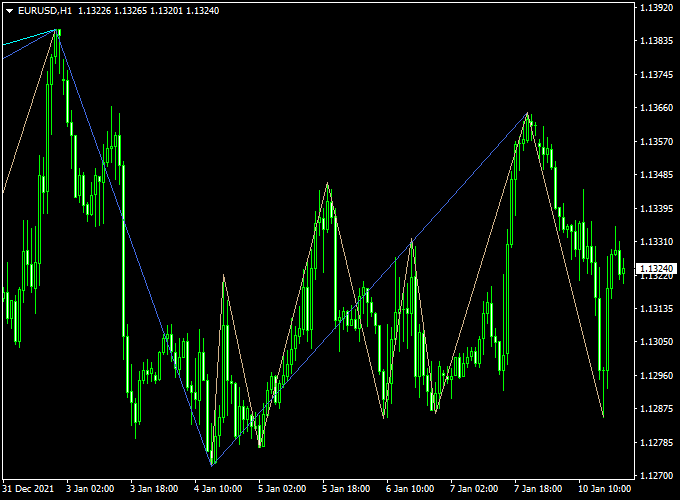
The chart shows the Trend Line Constructor Indicator applied to an MT4 chart.
Blue trend lines appear automatically, indicating potential breakout points.
Traders can buy when price breaks above a line and sell when it breaks below.
This setup is generally good for intraday trading, and it also works on slightly longer timeframes for swing trades.
Guide to Trade with Trend Line Constructor
Buy Rules
- Enter a buy when price breaks above a blue trend line
- Confirm breakout with volume or supporting indicators
Sell Rules
- Enter a sell when price breaks below a blue trend line
- Confirm breakout with volume or supporting indicators
Stop Loss
- Place stops a few pips beyond the broken trend line
- Adjust the stop based on volatility and timeframe
- For swing trades, use the next support/resistance level
Take Profit
- Target the next visible trend line or support/resistance level
- Exit fully if the price reverses before reaching the next level
Practical Tips
- Combine with momentum indicators to confirm breakouts
- For intraday trading, focus on M5–H1 charts
- For swing trading, H1–H4 charts provide stronger signals
- Avoid trading in low volatility ranges without clear breakouts
MT4 Intraday Strategy: Trend Line Constructor + Silver Trend Indicator
This intraday strategy combines the Trend Line Constructor Indicator for MT4 and the Silver Trend Indicator.
The combination provides traders with an excellent visual approach to identifying breakout zones and trend confirmations.
The Trend Line Constructor automatically draws multiple dynamic trend lines on the chart, helping to detect areas of price compression or breakout.
The Silver Trend indicator adds clarity with its color-coded candlesticks—blue for buy signals and red for sell signals—giving traders immediate visual cues for entry decisions.
This setup is best suited for intraday traders working on M15 to H1 charts.
It’s designed for traders who want to capture short-term market moves while keeping risk controlled.
The system works well during London and New York sessions, where price volatility and volume are highest.
Buy Entry Rules
- Identify when the price breaks above a descending trend line drawn by the Trend Line Constructor.
- Wait for a blue candlestick from the Silver Trend Indicator to confirm the bullish move.
- Enter a buy trade at the close of the first blue candle following the breakout.
- Set the stop loss a few pips below the most recent swing low or trend line support.
- Take profit at 25–40 pips or at the next resistance level identified by the indicator lines.
Sell Entry Rules
- Look for a price break below an ascending trend line created by the Trend Line Constructor.
- Wait for a red candle signal from the Silver Trend Indicator.
- Enter a sell trade at the close of the first red candle, confirming the breakout.
- Place the stop loss a few pips above the previous swing high or trend line resistance.
- Set a take profit target between 25–40 pips or the next nearby support area.
Advantages
- Combines structure-based analysis (trend lines) with momentum-based confirmation (colored candles).
- Excellent for identifying early breakout entries during high-volume market sessions.
- Works on multiple intraday timeframes and major currency pairs.
- Visually clean setup that’s easy to interpret even for beginner traders.
Drawbacks
- In choppy or sideways markets, the strategy may produce false breakouts.
- Trend lines may adjust as price evolves, which can shift entry expectations.
- Requires active chart monitoring since signals appear visually without alerts.
- Performance may vary depending on market volatility and spread conditions.
Case Study 1: USD/CAD on M30
During the London session, USD/CAD was forming lower highs under a descending trend line near 1.3640.
Price finally broke above the line with a strong blue candle from the Silver Trend indicator.
A buy order was placed at 1.3645 with a 20-pip stop loss and a 35-pip take profit.
Within two hours, the price climbed steadily to 1.3680, hitting the target for a solid intraday gain.
Case Study 2: AUD/USD on H1
On AUD/USD, the Trend Line Constructor displayed an ascending trend line around 0.6520.
After failing to hold above, a red Silver Trend candle appeared at 0.6518.
A sell entry was triggered with a 25-pip stop loss and 40-pip target.
As the US session opened, the pair dropped to 0.6478, reaching the take profit smoothly in less than three hours.
Strategy Tips
- Use this system primarily during the London and New York sessions when market activity is high.
- Filter signals using key support and resistance zones or previous day highs/lows.
- For improved accuracy, avoid trading near major news announcements.
- Always adjust take profit and stop loss levels according to current volatility.
Download Now
Download the “Konstruktor.mq4” indicator for Metatrader 4
FAQ
Can I use this indicator for short-term trades?
Yes. On M5–M15 charts, you can scalp or enter quick intraday trades when price breaks a trend line.
How do I know if a breakout is strong?
Confirm with volume, candlestick patterns, or momentum indicators. Breakouts with strong follow-through are more reliable.
Can it be combined with other indicators?
Absolutely. Combining with oscillators, moving averages, or ATR can help filter false breakouts and improve timing.
Summary
The Trend Line Constructor Forex Indicator for MT4 draws automatic trend lines based on Zig Zag patterns and highlights potential breakout points.
It helps traders identify support and resistance levels and act when price breaks the lines.
It is generally good for intraday trading on M5–H1 charts, but can also be applied to H1–H4 swing trades.
Traders can use it for breakout entries, reversals, or trend continuation setups.
This indicator simplifies analysis by visually showing where price may reverse or continue.
Using it alongside momentum or trend-confirmation indicators can enhance reliability and improve trading performance.


